–
7
–
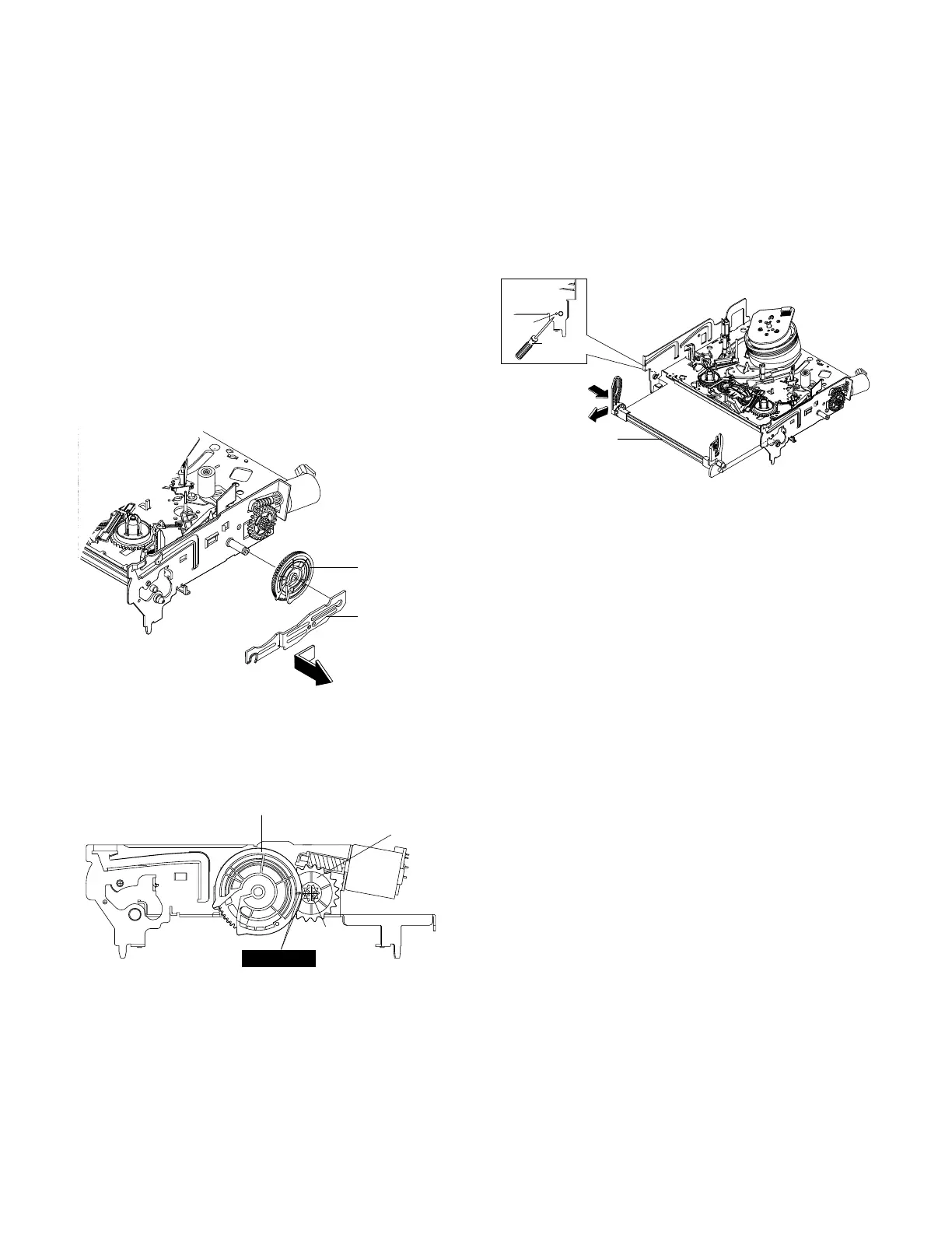
1-2-4 Lever FL Arm Ass’y Removal
1) Push the hole “A” in the direction of arrow “B”
use the pin.(about Dia.2.5)
2) Pull out the Lever FL Arm Ass'y Πfrom the Boss
of Main Base.
3) Remove the Lever FL Arm Ass'y Πin the direc-
tion of arrow “C”.
Fig. 1-7 Gear FL Cam, Gear Worm
1-2-3 Slider FL Drive, Gear FL Cam Removal
1) Pull the Slider FL Drive Πto the front direction.
2) Remove the Slider FL Drive Πin the direction of
arrow. (Refer to Fig. 1-6)
3) Remove the Gear FL cam ´.
Note : When reinstalling be sure to reassemble Slider
FL drive Πafter you insert the Boss of Lever FL
ARM-R in Groove of Slider Fl drive Œ.
Assembly : Align the Gear FL Cam Πwith the Gear
worm wheel Post as shown drawing.
(Refer to Timing point)



 To Next Page