Playing Tracks in Random
Order
(Shuffle Play)
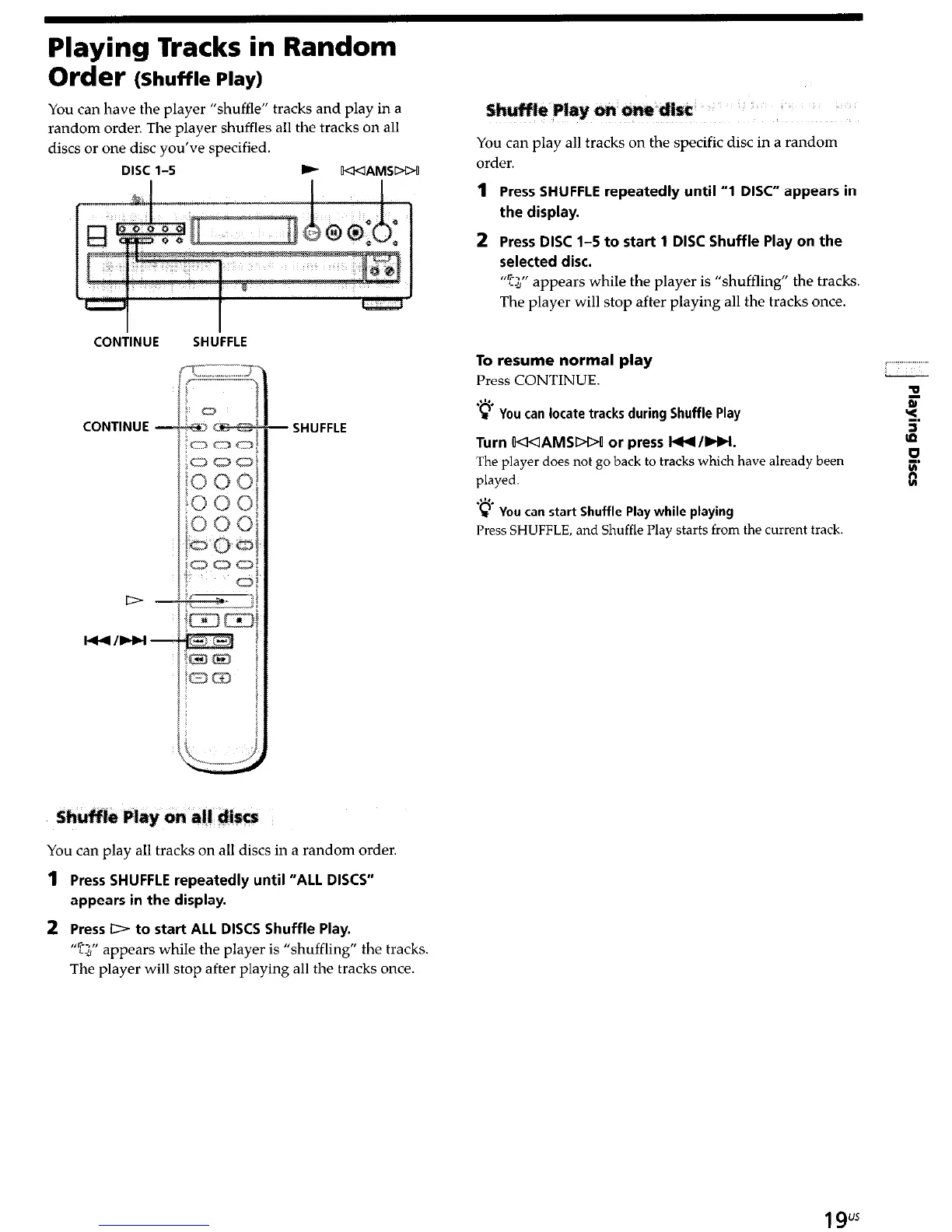
You can have the player “shuffle” tracks and play in a
random order. The player shuffles all the tracks on all
discs or one disc you’ve specified.
DISC l-5 b
IKKIAMSDW
CONilNUE
CONTINUE -
SHU’FFLE
SHUFFLE
You can play all tracks on all discs in a random order.
1
Press SHUFFLE repeatedly until “ALL DISCS”
appears in the display.
2 Press D to start ALL DISCS Shuffle Play.
“G”
appears while the player is “shuffling” the tracks.
The player will stop after playing all the tracks once
e PI
&SC
You can play all tracks on the specific disc in a random
order.
1
Press SHUFFLE repeatedly until “1 DISC” appears in
the display.
2
Press DISC l-5 to start 1 DISC Shuffle Play on the
selected disc.
“Q” appears while the player is “shuffling” the tracks.
The player will stop after playing all the tracks once.
To resume normal play
Press CONTINUE.
L
P Y
ou can locate tracks during Shuffle Play
Turn WAMSDW or press l44/Ht.
The player does not go back to tracks which have already been
played.
z’*,
c You can start Shuffle Play while playing
Press SHUFFLE, and Shuffle Play starts from the current track
19"


 To Next Page