EasyManua.ls Logo

Sony SL-C7E - Page 41

Sony SL-C7E
Print Icon
To Next Page IconTo Next Page
To Previous Page IconTo Previous Page
Loading...
OPERATING
VOLTAGE
This
machine
operates
on
110V
127V
or
220V
-
240V.
Before
connecting
the
unit
to
the
power
source,
check
that
the
voltage
selector
setting
is
correct
for
your
power
supply.
(The
voltage
selector
is
located
on
the
rear
panel.)
:
Reset
the
selector
if
your
local
mains
supply
is
not
same
as
that
of
the
recorder.
110V
—<$<—<$
220
V
127
V
240
V
[i
J
®
AERIAL
CONNECTION
:
,;
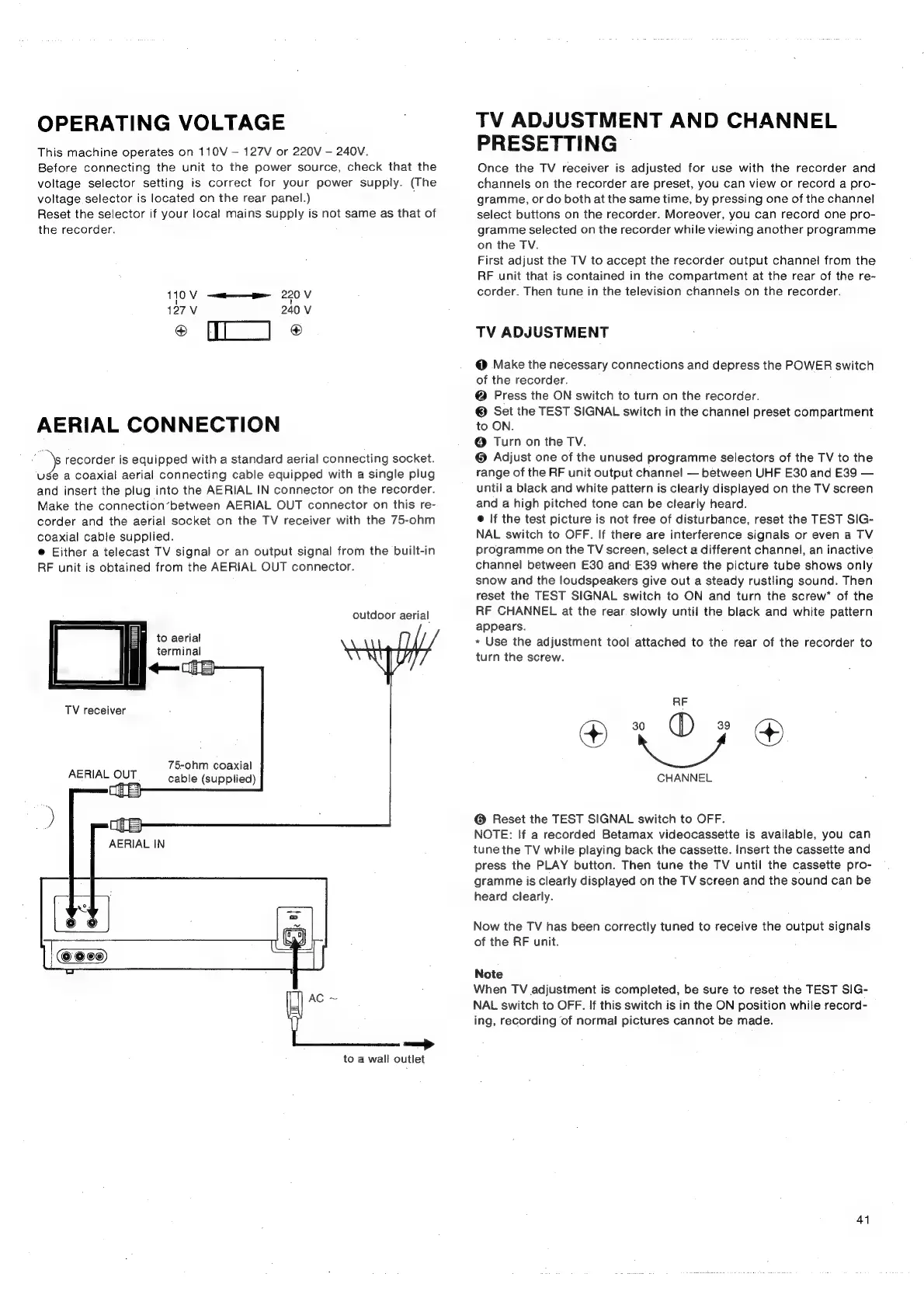
recorder
is
equipped
with
a
standard
aerial
connecting
socket.
use
a
coaxial
aerial
connecting
cable
equipped
with
a
single
plug
and
insert
the
plug
into
the
AERIAL
IN
connector
on
the
recorder.
Make
the
connection’between
AERIAL
OUT
connector
on
this
re-
corder
and
the
aerial
socket
on
the
TV
receiver
with
the
75-ohm
coaxial
cable
supplied.
@
Either
a
telecast
TV
signal
or
an
output
signal
from
the
built-in
RF
unit
is
obtained
from
the
AERIAL
OUT
connector.
outdoor
aerial
to
aerial
terminal
TV
receiver
75-ohm
coaxial
AERIAL
OUT
cable
(supplied)
to
a
wall
outlet
TV
ADJUSTMENT
AND
CHANNEL
PRESETTING
©
Once
the
TV
receiver
is
adjusted
for
use
with
the
recorder
and
channels
on
the
recorder
are
preset,
you
can
view
or
record
a
pro-
gramme,
or
do
both
at
the
same
time,
by
pressing
one
of
the
channel
select
buttons
on
the
recorder.
Moreover,
you
can
record
one
pro-
gramme
selected
on
the
recorder
while
viewing
another
programme
on
the
TV.
First
adjust
the
TV
to
accept
the
recorder
output
channel
from
the
RF
unit that
is
contained
in
the
compartment
at
the
rear
of
the
re-
corder.
Then
tune
in
the
television
channels
on
the
recorder.
TV
ADJUSTMENT
@
Make
the
necessary
connections
and
depress
the
POWER
switch
of
the
recorder.
@
Press
the
ON
switch
to
turn
on the
recorder.
©
Set
the
TEST
SIGNAL
switch
in
the
channel
preset
compartment
to
ON.
®
Turn
on the
TV.
®
Adjust
one
of
the
unused
programme
selectors
of
the
TV
to
the
range
of
the
RF
unit
output
channel
between
UHF
E30
and
E39
until
a
black
and
white
pattern
is
clearly
displayed
on
the
TV
screen
and
a
high
pitched
tone
can
be
clearly
heard.
@
If
the
test
picture
is
not
free
of
disturbance,
reset
the
TEST
SIG-
NAL
switch
to
OFF.
If
there
are
interference
signals
or
even
a
TV
programme
on
the
TV
screen,
select
a
different
channel,
an
inactive
channel
between
E30
and
E39
where
the
picture
tube
shows
only
snow
and
the
loudspeakers
give
out
a
steady
rustling
sound.
Then
reset
the
TEST
SIGNAL
switch
to
ON
and
turn
the
screw*
of
the
RF
CHANNEL
at
the
rear
slowly
until
the
black
and
white
pattern
appears.
;
*
Use
the
adjustment
tool
attached
to
the
rear
of
the
recorder
to
turn
the
screw.
CHANNEL
@
Reset
the
TEST
SIGNAL
switch
to
OFF.
NOTE:
If
a
recorded
Betamax
videocassette
is
available,
you
can
tune
the
TV
while
playing
back
the
cassette.
Insert
the
cassette
and
press
the
PLAY
button.
Then
tune
the
TV
until!
the
cassette
pro-
gramme
is
clearly
displayed
on
the
TV
screen
and
the
sound
can
be
heard
clearly.
Now
the
TV
has
been
correctly
tuned
to
receive
the
output
signals
of
the
RF
unit.
Note
When
TV
adjustment
is
completed,
be
sure
to
reset
the
TEST
SIG-
NAL
switch
to
OFF.
If
this
switch
is
in
the
ON
position
while
record-
ing,
recording
of
normal
pictures
cannot
be
made.
41

Related product manuals