EasyManua.ls Logo

Sony SL-C7E - Eee

Sony SL-C7E
Print Icon
To Next Page IconTo Next Page
To Previous Page IconTo Previous Page
Loading...
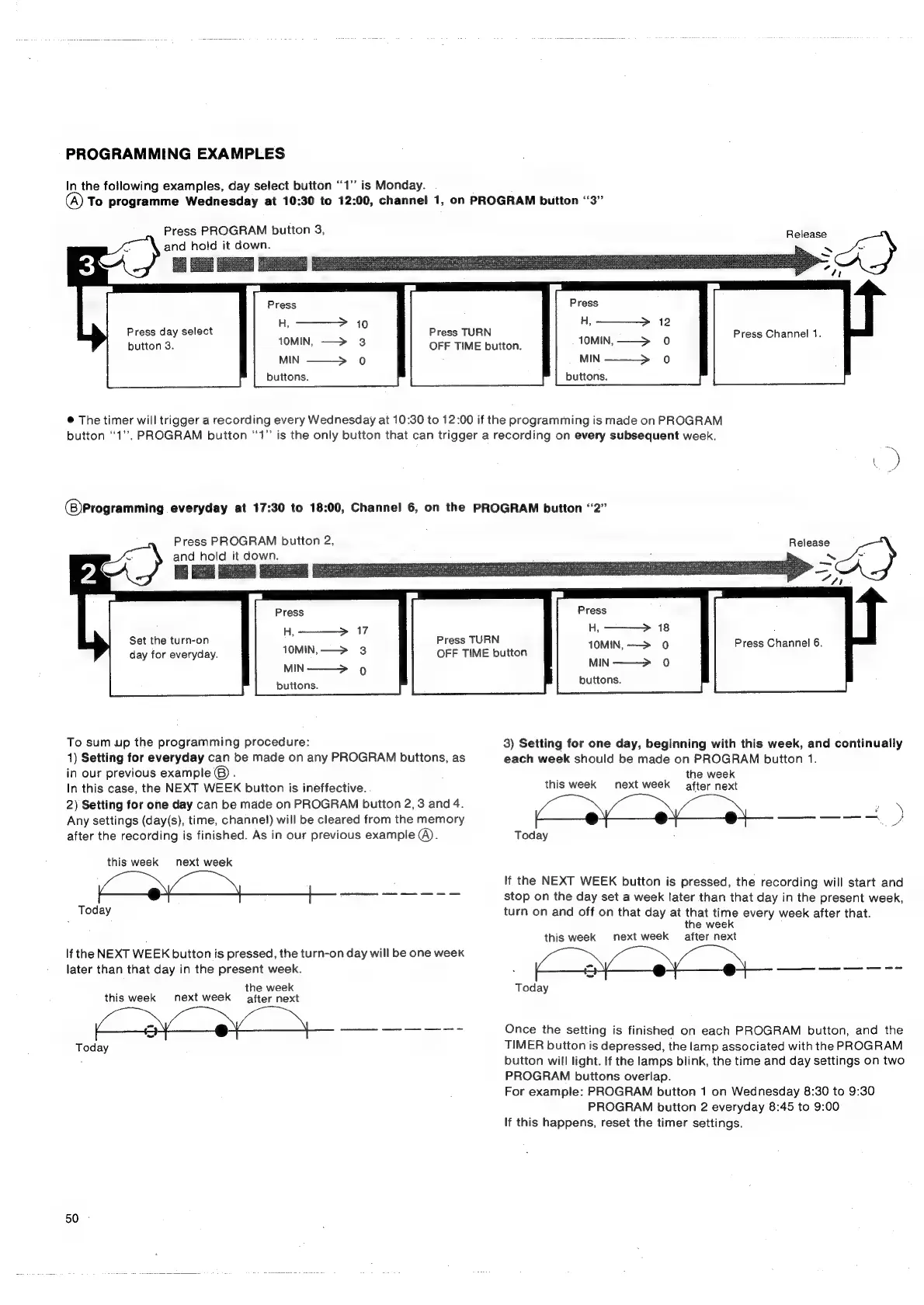
PROGRAMMING
EXAMPLES
In
the
following
examples,
day
select
button
“1”
is
Monday.
(A)
To
programme
Wednesday
at
10:30
to
12:00,
channel
1,
on
PROGRAM
button
“3”
Press
PROGRAM
button
3,
and
hold
it
down.
Press
Press
day
select
Hs
ua
Press
TURN
2
be
ress ress
Press
Channel
1.
button
3.
10MIN,
—>
3
OFF
TIME
button.
10MIN,
——>
0
MIN
——>
0
MIN
———>
0
buttons.
buttons.
Release
.
¢
!
Press
@
The
timer
will
trigger
a
recording
every
Wednesday
at
10:30
to
12:00
if
the
programming
is
made
on
PROGRAM
button
‘1’.
PROGRAM
button
‘‘1”
is
the
only
button
that
can
trigger
a
recording
on
every
subsequent
week.
(8)Programming
everyday
at
17:30
to
18:00,
Channel
6,
on
the
PROGRAM
button
“2”
Press
PROGRAM
button
2,
and
hold
it
down.
Press
H,-———>
17
10MIN,—>
3
MIN———>
9
buttons.
Set
the
turn-on
day
for
everyday.
To
sum
up
the
programming
procedure:
1)
Setting
for
everyday
can
be
made
on
any
PROGRAM
buttons,
as
in
our
previous
example
®)
:
In
this
case,
the
NEXT
WEEK
button
is
ineffective.
2)
Setting
for
one
day
can
be
made
on
PROGRAM
button
2,
3
and
4.
Any
settings
(day(s),
time,
channel)
will
be
cleared
from
the
memory
after
the
recording
is
finished.
As
in
our
previous
example
@).
this
week
next
week
SE
eee
ee
Today
If
the
NEXT
WEEK
button
is
pressed,
the
turn-on
day
will
be
one
week
later
than
that
day
in
the
present
week.
;
the
week
this
week
next
week
after
next
SS
a
Today
50
-
Press
TURN
OFF
TIME
button
Release
I
SE
TREE
x
onig
pas
“n
Press
A,
18
10MIN,
-——>
0
MIN-——->
0
buttons.
Press
Channel
6.
3)
Setting
for
one
day,
beginning
with
this
week,
and
continually
each
week
should
be
made
on
PROGRAM
button
1.
the
week
this
week
next
week
after
next
Today
If
the
NEXT
WEEK
button
is
pressed,
the
recording
will
start
and
stop
on
the
day
set
a
week
later
than
that
day
in
the
present
week,
turn
on
and
off
on
that
day
at
that
time
every
week
after
that.
the
week
this
week
next
week
after
next
|
|
Today
Once
the
setting
is
finished
on
each
PROGRAM
button,
and
the
TIMER
button
is
depressed,
the
lamp
associated
with
the
PROGRAM
button
will
light.
If
the
lamps
blink,
the
time
and
day
settings
on
two
PROGRAM
buttons
overlap.
For
example:
PROGRAM
button
1
on
Wednesday
8:30
to
9:30
PROGRAM
button
2
everyday
8:45
to
9:00
If
this
happens,
reset
the
timer
settings.

Related product manuals