EasyManua.ls Logo

Sony SL-C7E - Page 49

Sony SL-C7E
Print Icon
To Next Page IconTo Next Page
To Previous Page IconTo Previous Page
Loading...
TURN-ON/OFF
TIME
AND
DAY
SETTINGS
FOR
TIMER
RECORDING
Before
proceeding
with
this
setting,
set
the
clock
time
and
day
correctly.
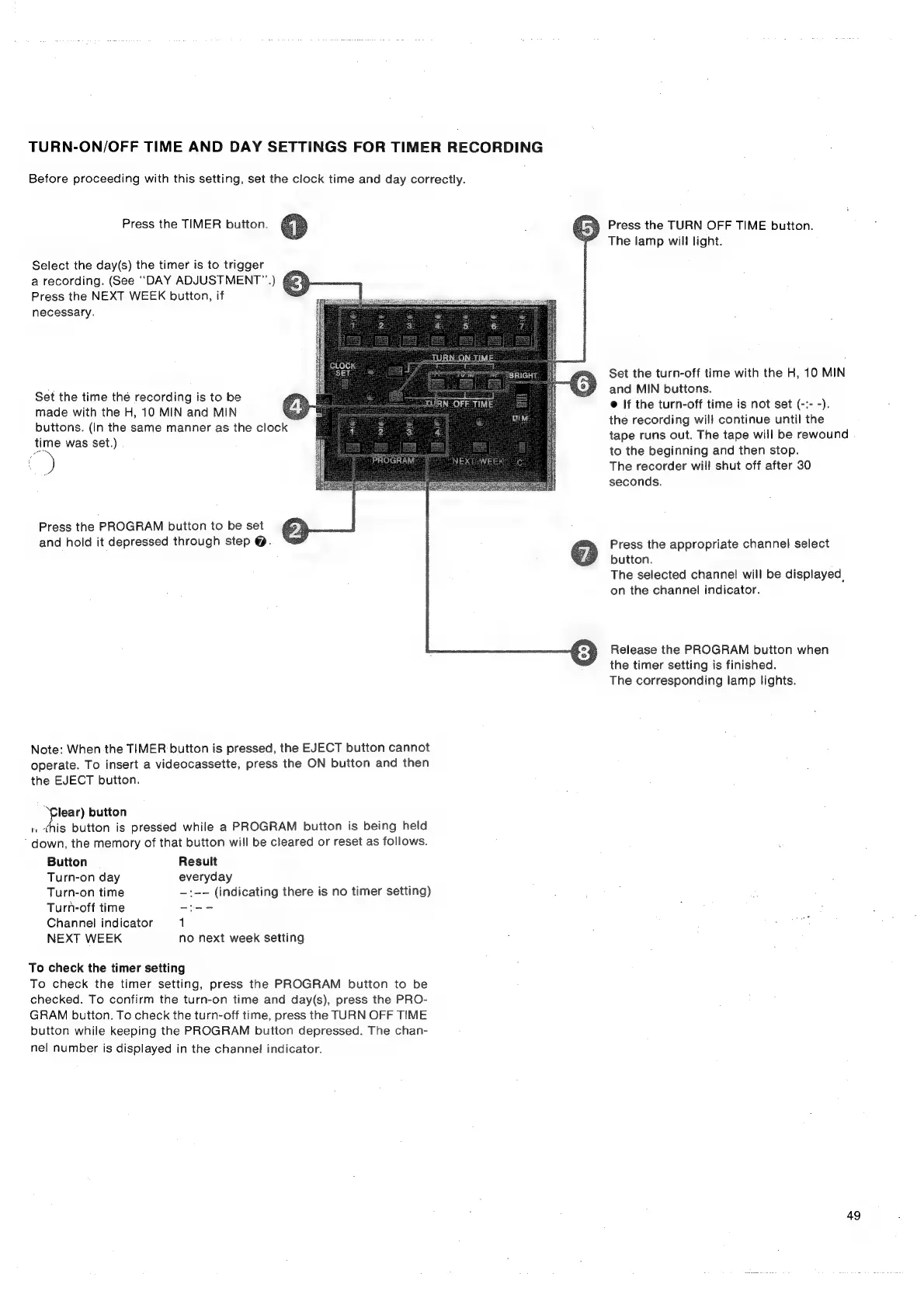
Press
the
TIMER
button.
ee
§
Press
the
TURN
OFF
TIME
button.
°”
The
lamp
will
light.
Select
the
day(s)
the
timer
is
to
trigger
a
recording.
(See
“DAY
ADJUSTMENT”)
Press
the
NEXT
WEEK
button,
if
necessary.
Set
the
turn-off
time
with
the
H,
10
MIN
.
:
wets
and
MIN
buttons.
Set
the
time
the
recording
is
to
be
@
If
the
turn-off
time
is
not
set
(-:-
-)
made
with
the
H,
10
MIN
and
MIN
say
5
i
f
a.
Sa
2
,
OD:
.
.
é
buttons.
(In
the
same
manner
as
the
clock
;
:
|
oar
eee
al
ale
time
was
set.
:
a
)
oe
to
the
beginning
and
then
stop.
)
NXE
NES
The
recorder
will
shut
off
after
30
seconds.
Press
the
PROGRAM
button
to
be
set
and
hold
it
depressed
through
step
@.
Press
the
appropriate
channel
select
button.
The
selected
channel
will
be
displayed,
on
the
channel
indicator.
Release
the
PROGRAM
button
when
the
timer
setting
is
finished.
The
corresponding
lamp
lights.
Note:
When
the
TIMER
button
is
pressed,
the
EJECT
button
cannot
operate.
To
insert
a
videocassette,
press
the
ON
button
and
then
the
EJECT
button.
lear)
button
1,
this
button
is
pressed
while
a
PROGRAM
button
is
being
held
down,
the
memory
of
that
button
will
be
cleared
or
reset
as
follows.
Button
Result
Turn-on
day
everyday
Turn-on
time
—:--
(indicating
there
is
no
timer
setting)
Turh-off
time
-te-
Channel
indicator
1
NEXT
WEEK
no
next
week
setting
To
check
the
timer
setting
To
check
the
timer
setting,
press
the
PROGRAM
button
to
be
checked.
To
confirm
the
turn-on
time
and
day(s),
press
the
PRO-
GRAM
button.
To
check
the
turn-off
time,
press
the
TURN
OFF
TIME
button
while
keeping
the
PROGRAM
button
depressed.
The
chan-
nel
number
is
displayed
in
the
channel
indicator.
49

Related product manuals