EasyManua.ls Logo

Sony SL-C7E - Page 48

Sony SL-C7E
Print Icon
To Next Page IconTo Next Page
To Previous Page IconTo Previous Page
Loading...
CLOCK
TIME
ADJUSTMENT
"
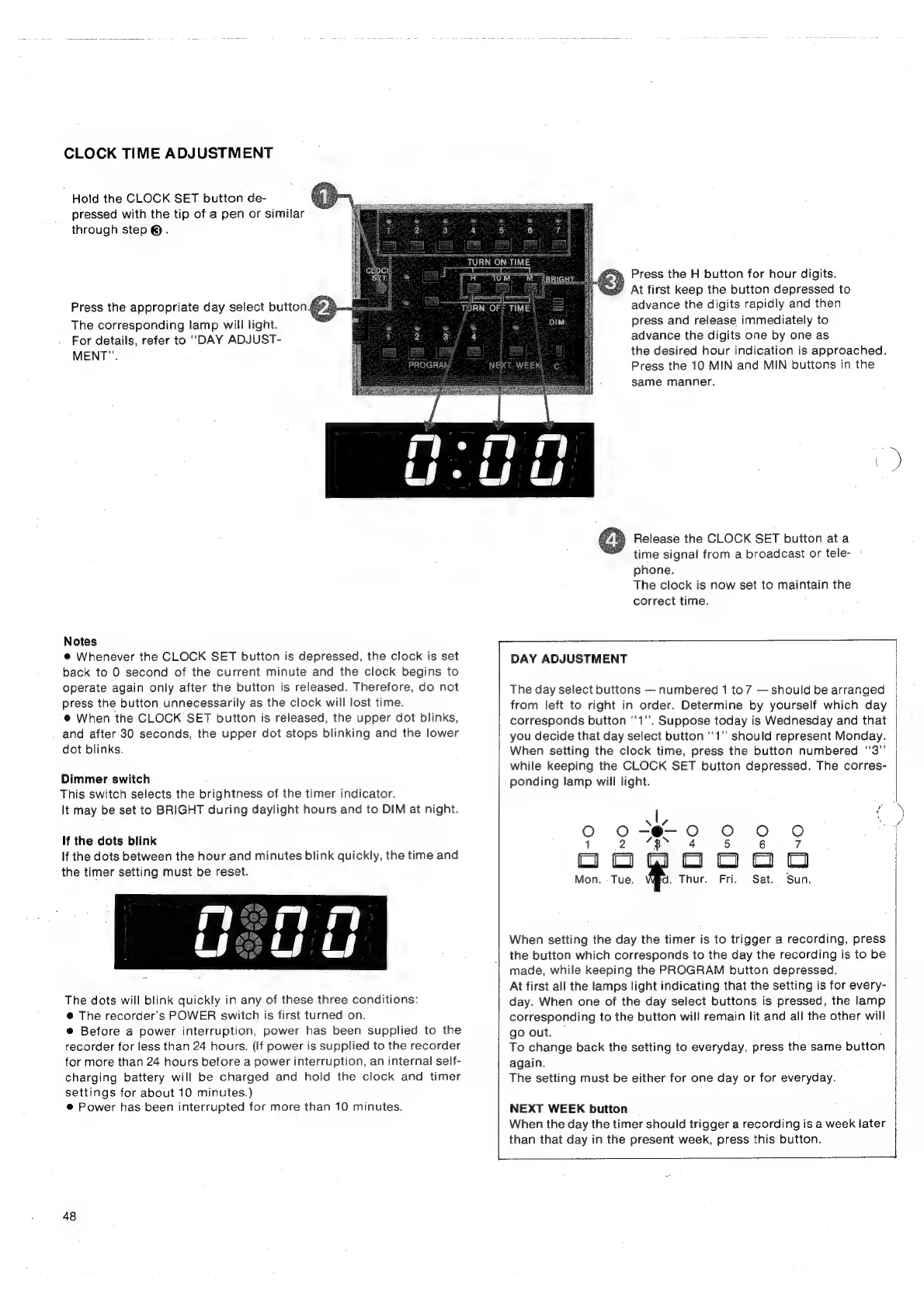
Hold
the
CLOCK
SET
button
de-
pressed
with
the
tip
of
a
pen
or
similar
through
step
®.
Press
the
appropriate
day
select
butto
The
corresponding
lamp
will
light.
For
details,
refer
to
“DAY
ADJUST-
MENT”.
Notes
@
Whenever
the
CLOCK
SET
button
is
depressed,
the
clock
is
set
back
to
0
second
of
the
current
minute
and
the
clock
begins
to
operate
again
only
after
the
button
is
released.
Therefore,
do
not
press
the
button
unnecessarily
as
the
clock
will
lost
time.
@
When
the
CLOCK
SET
button
is
released,
the
upper
dot
blinks,
and
after
30
seconds,
the
upper
dot
stops
blinking
and
the
lower
dot
blinks.
Dimmer
switch
This
switch
selects
the
brightness
of
the
timer
indicator.
It
may
be
set
to
BRIGHT
during
daylight
hours
and
to
DIM
at
night.
If
the
dots
blink
If
the
dots
between
the
hour
and
minutes
blink
quickly,
the
time
and
the
timer
setting
must
be
reset.
The
dots
will
blink
quickly
in
any
of
these
three
conditions:
@
The
recorder’s
POWER
switch
is
first
turned
on.
e@
Before
a
power
interruption,
power
has
been
supplied
to
the
recorder
for
less
than
24
hours.
(If
power
is
supplied
to
the
recorder
for
more
than
24
hours
before
a
power
interruption,
an
internal
seif-
charging
battery
will
be
charged
and
hold
the
clock
and
timer
settings
for
about
10
minutes.)
®
Power
has
been
interrupted
for
more
than
10
minutes.
48
Press
the
H
button
for
hour
digits.
At
first
keep
the
button
depressed
to
advance
the
digits
rapidly
and
then
press
and
release
immediately
to
advance
the
digits.
one
by
one
as
the
desired
hour
indication
is
approached.
Press
the
10
MIN
and
MIN
buttons
in
the
same
manner.
+)
Release
the
CLOCK
SET
button
ata
time
signal
from
a
broadcast
or
tele-
°
phone.
The
clock
is
now
set
to
maintain
the
correct
time.
=
DAY
ADJUSTMENT
The
day
select
buttons
numbered
1
to7
should
be
arranged
from
left
to
right
in
order.
Determine
by
yourself
which
day
corresponds
button
‘‘1’’.
Suppose
today
is
Wednesday
and
that
you
decide
that
day
select
button
“1”
should
represent
Monday.
When
setting
the
clock
time,
press
the
button
numbered
‘‘3”
while
keeping
the
CLOCK
SET
button
depressed.
The
corres-
ponding
lamp
will
light.
a
|
a:
Oo
oO
<8
9
9.9
0
1
ee
5
tL)
Li
‘i
a
oO
Mon.
-
Tue.
d.
Thur.
Fri.
Sat.
Sun.
When
setting
the
day
the
timer
is
to
trigger
a
recording,
press
the
button
which
corresponds
to
the
day
the
recording
is
to
be
made,
while
keeping
the
PROGRAM
button
depressed.
At
first
all
the
lamps
light
indicating
that
the
setting
is
for
every-
day.
When
one
of
the
day
select
buttons
is
pressed,
the
lamp
corresponding
to
the
button
will
remain
lit
and
all
the
other
will
go
out.
To
change
back
the
setting
to
everyday,
press
the
same
button
again.
The
setting
must
be
either
for
one
day
or
for
everyday.
NEXT
WEEK
button
When
the
day
the
timer
should
trigger
a
recordingisa
week
later
than
that
day
in
the
present
week,
press
this
button.

Related product manuals