EasyManua.ls Logo

Sony SL-C7E - Page 51

Sony SL-C7E
Print Icon
To Next Page IconTo Next Page
To Previous Page IconTo Previous Page
Loading...
REMOTE
CONTROL
OPERATION
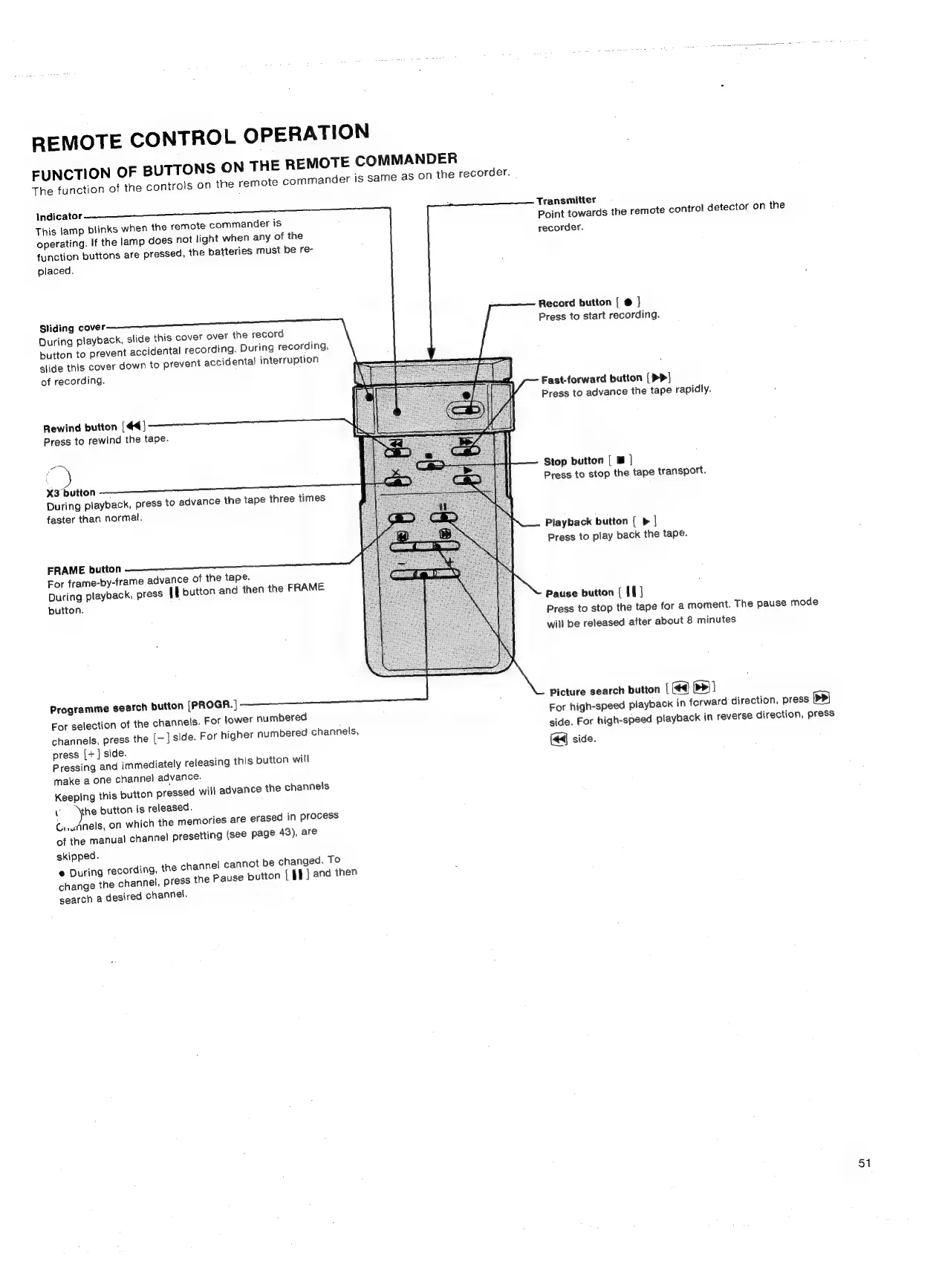
EUNCTION
OF
BUTTONS
ON
THE
REMOTE
COMMANDER
The
function
of
the
controls
on
the
remote
commander
is
same
as
On
the
recorder.
indicator
This
lamp
blinks
when
the
remote
commander
is
operating.
If
the
lamp
does
not
light
when
any
of
the
function
buttons
are
pressed,
the
batteries
must
be
re-
placed.
Sliding
cover
During
playback,
slide
this
cover
over
the
record
button
to
prevent
accidental
recording.
During
recording,
slide
this
cover
down
to
prevent
accidental
interruption
of
recording.
Rewind
button
[44]
Press
to
rewind
the
tape.
oe
X3
button
During
playback,
press
to
advance
the
tape
three
times
faster
than
normal.
FRAME
button
For
frame-by-frame
advance
of
the
tape.
During
playback,
press
[E
button
and
then
the
FRAME
button.
Programme
search
button
[PROGR.
|
For
selection
of
the
channels.
For
lower
numbered
channels,
press
the
[-]
side.
For
higher
numbered
channels,
press
[+]
side.
Pressing
and
immediately
releasing
this
button
will
make
a
one
channel
advance.
Keeping
this
button
pressed
will
advance
the
channels
Vv
\the
button
is
released.
Gi.uAnels,
on
which
the
memories
are
erased
in
process
of
the
manual
channel
presetting
(see
page
43),
are
skipped.
@
During
recording,
the
channel
cannot
be
changed.
To
change
the
channel,
press
the
Pause
button
[
I}
]
and
then
search
a
desired
channel.
Transmitter
Point
towards
the
remote
control
detector
on
the
recorder.
Record
button
[
@
|
Press
to
start
recording.
Fast-forward
button
(
PP]
Press
to
advance
the
tape
rapidly.
Stop
button
[
m
|
Press
to
stop
the
tape
transport.
Playback
button
[
>
|
Press
to
play
back
the
tape.
Pause
button
(
If
|
Press
to
stop
the
tape
for
a
moment.
The
pause
mode
will
be
released
after
about
8
minutes
Picture
search
button
|
(4)
>>]
For
high-speed
playback
in
forward
direction,
press
pb
side.
For
high-speed
playback
in
reverse
direction,
press
(<4
side.
51

Related product manuals