EasyManua.ls Logo

Sony SL-C7E - Page 42

Sony SL-C7E
Print Icon
To Next Page IconTo Next Page
To Previous Page IconTo Previous Page
Loading...
CHANNEL
PRESETTING
You
can
preset
automatically
all
the
channels
in
numerical
sequence
at
one
time
or,
if
you
wish,
preset
the
channels
one
by
one.
Location
of
controls
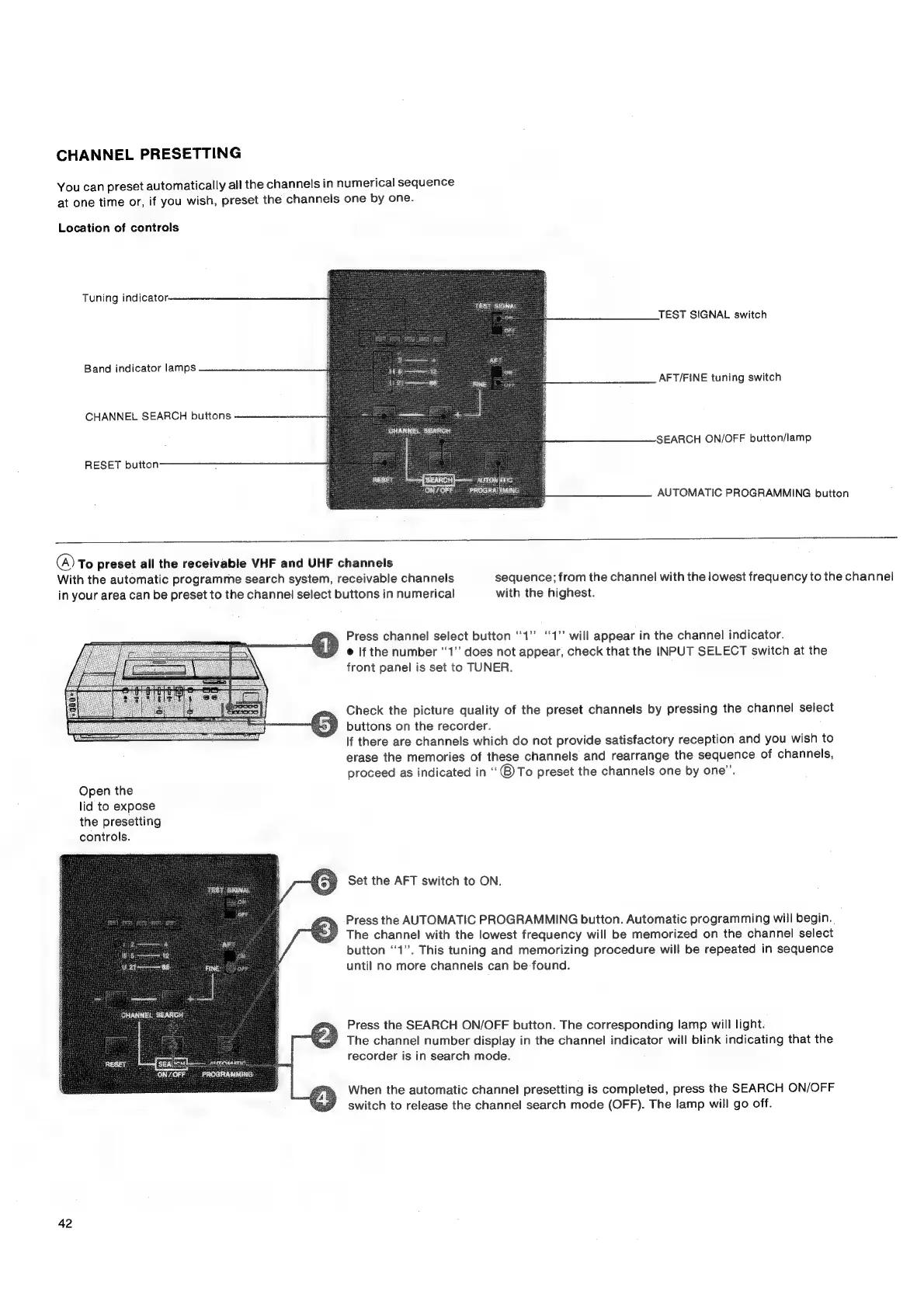
Tuning
indicator.
TEST
SIGNAL
TEST
SIGNAL
switch
Band
indicator
lamps
AFT/FINE
tuning
switch
CHANNEL
SEARCH
buttons
SEARCH
ON/OFF
button/lamp
AUTON
ATIC
PROGRAIIMING
AUTOMATIC
PROGRAMMING
button
(A)
To
preset
all
the
receivable
VHF
and
UHF
channels
With
the
automatic
programme
search
system,
receivable
channels
sequence;
from
the
channel
with
the
lowest
frequency
to
the
channel
in
your
area
can
be
preset
to
the
channel
select
buttons
in
numerical
with
the
highest.
Press
channel
select
button
“1”
‘‘1”
will
appear
in
the
channel
indicator.
@
|f
the
number
‘1’
does
not
appear,
check
that
the
INPUT
SELECT
switch
at
the
front
panel
is
set
to
TUNER.
Check
the
picture
quality
of
the
preset
channels
by
pressing
the
channel
select
buttons
on
the
recorder.
If
there
are
channels
which
do
not
provide
satisfactory
reception
and
you
wish
to
erase
the
memories
of
these
channels
and
rearrange
the
sequence
of
channels,
proceed
as
indicated
in
‘“®)To
preset
the
channels
one
by
one”.
Open
the
lid
to
expose
the
presetting
controls.
Set
the
AFT
switch
to
ON.
Press
the
AUTOMATIC
PROGRAMMING
button.
Automatic
programming
will
begin...
The
channel
with
the
lowest
frequency
will
be
memorized
on
the
channel
select
button
“1”.
This
tuning
and
memorizing
procedure
will
be
repeated
in
sequence
until
no
more
channels
can
be
found.
Press
the
SEARCH
ON/OFF
button.
The
corresponding
lamp
will
light.
The
channel
number
display
in
the
channel
indicator
will
blink
indicating
that
the
recorder
is
in
search
mode.
When
the
automatic
channel
presetting
is
completed,
press
the
SEARCH
ON/OFF
switch
to
release
the
channel
search
mode
(OFF).
The
lamp
will
go
off.
42

Related product manuals