EasyManua.ls Logo

Sony SL-C7E - Page 43

Sony SL-C7E
Print Icon
To Next Page IconTo Next Page
To Previous Page IconTo Previous Page
Loading...
6)
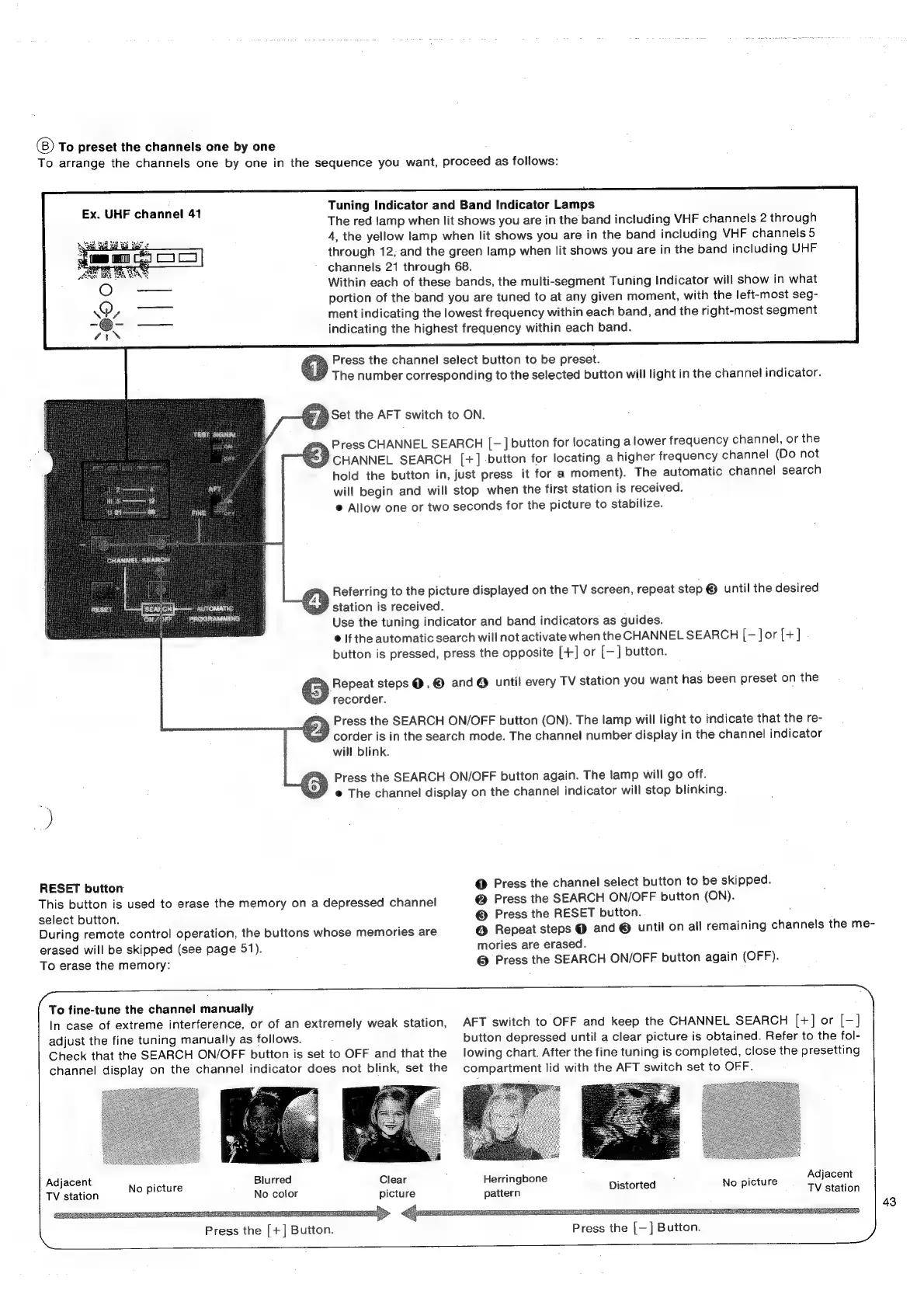
To
preset
the
channels
one
by
one
To
arrange
the
channels
one
by
one
in
the
sequence
you
want,
proceed
as
follows:
Tuning
Indicator
and
Band
Indicator
Lamps
The
red
lamp
when
lit
shows
you
are
in
the
band
including
VHF
channels
2
through
4,
the
yellow
lamp
when
lit
shows
you
are
in
the
band
including
VHF
channels
5
through
12,
and
the
green
lamp
when
lit
shows
you
are
in
the
band
including
UHF
channels
21
through
68.
Within
each
of
these
bands,
the
multi-segment
Tuning
Indicator
will
show
in
what
portion
of
the
band
you
are
tuned
to
at
any
given
moment,
with
the
left-most
seg-
ment
indicating
the
lowest
frequency
within
each
band,
and
the
right-most
segment
indicating
the
highest
frequency
within
each
band.
Ex.
UHF
channel
41
Press
the
channel
select
button
to
be
preset.
The
number
corresponding
to
the
selected
button
will
light
in
the
channel
indicator.
Set
the
AFT
switch
to
ON.
Press
CHANNEL
SEARCH
[—]
button
for
locating
a
lower
frequency
channel,
or
the
CHANNEL
SEARCH
[+]
-button
for
locating
a
higher
frequency
channel
(Do
not
hold
the
button
in,
just
press
it
for
a
moment).
The
automatic
channel
search
will
begin
and
will
stop
when
the
first
station
is
received.
@
Allow
one
or
two
seconds
for
the
picture
to
stabilize.
Referring
to
the
picture
displayed
on
the
TV
screen,
repeat
step
®
until
the
desired
0
station
is
received.
:
Use
the
tuning
indicator
and
band
indicators
as
guides.
©
If
the
automatic
search
will
not
activate
when
the
CHANNEL
SEARCH
[—
Jor
[+]
button
is
pressed,
press
the
opposite
[+]
or
[—]
button.
G
Pervert
steps
@,
©
and@
until
every
TV
station
you
want
has
been
preset
on
the
recorder.
:
Press
the
SEARCH
ON/OFF
button
(ON).
The
lamp
will
light
to
indicate
that
the
re-
corder
is
in
the
search
mode.
The
channel
number
display
in
the
channel
indicator
will
blink.
Press
the
SEARCH
ON/OFF
button
again.
The
lamp
will
go
off.
@
The
channel
display
on
the
channel
indicator
will
stop
blinking.
RESET
button
@
Press
the
channel
select
button
to
be
skipped.
This
button
is
used
to
erase
the
memory
on
a
depressed
channel
@
Press
the
SEARCH
ON/OFF
button
(ON).
select
button.
©
Press
the
RESET
button.
;
During
remote
control
operation,
the
buttons
whose
memories
are
@
Repeat
steps
@
and
©
until
on
all
remaining
channels
the
me-
erased
will
be
skipped
(see
page
51).
mories
are
erased.
To
erase
the
memory:
@
Press
the
SEARCH
ON/OFF
button
again
(OFF).
(0
fine-tune
the
channel
manually
In
case
of
extreme
interference,
or
of
an
extremely
weak
station,
AFT
switch
to
OFF
and
keep
the
CHANNEL
SEARCH
[+]
or
[—]
adjust
the
fine
tuning
manually
as
follows.
button
depressed
until
a
clear
picture
is
obtained.
Refer
to
the
fol-
Check
that
the
SEARCH
ON/OFF
button
is
set
to
OFF
and
that
the
lowing
chart.
After
the
fine
tuning
is
completed,
close
the
presetting
channel
display
on
the
channel
indicator
does
not
blink,
set
the
compartment
lid
with
the
AFT
switch
set
to
OFF.
Adjacent
,
Blurred
Clear
Herringbone
,
:
:
:
Adjacent
No
picture
;
TV
station
Nopietate
No
color
picture
pattern
Dizon
ne
TV
station
Mt.
Press
the
[+]
Button.
)
Press
the
[—]
Button.
)
43

Related product manuals