EasyManua.ls Logo

Sony SL-C7E - Page 44

Sony SL-C7E
Print Icon
To Next Page IconTo Next Page
To Previous Page IconTo Previous Page
Loading...
OPERATION
Instructions
for
record/playback
operations
are
contained
in
the
ready-reference
for
your
convenience.
The
functions
of
the
auxi-
liary
controls
and
other
operating
procedures
are
described
in
detail
below.
ON,
STANDBY
AND
TIMER
BUTTONS
Usually
keep
the
POWER
switch
in
the
depressed
position
and
turn
the
recorder
on
and
off
with
the
ON
button.
The
POWER
switch
functions
as
a
main
power
on/off
switch.
When
the
switch
is
set
to
off,
the
power
supply
to
all
sections
of
the
recorder,
including
the
timer
section,
will
be
shut
off
and
the
timer
memory
will
be
erased.
Press
the
ON
button
to
turn
on
the
power
for
routine
operation.
The
pilot
lamp
will
light.
Press
the
STANDBY
button
when
the
recorder
is
not
in
use.
All
power
to
the
recorder,
except
the
timer
section,
is
shut
off.
Press
the
TIMER
button
for
timer
recording.
The
pilot
lamp
will
light.
Power
to
the
recorder,
except
to
the
timer
section,
will
shut
off,
preparing
the
recorder
for
timer
recording.
e@
The
timer
adjustments
can
be
performed
regardless
of
the
setting
of
the
ON,
STANDBY
or
TIMER
buttons.
REC
AND
AUDIO
DUB
BUTTONS
The
REC
and
AUDIO
DUB
buttons
function
only
from
the
stop
or
pause
mode
in
order
to
avoid
accidental
erasure.
To
enter
the
record
or
audio
dubbing
mode
during
the
tape
running,
press
the
STOP
or
PAUSE
button
then
the
REC
or
AUDIO
DUB
button.
If
the
EJECT,
REW,
PLAY
or
FF
button
is
pressed
during
recording
or
audio
dubbing,
the
mode
changes.
During
recording,
the
channel
cannot
be
changed
even
if
the
other
channel
select
button
is
pressed.
To
change
the
channel,
press
the
PAUSE
button
then
the
desired
channe!
select
button.
VARIABLE
SPEED
PLAYBACK
During
playback,
it
is
possible
to
view
a
still,
slow-motion,
triple-speed
or
high-speed
picture.
Picture
search
(high-speed
picture)
its
normal
playback
speed.
Notes
e@
Streaks
appear
on
the
playback
picture,
but
this
is
normal
and
not
a
problem.
®
If
the
picture
flows
vertically,
adjust
the
vertical
hold
control
on
the
TV.
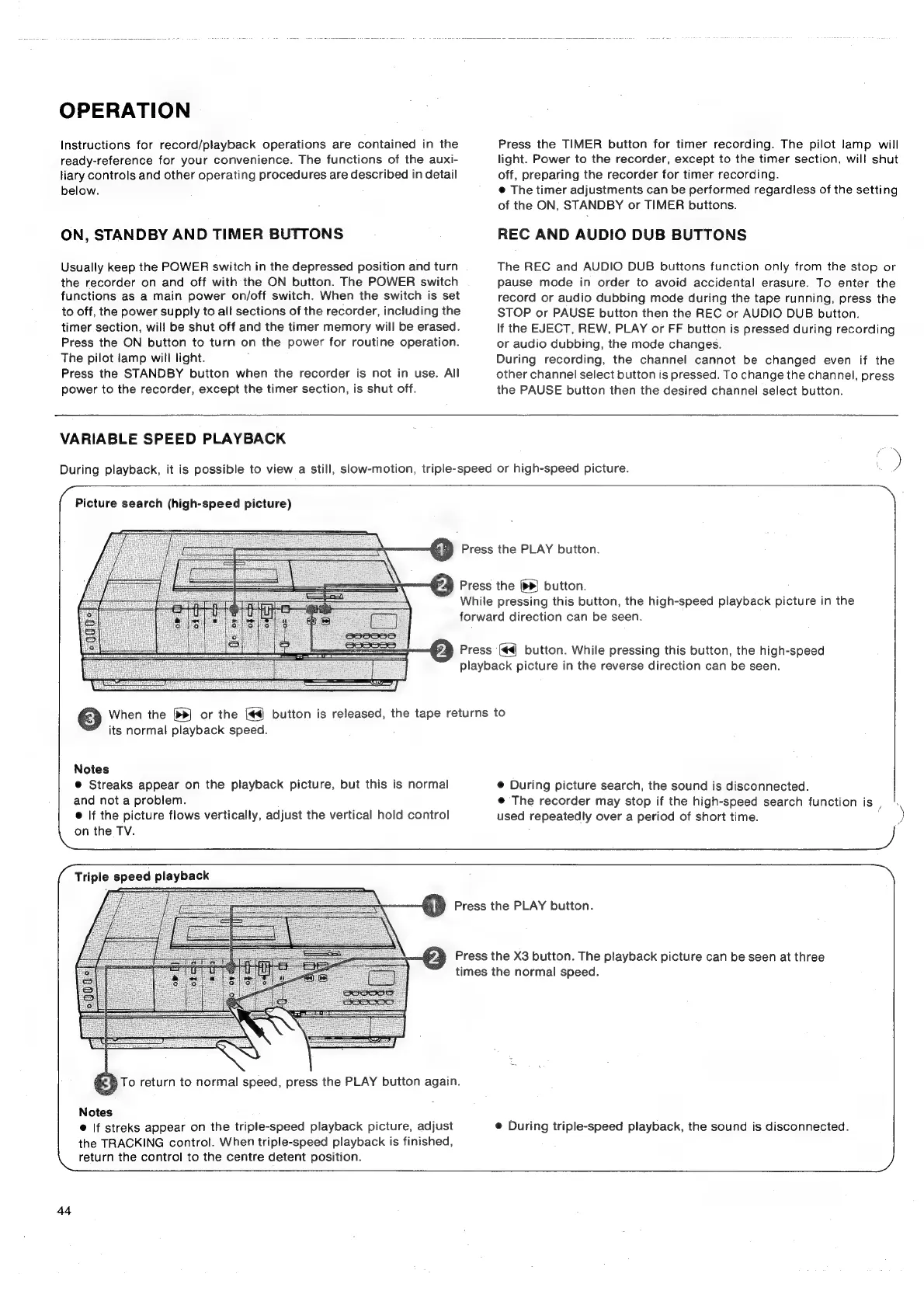
#2
Press
the
PLAY
button.
P2)
Press
the
(bd)
button.
While
pressing
this
button,
the
high-speed
playback
picture
in
the
forward
direction
can
be
seen.
¥4)
Press
(44)
button.
While
pressing
this
button,
the
high-speed
playback
picture
in
the
reverse
direction
can
be
seen.
When
the
[>>]
or
the
[#4
button
is
released,
the
tape
returns
to
@
During
picture
search,
the
sound
is
disconnected.
@
The
recorder
may
stop
if
the
high-speed
search
function
is
,
used
repeatedly
over
a
period
of
short
time.
Triple
speed
playback
Notes
@
|f
streks
appear
on
the
triple-speed
playback
picture,
adjust
the
TRACKING
control.
When
triple-speed
playback
is
finished,
return
the
control
to
the
centre
detent
position.
4
Press
the
PLAY
buiton.
2
Press
the
X3
button.
The
playback
picture
can
be
seen
at
three
times
the
normal
speed.
38
To
return
to
normal
speed,
press
the
PLAY
button
again.
I
e
During
triple-speed
playback,
the
sound
is
disconnected.
44

Related product manuals