EasyManua.ls Logo

Sony SL-C7E - Page 46

Sony SL-C7E
Print Icon
To Next Page IconTo Next Page
To Previous Page IconTo Previous Page
Loading...
FAST
FORWARD
AND
REWIND
To
advance
the
tape
rapidly,
press
the
FF
button.
To
rewind
the
tape,
press
the
REW
button.
You
can
change
from
any
operating
mode
(except
pause)
directly
into
the
fast
forward
or
rewind
mode,
because
of
the
“logic
control’’
system
used
in
this
machine.
FULL
AUTO
REWIND
When
the
tape
reaches
its
end,
it
will
stop
automatically
and
the
REC,
PLAY
or
FF
lamp
will
go
out.
The
END
ALARM
will
sound
for
10
seconds
if
the
END
ALARM
switch
is
set
to
ON.
Then,
the
REW
lamp
will
light
and
the
tape
will
automatically
rewind
to
the
begin-
ning
and
stop.
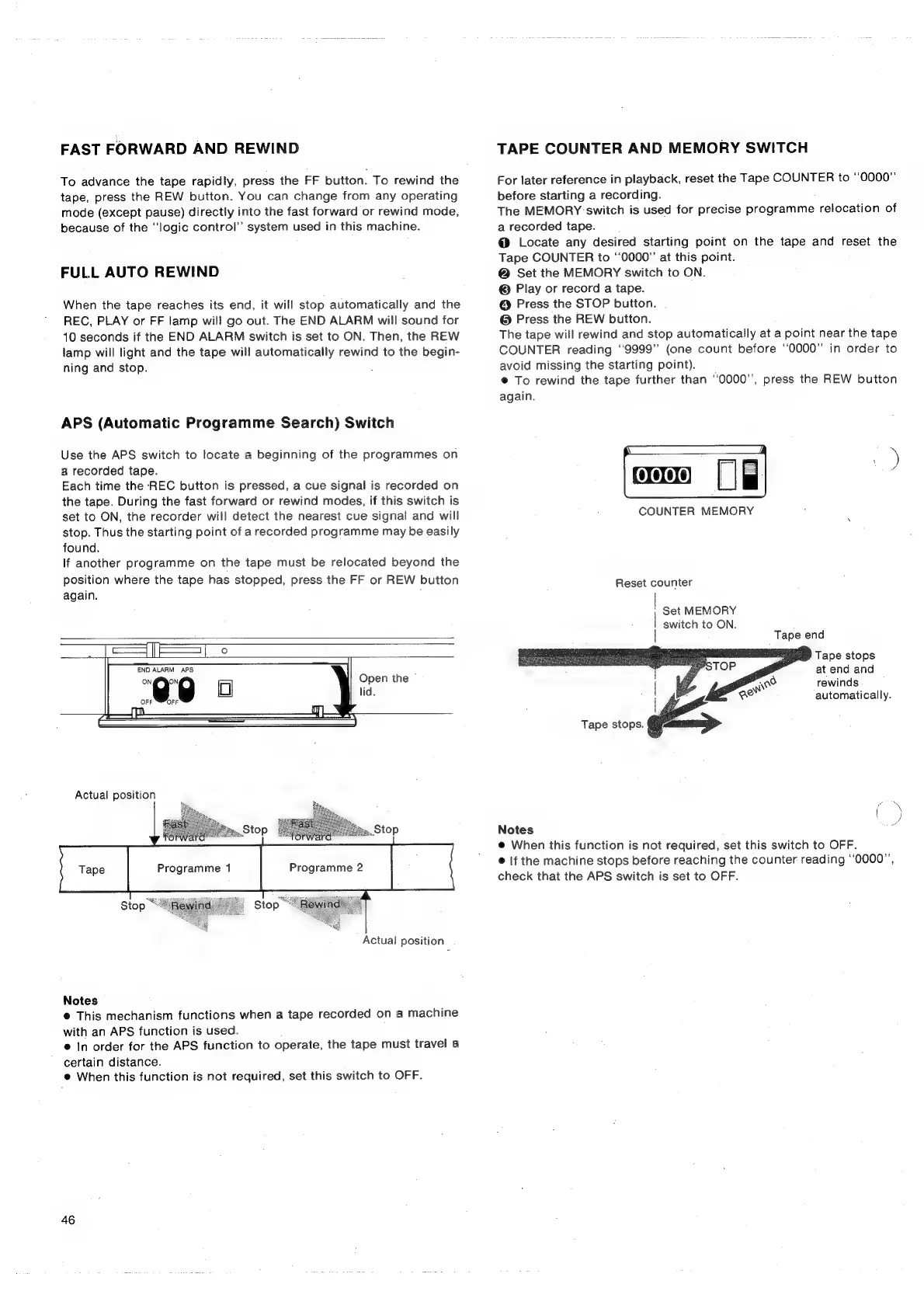
APS
(Automatic
Programme
Search)
Switch
Use
the
APS
switch
to
locate
a
beginning
of
the
programmes
on
a
recorded
tape.
Each
time
the
REC
button
is
pressed,
a
cue
signal
is
recorded
on
the
tape.
During
the
fast
forward
or
rewind
modes,
if
this
switch
is
set
to
ON,
the
recorder
will
detect
the
nearest
cue
signal
and
will
stop.
Thus
the
starting
point
of
a
recorded
programme
may
be
easily
found.
If
another
programme
on
the
tape
must
be
relocated
beyond
the
position
where
the
tape
has
stopped,
press
the
FF
or
REW
button
again.
Open
the
©
lid.
Actual
position
forward
S
Stop
Stop
Actua!
position
Notes
@
This
mechanism
functions
when
a
tape
recorded
on
a
machine
with
an
APS
function
is
used.
®
In
order
for
the
APS
function
to
operate,
the
tape
must
travel
a
certain
distance.
@
When
this
function
is
not
required,
set
this
switch
to
OFF.
46
TAPE
COUNTER
AND
MEMORY
SWITCH
For
later
reference
in
playback,
reset
the
Tape
COUNTER
to
“0000”
before
starting
a
recording.
The
MEMORY
‘switch
is
used
for
precise
programme
relocation
of
a
recorded
tape.
@
Locate
any
desired
starting
point
on
the
tape
and
reset
the
Tape
COUNTER
to
‘0000’
at
this
point.
@
Set
the
MEMORY
switch
to
ON.
©
Play
or
record
a
tape.
@
Press
the
STOP
button.
@
Press
the
REW
button.
The
tape
will
rewind
and
stop
automatically
at
a
point near
the
tape
COUNTER
reading
‘‘9999”
(one
count
before
“0000”
in
order
to
avoid
missing
the
starting
point).
©
To
rewind
the
tape
further
than
“0000”,
press
the
REW
button
again.
COUNTER
MEMORY
Reset
counter
;
Set
MEMORY
switch
to
ON.
Tape
end
Tape
stops
at
end
and
rewinds
automatically.
Tape
stops.
Notes
@
When
this
function
is
not
required,
set
this
switch
to
OFF.
@
If
the
machine
stops
before
reaching
the
counter
reading
‘‘0000”’,
check
that
the
APS
switch
is
set
to
OFF.
ey

Related product manuals