EasyManua.ls Logo

Sony SL-C7E - Page 53

Sony SL-C7E
Print Icon
To Next Page IconTo Next Page
To Previous Page IconTo Previous Page
Loading...
CONNECTIONS
FOR
ADDITIONAL
USES
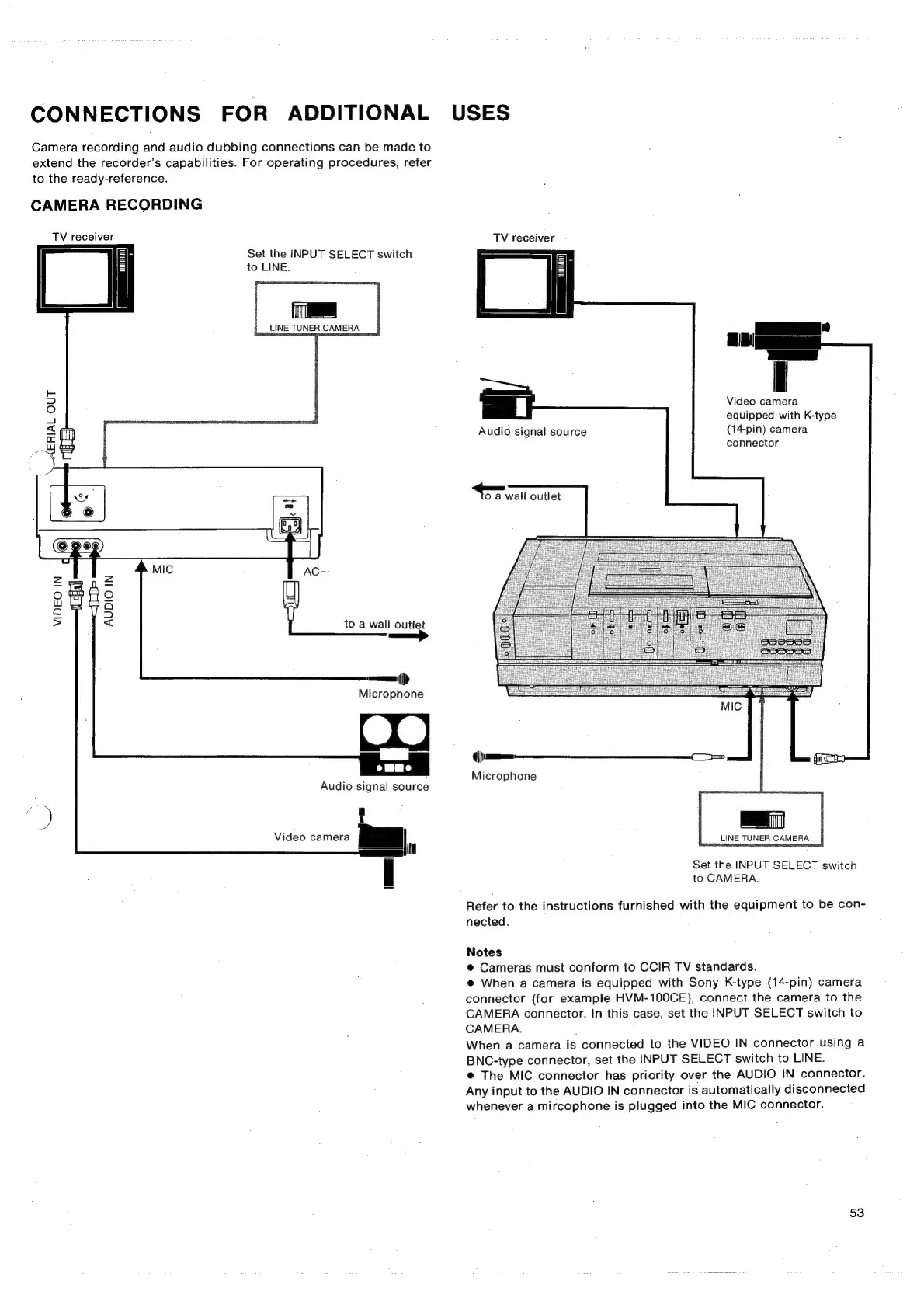
Camera
recording
and
audio
dubbing
connections
can
be
made
to
extend
the
recorder’s
capabilities.
For
operating
procedures,
refer
to
the
ready-reference.
CAMERA
RECORDING
TV
receiver
Set
the
INPUT
SELECT
switch
to
LINE.
LINE
TUNER
CAMERA
VIDEO
IN
AUDIO
IN
to
a
wall
outlet
n>
vem)
Microphone
Audio
signal
source
Video
camera
TV
receiver
Video
camera
equipped
with
K-type
(14-pin)
camera
connector
Audio
signal
source
oO
a
wall
outlet
Microphone
LINE
TUNER
CAMERA
Set
the
INPUT
SELECT
switch
to
CAMERA.
Refer
to
the
instructions
furnished
with
the
equipment
to
be
con-
nected.
Notes
@
Cameras
must
conform
to
CCIR
TV
standards.
@
When
a
camera
is
equipped
with
Sony
K-type
(14-pin)
camera
connector
(for
example
HVM-100CE),
connect
the
camera
to
the
CAMERA
connector.
In
this
case,
set
the
INPUT
SELECT
switch
to
CAMERA.
.
When
a
camera
is
connected
to
the
VIDEO
IN
connector
using
a
BNC-type
connector,
set
the
INPUT
SELECT
switch
to
LINE.
@
The MIC
connector
has
priority
over
the
AUDIO
IN
connector.
Any
input
to
the
AUDIO
IN
connector
is
automatically
disconnected
whenever
a
mircophone
is
plugged
into
the
MIC
connector.
53

Related product manuals