1-5
20
Getting Started
MENU
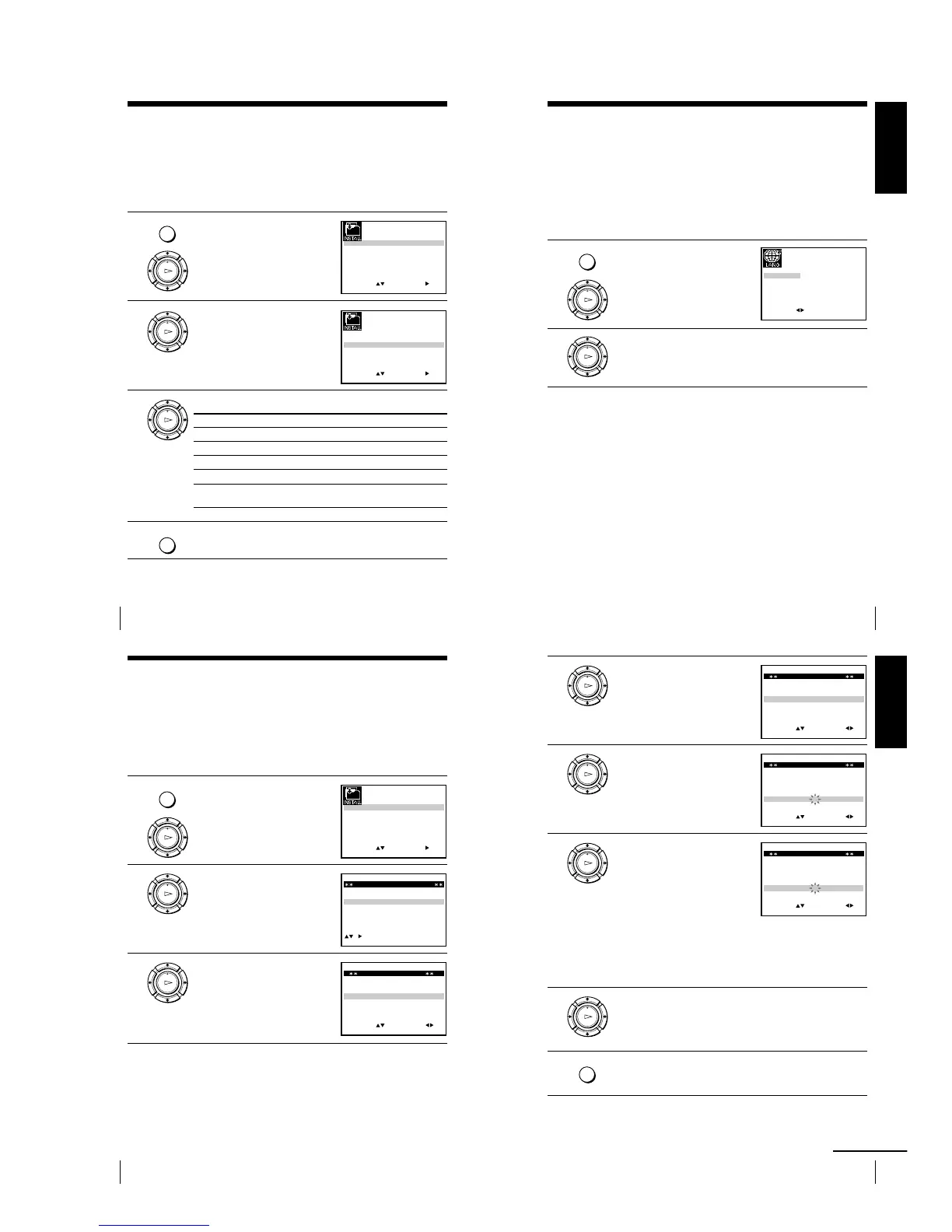
Step 6 : Selecting the TV system
You must select the appropriate TV system for your area.
Before you start
¥ Turn on the VCR and the TV.
¥ Set the TV to the video channel.
¥ Refer to Index to parts and controls for button locations.
1 Press MENU, then press M/m/</
, to highlight INSTALLATION
and press OK.
2 Press M/m to highlight TV
SYSTEM, then press ,.
3 Press , to select the appropriate TV system.
Select For
G the B/G TV system
K the D/K TV system
I the I TV system
B* the B/B TV system
M* the U.S—ANT., U.S—HRC, U.S—IRC and JAPAN TV
systems
4 Press MENU to exit the menu.
*SLV-ED929MI only
MENU
OK
PLAY
OK
PLAY
OK
PLAY
SET
MENU:
:
OK:END
SELECT
AUTO SET UP
MANUAL SET UP
TV SYSTEM
32:
G:
VCR OUTPUT CH
:
EXIT
SET
MENU:
:
OK:END
SELECT
AUTO SET UP
MANUAL SET UP
TV SYSTEM
32:
G:
VCR OUTPUT CH
:
EXIT
21
Getting Started
Getting Started
Selecting a language (SLV-ED828ME/SG
and ED323ME/SG only)
You can change the on-screen display language from the one you selected with the
Auto Set Up function.
Before you start
¥ Turn on the VCR and the TV.
¥ Set the TV to the video channel.
¥ Refer to Index to parts and controls for button locations.
1 Press MENU, then press M/m/</
, to highlight LANGUAGE SET
and press OK.
2 Press </, to highlight the desired language, ENGLISH or
ARABIC, then press OK.
MENU
OK
PLAY
EXIT MENU:OK:SET
SELECT
ENGLISH ARABIC
:
OK
PLAY
22
Getting Started
MENU
OK
PLAY
SET
MENU:
:
OK:END
SELECT
AUTO SET UP
MANUAL SET UP
TV SYSTEM
32:
G:
VCR OUTPUT CH
:
EXIT
OK
PLAY
EXIT MENU:CLEAR:DELETE
SWAPPING OK
TV STATION TABLE
:
5
4
3
2
1
0
0
0
0
3
3
2
2
2
0
9
7
I
C
L
A
J
D
M
A
K
E
N
B
—
—
—
—
B/G/D/K
B/G/D/K
B/G/D/K
B/G/D/K
PR CH NAME SYSTEM
OK
PLAY
MENU:OK:END
SELECT
PR : 5
SYSTEM : B/G/D/K
MFT : —
NAME : ————
:
SET :
EXIT
MANUAL TUNING
CH : ———
Presetting channels
If some channels could not be preset using the Auto Set Up function, you can preset
them manually.
Before you start
¥ Turn on the VCR and the TV.
¥ Set the TV to the video channel.
¥ Refer to Index to parts and controls for button locations.
1 Press MENU, then press M/m/</
, to highlight INSTALLATION
and press OK.
2 Press M/m to highlight MANUAL
SET UP, then press ,.
3 Press M/m to highlight the row
which you want to preset, then
press ,.
To display other pages for
programme positions 6 to 80, press
M/m repeatedly.
23
Getting Started
Getting Started
4 Press </, repeatedly until the
channel you want is displayed.
Select the appropriate TV system, if
necessary.
5 Press M/m to highlight NAME,
then press ,.
6 Enter the station name.
1 Press M/m to select a character.
Each time you press M, the
character changes as shown
below.
A t B t t Z t 0 t 1
t t 9 t A
2 Press , to set the next character.
The next space flashes.
To correct a character, press </, until the character you want
to correct flashes, then reset it.
You can set up to 4 characters for the station name.
7 Press OK to confirm the station name.
8 Press MENU to exit the menu.
OK
PLAY
MENU:OK:END
SELECT
PR : 5
SYSTEM : B/G/D/K
MFT : —
NAME : ————
:
SET :
EXIT
MANUAL TUNING
CH : 033
OK
PLAY
MENU:OK:END
SELECT
PR : 5
SYSTEM : B/G/D/K
MFT : —
NAME : ————
:
SET :
EXIT
MANUAL TUNING
CH : 033
OK
PLAY
OK
PLAY
MENU
MENU:OK:END
SELECT
PR : 5
SYSTEM : B/G/D/K
MFT : —
NAME : O———
:
SET :
EXIT
MANUAL TUNING
CH : 033
continued


 To Next Page