13
GB
Listening to music through a BLUETOOTH connection
Listening to music by
one-touch action (NFC)
NFC is a technology for short-range wireless
communication between various devices
such as a mobile phone and IC tag.
Just touch your smartphone on the unit. The
unit is turned on automatically, and pairing
and BLUETOOTH connection are
established.
Beforehand, turn the NFC settings to on and
unlock the screen of the smartphone.
1
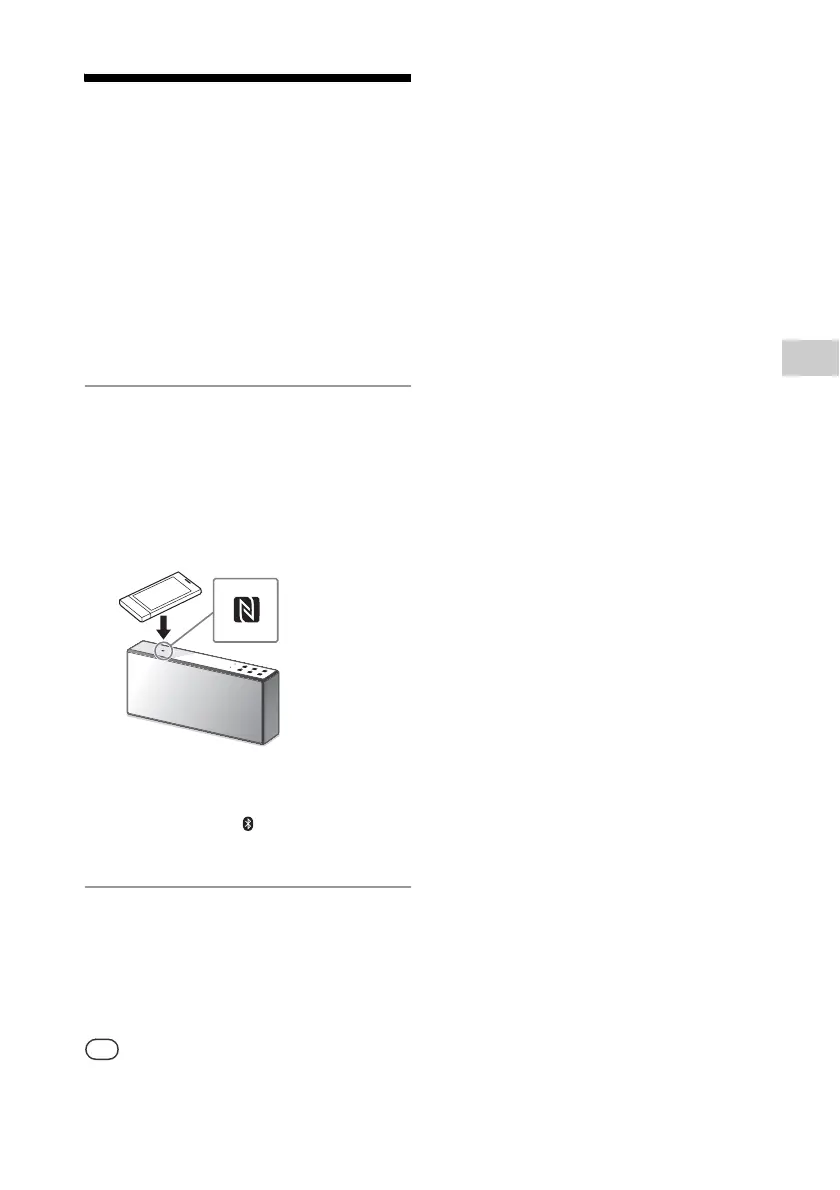
Touch your smartphone on the
N-Mark on the unit.
Touch the smartphone on the unit and
maintain contact until the smartphone
responds.
Refer to the user’s guide of your
smartphone for the part of your
smartphone used as touch contact.
Follow the on-screen instructions to
establish the connection.
When a BLUETOOTH connection is
established, the (BLUETOOTH)
indicator stops flashing and stays lit.
2
After completing the connection,
start playback on the
smartphone.
To disconnect the established
connection, touch your smartphone on
the N-Mark on the unit.
When you touch an NFC-compliant smartphone on
the unit while another BLUETOOTH device is
connected with this unit, the BLUETOOTH device is
disconnected and the unit is connected with the
smartphone.



 To Next Page