7
GB
Getting started
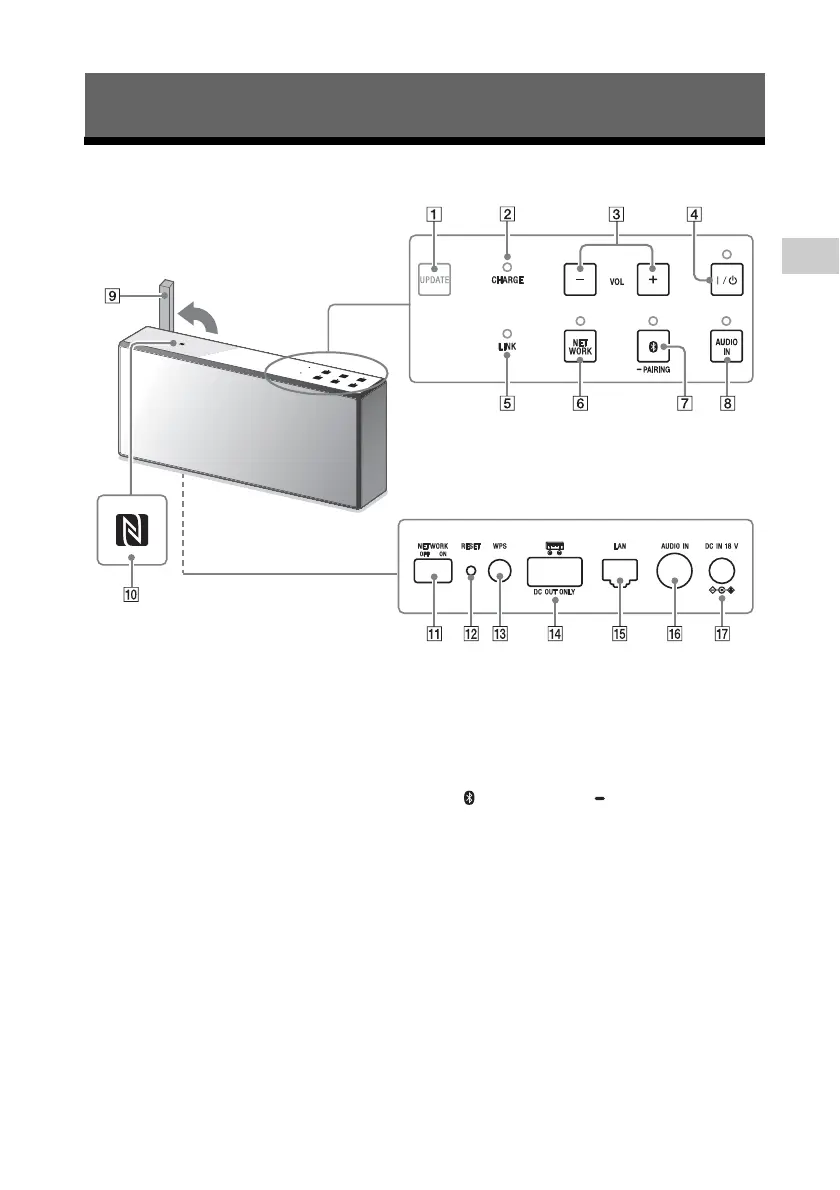
Location and function of controls
UPDATE button
Indicates the status of the unit’s software
update.
CHARGE indicator
Display the charging status of the built-in
lithium-ion battery by the lighting and
flashing of the indicator.
VOL (volume) –/+ buttons
Tap to adjust the volume.
The / (on/standby) indicator flashes
according to the volume adjustment
when tapped.
/ (on/standby) button/indicator
Tap to turn the power of the unit on and
off.
LINK indicator
Indicates the status of the network
connection of the unit.
NETWORK button/indicator
Tap to switch the unit to NETWORK
mode.
Tap to use various music services or
listen to music stored in a device on the
home network with the unit.
(BLUETOOTH) PAIRING button/
indicator
Tap when pairing or connecting with a
BLUETOOTH device or listening to music
with a BLUETOOTH device.
Tap once to switch the unit to
BLUETOOTH mode. Tap and hold to
switch the unit to pairing mode.
AUDIO IN button/indicator
Tap to listen to music in a device
connected to the AUDIO IN jack. The
AUDIO IN indicator lights up when
tapped.
Getting started



 To Next Page