15
GB
Listening to music via a Wi-Fi network
3
Set the NETWORK OFF/ON switch
to ON, then turn the unit on.
Wait until the LINK indicator stops
flashing and stays lit in pink. It takes
about 1 minute.
When you connect the unit to a PC for the
first time, it takes about 4 or 5 minutes until
the LINK indicator stops flashing and stays lit.
4
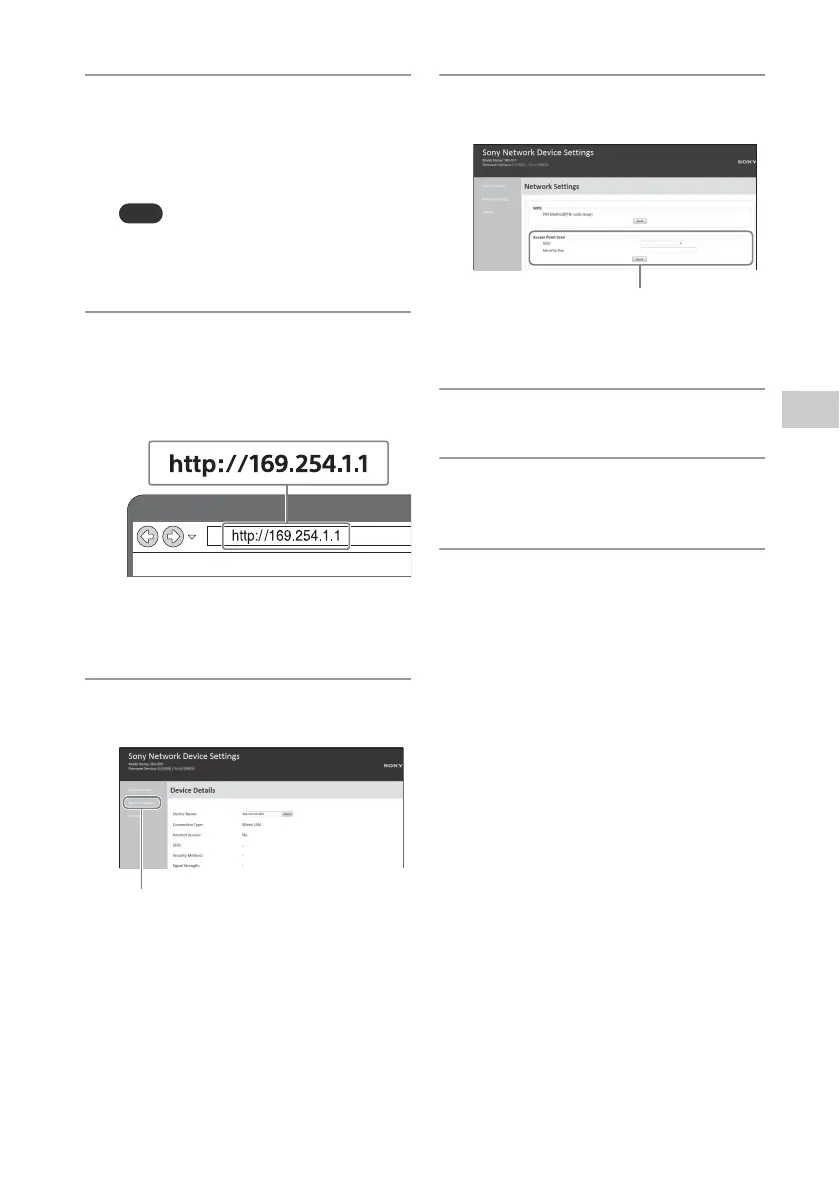
Display [Sony Network Device
Settings] on your PC.
Launch a browser.
Enter the following URL in the
address bar.
The above URL is only for when the PC
and unit are connected with a LAN
cable.
5
Select [Network Settings] from
the menu.
6
Select the SSID of your wireless
router and enter the password.
See the recorded password in step 1
(page 14).
7
Select [Apply].
8
When prompted, unplug the LAN
cable from the unit.
9
Check that the LINK indicator
lights up in orange.
Set the Wi-Fi antenna (aerial) (page 8).
When the Wi-Fi connection is
established, the LINK indicator lights up
in orange.
It may take more than 1 minute to light
up.
For information on how to listen to music
with this unit, refer to the Wi-Fi Startup
Guide (separate document).



 To Next Page