Connect a second or more speakers.
The following operation is an example of connecting SRS-XB21 as the second speaker. Refer to the operating
instructions supplied with the device you are using to connect other devices compatible with the Wireless Party
Chain function.
2
Press the
(power) button/ PAIRING button on the speaker to be connected.
The
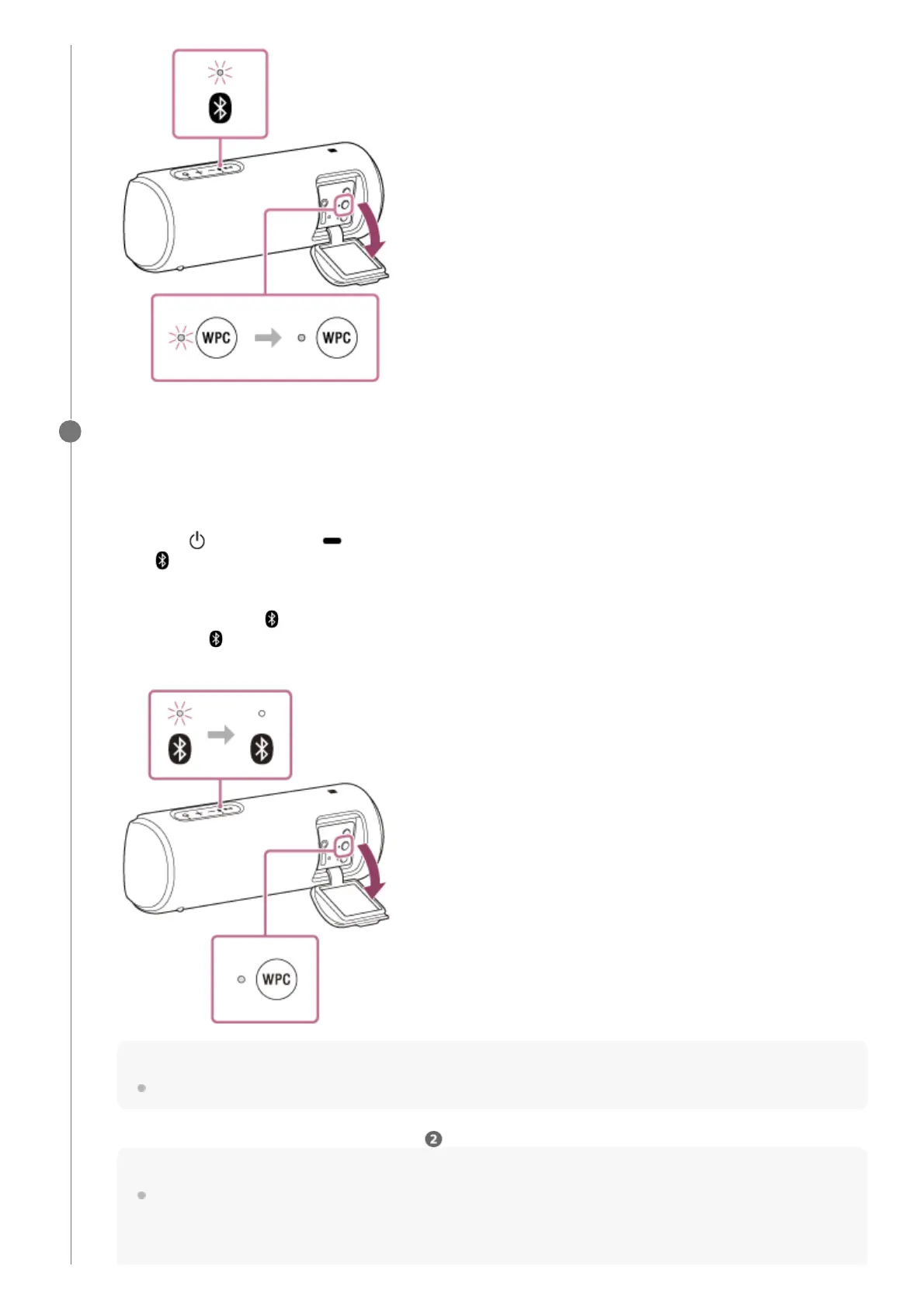
(BLUETOOTH) indicator of the speaker you turned on flashes in blue.
1.
Press the WPC (Wireless Party Chain) button.
A beep is heard, the
(BLUETOOTH) indicator flashes and the WPC (Wireless Party Chain) indicator lights
up, then the
(BLUETOOTH) indicator turns off. The WPC (Wireless Party Chain) indicator continues to stay
lit.
Hint
Connect the second speaker within 1 minute. After 1 minute or more, the speaker setting is canceled.
2.
To connect additional speakers, repeat steps – 1 to 2.
Hint
When connecting a third or more speakers, connect each one within 30 seconds of connecting the previous speaker.
After 30 seconds or more, the speaker cannot be connected.
3.



 To Next Page