EasyManua.ls Logo

Sony STR-AV280L - Function of Controls

Sony STR-AV280L
24 pages
Print Icon
To Next Page IconTo Next Page
To Previous Page IconTo Previous Page
Loading...
FUNCTION
OF
CONTROLS
QUARTZ
LOCK
DIGITAL
SYNTHESIZER:
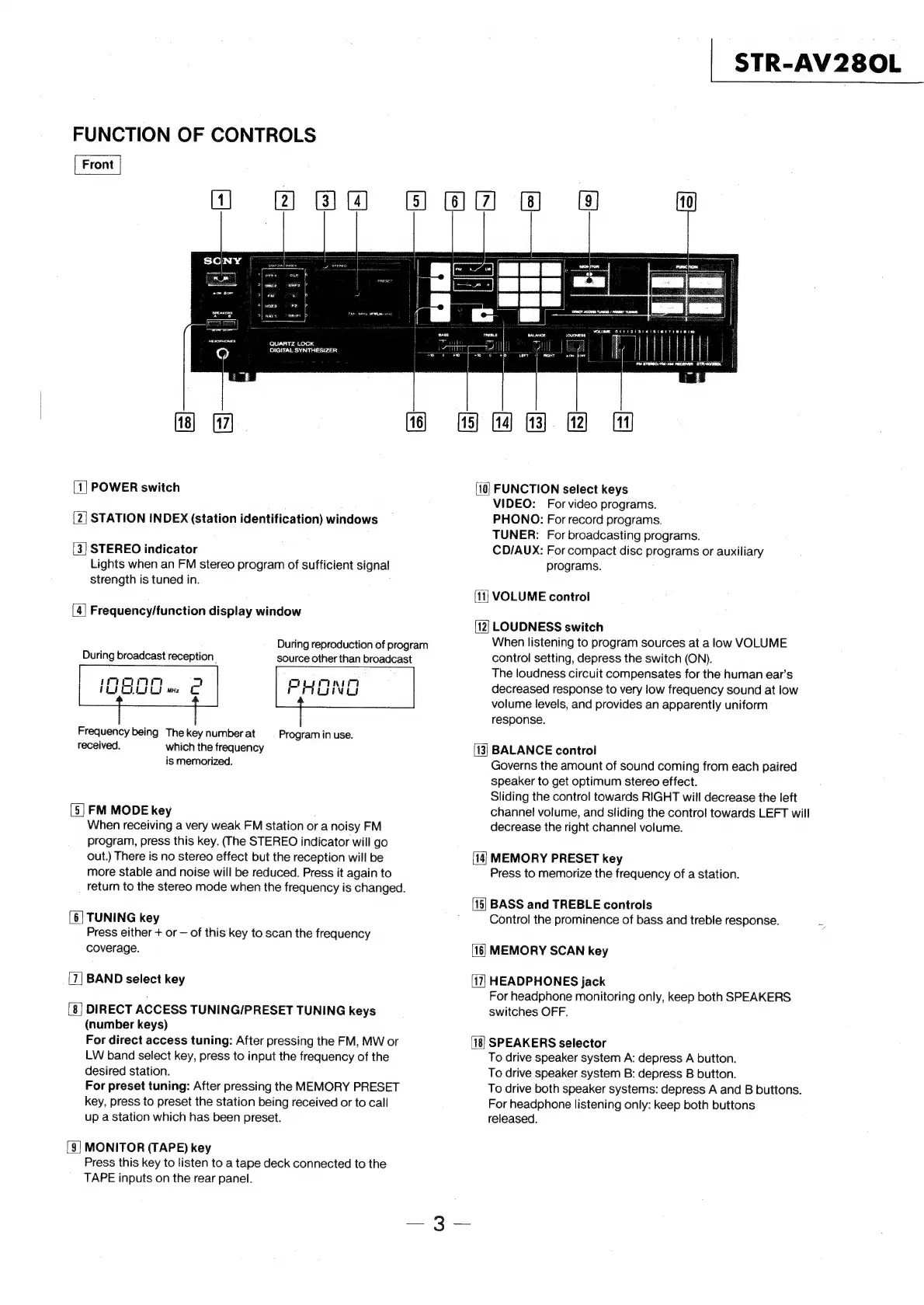
[1]
POWER
switch
NR
STATION
INDEX
(station
identification)
windows
w
STEREO
indicator
Lights
when
an
FM
stereo
program
of
sufficient
signal
strength
is
tuned
in.
>
Frequency/function
display
window
During
reproduction
of
program
During
broadcast
reception.
source
other
than
broadcast
immo
=a
Es
OLLI
me
PHONG
Frequency
being
The
key
number
at
received.
which
the
frequency
is
memorized.
Program
in
use.
[5]
FM
MODE
key
When
receiving
a
very
weak
FM
station
or
a
noisy
FM
program,
press
this
key.
(The
STEREO
indicator
will
go
out.)
There
is
no
stereo
effect
but
the
reception
will
be
more
stable
and
noise
will
be
reduced.
Press
it
again
to
return
to
the
stereo
mode
when
the
frequency
is
changed.
|
TUNING
key
Press
either
+
or
of
this
key
to
scan
the
frequency
coverage.
~|
BAND
select
key
DIRECT
ACCESS
TUNING/PRESET
TUNING
keys
(number
keys)
For
direct
access
tuning:
After
pressing
the
FM,
MW
or
LW
band
select
key,
press
to
input
the
frequency
of
the
desired
station.
For
preset
tuning:
After
pressing
the
MEMORY
PRESET
key,
press
to
preset
the
station
being
received
or
to
call
up
a
station
which
has
been
preset.
[eo
[9]
MONITOR
(TAPE)
key
Press
this
key
to
listen
to
a
tape
deck
connected
to
the
TAPE
inputs
on
the
rear
panel.
HM
OBB
BOO
@
@
[10]
nm
=
[13]
=
>
a)
&)
=)
=
o
|
STR-AV280L
FUNCTION
select
keys
VIDEO:
For
video
programs.
PHONO:
For
record
programs.
TUNER:
For
broadcasting
programs.
CD/AUX:
For
compact
disc
programs
or
auxiliary
programs.
[11]
VOLUME
control
LOUDNESS
switch
When
listening
to
program
sources
at
a
low
VOLUME
control
setting,
depress
the
switch
(ON).
The
loudness
circuit
compensates
for
the
human
ear’s
decreased
response
to
very
low
frequency
sound
at
low
volume
levels,
and
provides
an
apparently
uniform
response.
BALANCE
control
Governs
the
amount
of
sound
coming
from
each
paired
speaker
to
get
optimum
stereo
effect.
Sliding
the
control
towards
RIGHT
will
decrease
the
left
channel
volume,
and
sliding
the
control
towards
LEFT
will
decrease
the
right
channel
volume.
MEMORY
PRESET
key
Press
to
memorize
the
frequency
of
a
station.
BASS
and
TREBLE
controls
Control
the
prominence
of
bass
and
treble
response.
MEMORY
SCAN
key
HEADPHONES
jack
For
headphone
monitoring
only,
keep
both
SPEAKERS
switches
OFF.
SPEAKERS
selector
To
drive
speaker
system
A:
depress
A
button.
To
drive
speaker
system
B:
depress
B
button.
To
drive
both
speaker
systems:
depress
A
and
B
buttons.
For
headphone
listening
only:
keep
both
buttons
released.