EasyManua.ls Logo

Sony STR-D1090 - Tuning Preset Stations; Method A: Direct Preset Tuning; Method B: Scan Preset Tuning

Sony STR-D1090
51 pages
Print Icon
To Next Page IconTo Next Page
To Previous Page IconTo Previous Page
Loading...
Receiving
Broadcasts
Tuning
in
a
Preset
Station
(Preset
Tuning)
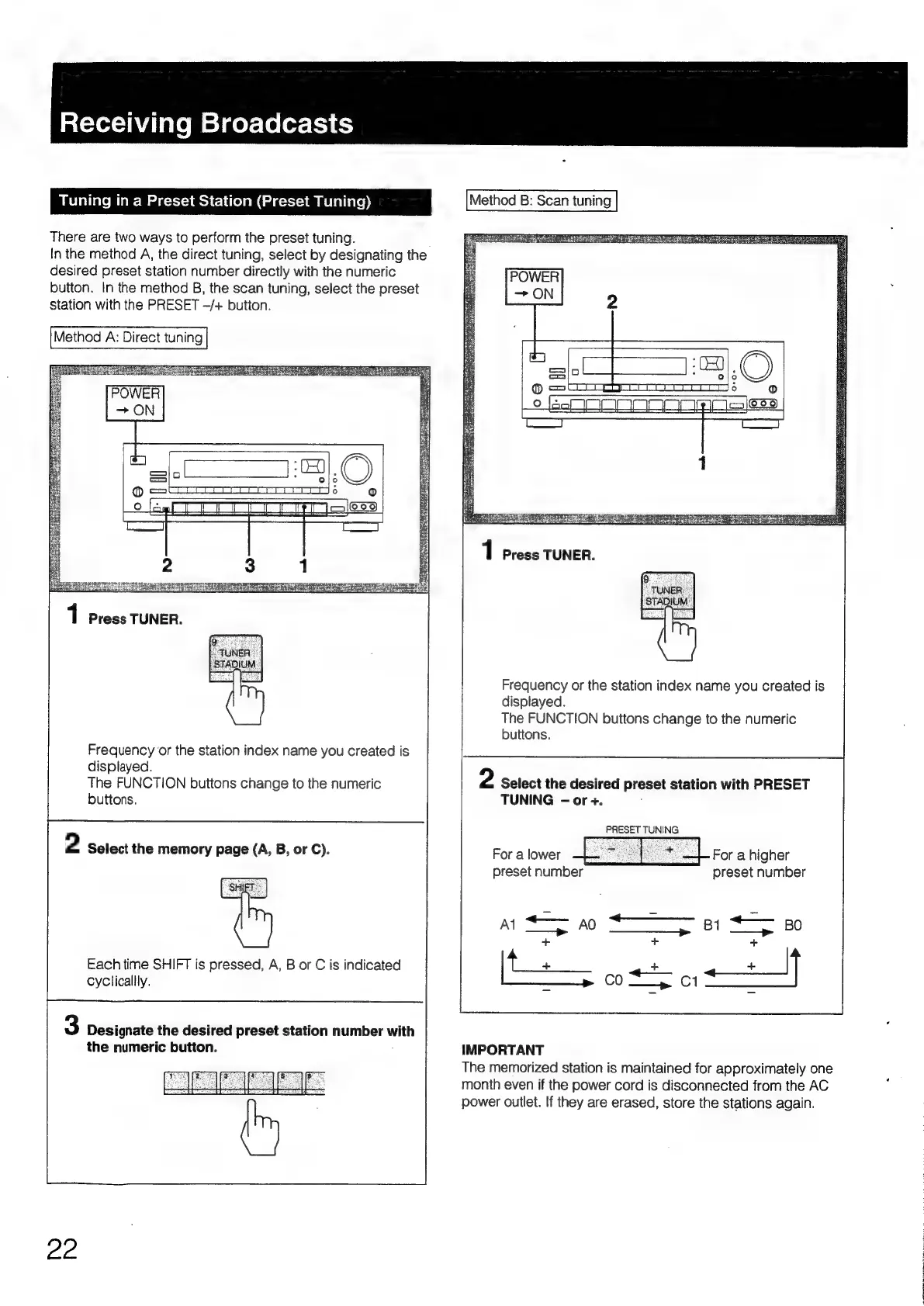
There
are
two
ways
to
perform
the
preset
tuning.
In
the
method
A,
the
direct
tuning,
select
by
designating
the
desired
preset
station
number
directly
with
the
numeric
button.
In
the
method
B,
the
scan
tuning,
select
the
preset
station
with
the
PRESET
-/+
button.
Method
A:
Direct
tuning
1
Press
TUNER.
Frequency
or
the
station
index
name
you
created
is
displayed.
The
FUNCTION
buttons
change
to
the
numeric
buttons.
2
Select
the
memory
page
(A,
B,
or
C).
Each
time
SHIFT
is
pressed,
A,
B
or
C
is
indicated
cyCclicallly.
3
Designate
the
desired
preset
station
number
with
the
numeric
button.
22
Method
B:
Scan
tuning
Frequency
or
the
station
index
name
you
created
is
displayed.
The
FUNCTION
buttons
change
to
the
numeric
buttons.
2
Select
the
desired
preset
station
with
PRESET
TUNING
-or
+.
:
PRESET
TUNING
For
a
lower
e
preset
number
For
a
higher
preset
number
IMPORTANT
The
memorized
station
is
maintained
for
approximately
one
month
even
if
the
power
cord
is
disconnected
from
the
AC
power
outlet.
If
they
are
erased,
store
the
stations
again.

Table of Contents

Related product manuals