EasyManua.ls Logo

Sony STR-D1090 - Selecting Stations by Index and FM Simulcast; Index Tuning for Preset Stations; Receiving FM Simulcast TV Audio

Sony STR-D1090
51 pages
Print Icon
To Next Page IconTo Next Page
To Previous Page IconTo Previous Page
Loading...
Receiving
Broadcasts
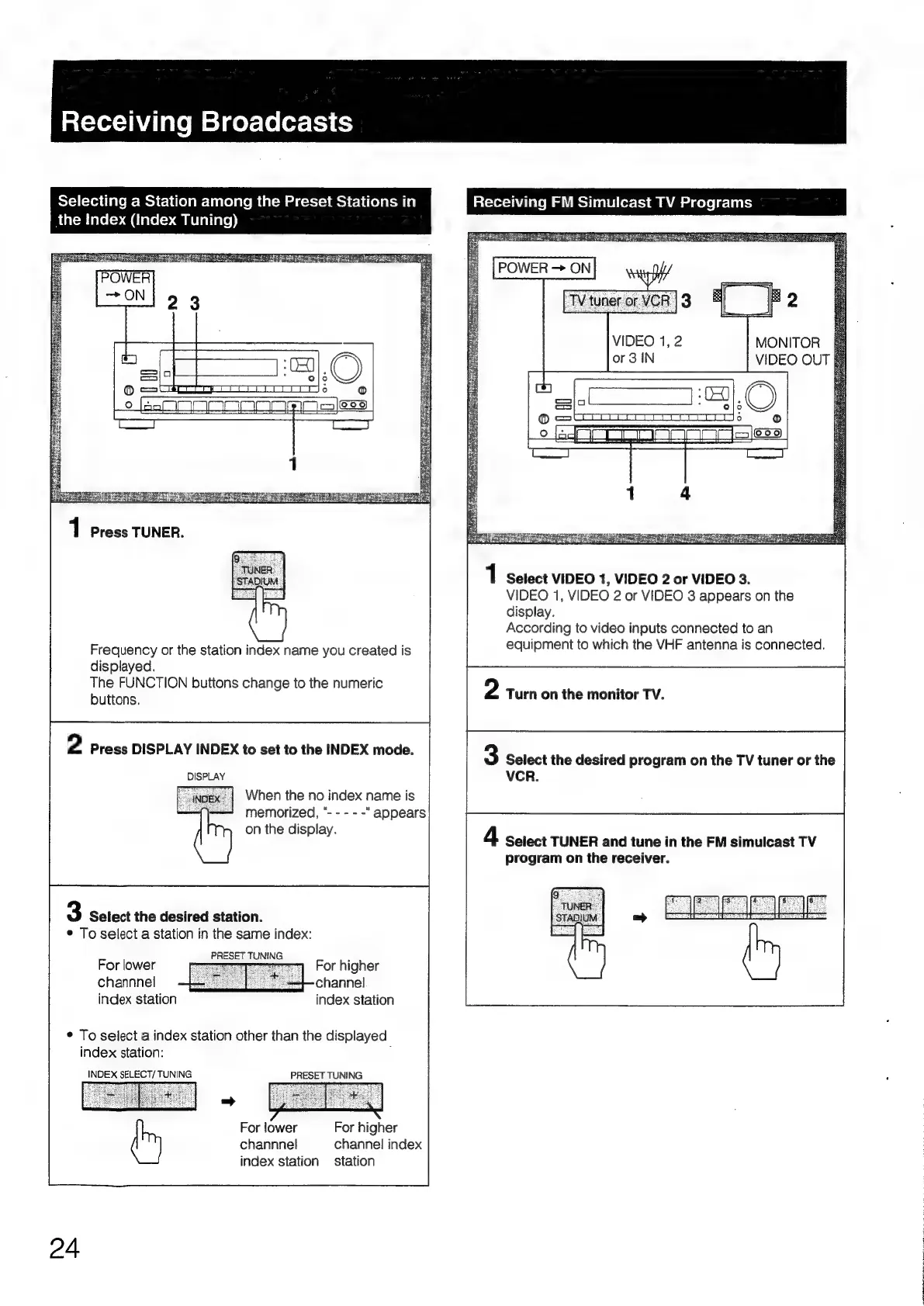
Frequency
or
the
station
index
name
you
created
is
displayed.
The
FUNCTION
buttons
change
to
the
numeric
buttons.
2
Press
DISPLAY
INDEX
to
set
to
the
INDEX
mode.
DISPLAY
When
the
no
index
name
is
memorized,
"-
-
-
- -
on
the
display.
3
Select
the
desired
station.
©
To
select
a
station
in
the
same
index:
PRESET
TUNING
For
lower
channnel
index
station
For
higher
channel
index
station
¢
To
select
a
index
station
other
than
the
displayed
index
station:
:
INDEX
SELECT/
TUNING
PRESET
TUNING
For
higher
For
lower
channnel
channel
index
index
station
station
24
Selecting
a
Station
among
the
Preset
Stations
in
Receiving
FM
Simulcast
TV
Programs
Riaccm
ace(=>
a
(iare(->
au
melaliare))
MONITOR
|
VIDEO
OUT
|
Select
VIDEO
1,
VIDEO
2
or
VIDEO
3.
VIDEO
1,
VIDEO
2
or
VIDEO
3
appears
on
the
display.
According
to
video
inputs
connected
to
an
equipment
to
which
the
VHF
antenna
is
connected.
2
Turn
on
the
monitor
TV.
3
Select
the
desired
program
on
the
TV
tuner
or
the
VCR.
4
Seiect
TUNER
and
tune
in
the
FM
simulcast
TV
program
on
the
receiver.

Table of Contents

Related product manuals