EasyManua.ls Logo

Sony STR-D1090 - Labeling Preset Stations with Index Names; Creating Custom Index Names for Presets; Displaying Preset Station Information

Sony STR-D1090
51 pages
Print Icon
To Next Page IconTo Next Page
To Previous Page IconTo Previous Page
Loading...
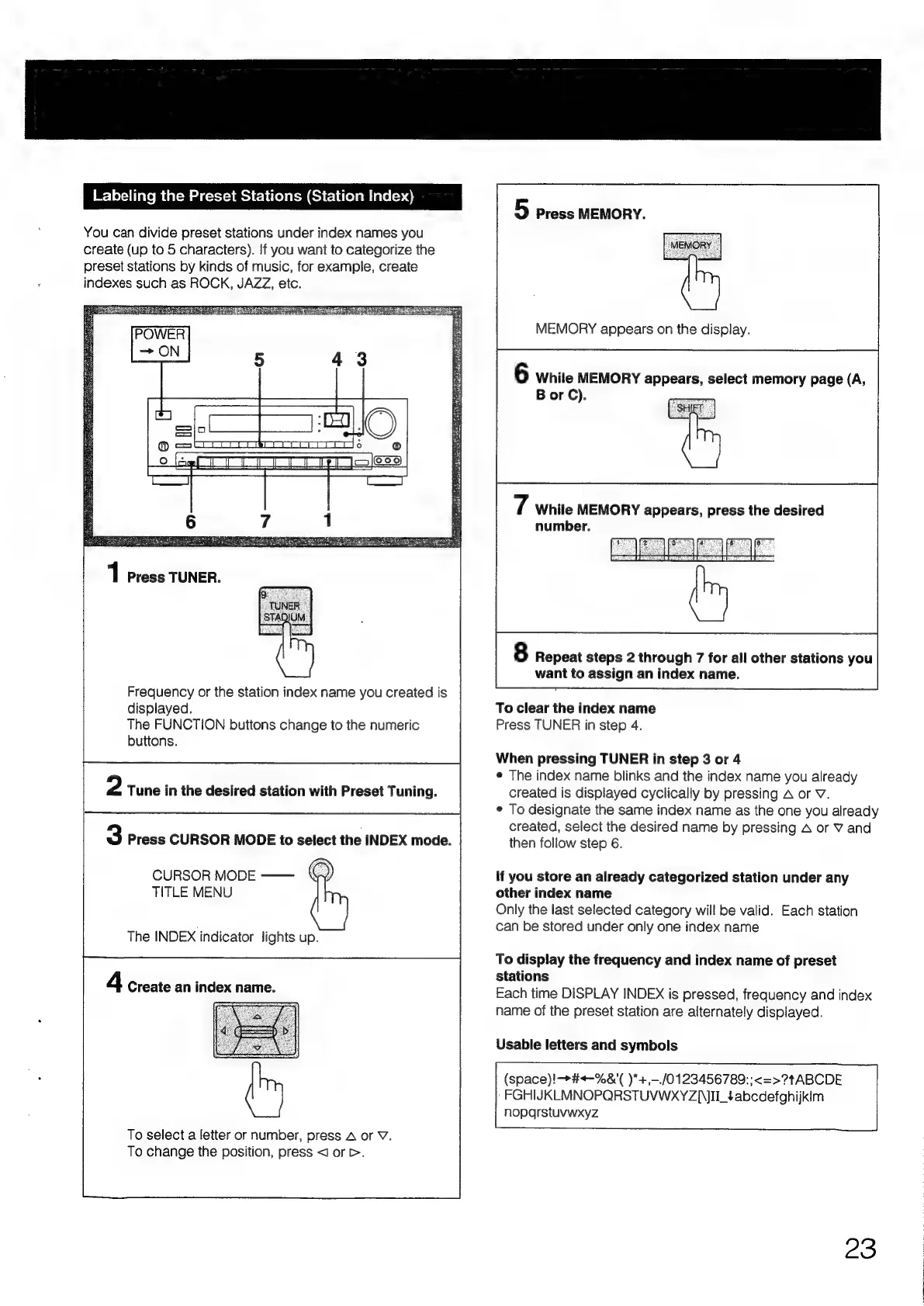
Labeling
the
Preset
Stations
(Station
Index)
You
can
divide
preset
stations
under
index
names
you
create
(up
to
5
characters).
If
you
want
to
categorize
the
preset
stations
by
kinds
of
music,
for
example,
create
indexes
such
as
ROCK,
JAZZ,
etc.
Frequency
or
the
station
index
name
you
created
is
displayed.
The
FUNCTION
buttons
change
to
the
numeric
buttons.
2
Tune
in
the
desired
station
with
Preset
Tuning.
3
Press
CURSOR
MODE
to
select
the
INDEX
mode.
CURSOR
MODE
——
©
TITLE
MENU
The
INDEX
indicator
lights
up.
4
Create
an
index
name.
To
select
a
letter
or
number,
press
A
or
V.
To
change
the
position,
press
<1
or
>.
5
Press
MEMORY.
MEMORY
appears
on
the
display.
6
While
MEMORY
appears,
select
memory
page
(A,
Bor
C).
7
While
MEMORY
appears,
press
the
desired
number.
8
Repeat
steps
2
through
7
for
all
other
stations
you
want
to
assign
an
index
name.
To
clear
the
index
name
Press
TUNER
in
step
4.
When
pressing
TUNER
in
step
3
or
4
¢
The
index
name
blinks
and
the
index
name
you
already
created
is
displayed
cyclically
by
pressing
A
or
V.
¢
To
designate
the
same
index
name
as
the
one you
already
created,
select
the
desired
name
by
pressing
A
or
V
and
then
follow
step
6.
If
you
store
an
already
categorized
station
under
any
other
index
name
Only
the
last
selected
category
will
be
valid.
Each
station
can
be
stored
under
only
one
index
name
To
display
the
frequency
and
index
name
of
preset
stations
Each
time
DISPLAY
INDEX
is
pressed,
frequency
and
index
name
of
the
preset
station
are
alternately
displayed.
Usable
letters
and
symbols
(space)!
>#-%&'(
)*+,-./0123456789:;<=>?t
ABCDE
FGHIJKLMNOPQRSTUVWXYZ|JII_t¢abcdetghijkim
noparstuvwxyz
23

Table of Contents

Related product manuals