EasyManua.ls Logo

Sony STR-D1090 - Editing Video Sources: Adding New Audio; Audio Dubbing for Video Editing

Sony STR-D1090
51 pages
Print Icon
To Next Page IconTo Next Page
To Previous Page IconTo Previous Page
Loading...
Coli
tiavem-
Mare
(-temelel
bl
cer-)
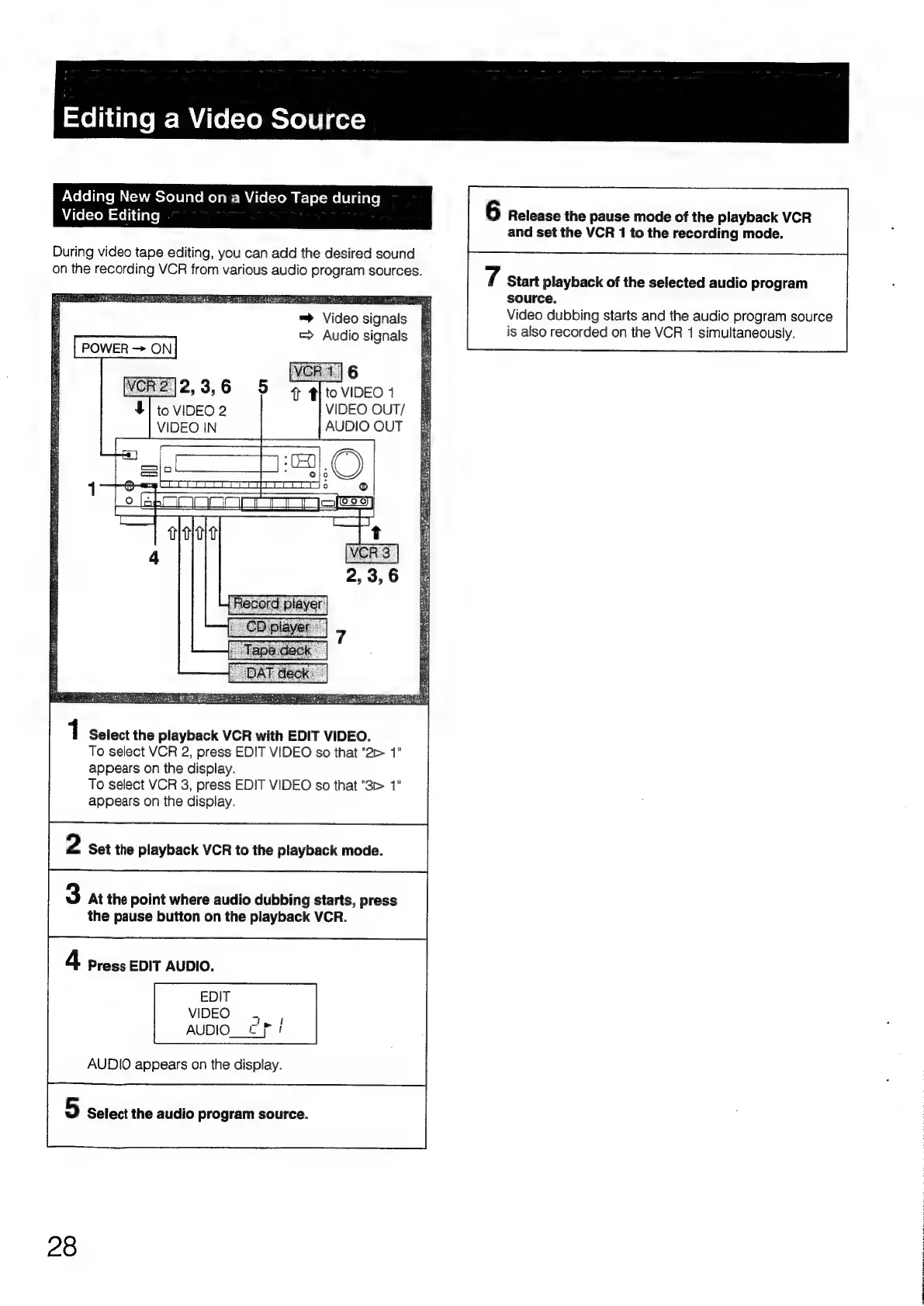
Adding
New
Sound
on
a
Video
Tape
during
Aitel=tom
=tel
i
tfare]
F
6
Release
the
pause
mode
of
the
playback
VCR
:
and
set
the
VCR
1
to
the
recording
mode.
During
video
tape
editing,
you
can
add
the
desired
sound
on
the
recording
VCR
from
various
audio
program
sources.
7
Start
playback
of
the
selected
audio
program
source.
Video
dubbing
starts
and
the
audio
program
source
is
also
recorded
on
the
VCR
1
simultaneously.
=™
Video
signals
=
Audio
signals
POWER
ON
to
VIDEO
2
VIDEO
OUT/
VIDEO
IN
AUDIO
OUT
1
1
Select
the
playback
VCR
with
EDIT
VIDEO.
To
select
VCR
2,
press
EDIT
VIDEO
so
that
"2>
1"
appears
on
the
display.
To
select
VCR
3,
press
EDIT
VIDEO
so
that
"3>
1"
appears
on
the
display.
2
Set
the
playback
VCR
to
the
playback
mode.
3
At
the
point
where
audio
dubbing
starts,
press
the
pause
button
on
the
playback
VCR.
4
Press
EDIT
AUDIO.
AUDIO
appears
on
the
display.
5
Select
the
audio
program
source.
28

Table of Contents

Related product manuals