EasyManua.ls Logo

Sony STR-D1090 - Troubleshooting: Speaker, Noise, and Remote Issues; Speaker and Noise Problems Resolution; Remote Control and Button Functionality Issues

Sony STR-D1090
51 pages
Print Icon
To Next Page IconTo Next Page
To Previous Page IconTo Previous Page
Loading...
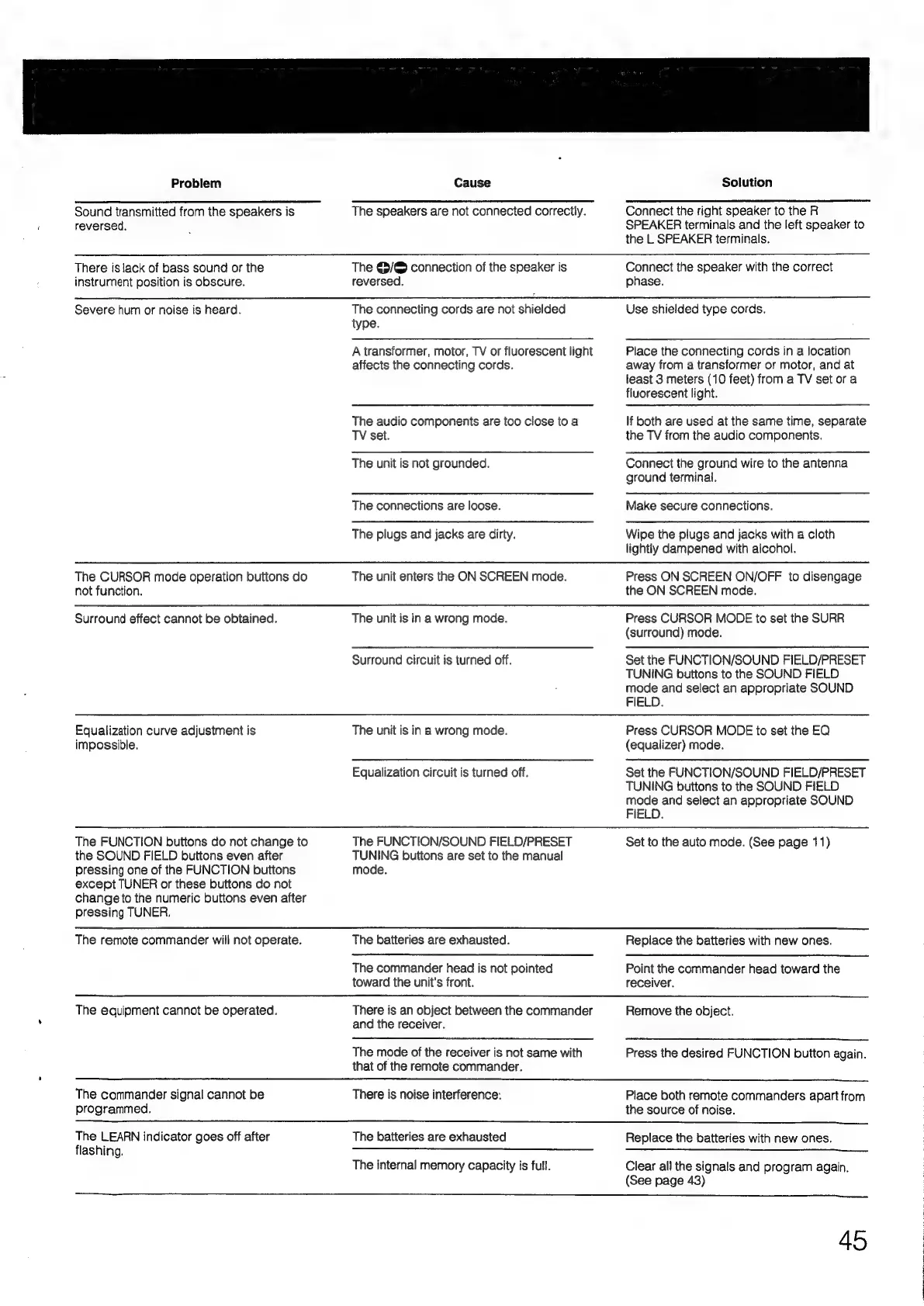
Problem
Sound
transmitted
from
the
speakers
is
reversed.
Cause
The
speakers
are
not
connected
correctly.
Solution
Connect
the
right
speaker
to
the
R
SPEAKER
terminals
and
the
left
speaker
to
the
L
SPEAKER
terminals.
There
is
lack
of
bass
sound
or
the
instrument
position
is
obscure.
The
@/©
connection
of
the
speaker
is
reversed.
Connect
the
speaker
with
the
correct
phase.
Severe
hum
or
noise
is
heard.
The
CURSOR
mode
operation
buttons
do
not
function.
Surround
effect
cannot
be
obtained.
Equalization
curve
adjustment
is
impossible.
The
FUNCTION
buttons
do
not
change
to
the
SOUND
FIELD
buttons
even
after
pressing
one
of
the
FUNCTION
buttons
except
TUNER
or
these
buttons
do
not
change
to
the
numeric
buttons
even
after
pressing
TUNER.
The
connecting
cords
are
not
shielded
type.
A
transformer,
motor,
TV
or
fluorescent
light
affects
the
connecting
cords.
The
audio
components
are
too
close
to
a
TV
set.
The
unit
is
not
grounded.
The
connections
are
loose.
The
plugs
and
jacks
are
dirty.
The
unit
enters
the
ON
SCREEN
mode.
The
unit
is
in
a
wrong
mode.
Surround
circuit
is
turned
off.
The
unit
is
in
a
wrong
mode.
Equalization
circuit
is
turned
off.
The
FUNCTION/SOUND
FIELD/PRESET
TUNING
buttons
are
set
to
the
manual
mode.
Use
shielded
type
cords.
Place
the
connecting
cords
in
a
location
away
from
a
transformer
or
motor,
and
at
least
3
meters
(10
feet)
from
a
TV
set
ora
fluorescent
light.
If
both
are
used
at
the
same
time,
separate
the
TV
from
the
audio
components.
Connect
the
ground
wire
to
the
antenna
ground
terminal.
Make
secure
connections.
Wipe
the
plugs
and
jacks
with
a
cloth
lightly
dampened
with
alcohol.
Press
ON
SCREEN
ON/OFF
to
disengage
the
ON
SCREEN
mode.
Press
CURSOR
MODE
to
set
the
SURR
(surround)
mode.
Set
the
FUNCTION/SOUND
FIELD/PRESET
TUNING
buttons
to
the
SOUND
FIELD
mode
and
select
an
appropriate
SOUND
FIELD.
Press
CURSOR
MODE
to
set
the
EQ
(equalizer)
mode.
Set
the
FUNCTION/SOUND
FIELD/PRESET
TUNING
buttons
to
the
SOUND
FIELD
mode
and
select
an
appropriate
SOUND
FIELD.
Set
to
the
auto
mode.
(See
page
11)
The
remote
commander
will
not
operate.
The
batteries
are
exhausted.
The
commander
head
is
not
pointed
toward
the
unit's
front.
Replace
the
batteries
with
new
ones.
Point
the
commander
head
toward
the
receiver.
The
equipment
cannot
be
operated.
There
is
an
object
between
the
commander
and
the
receiver.
The
mode
of
the
receiver
is
not
same
with
that
of
the
remote
commander.
Remove
the
object.
Press
the
desired
FUNCTION
button
again.
The
commander
signal
cannot
be
programmed.
There
is
noise
interference.
Place
both
remote
commanders
apart
from
the
source
of
noise.
The
LEARN
indicator
goes
off
after
flashing.
The
batteries
are
exhausted
The
internal
memory
capacity
is
full.
Replace
the
batteries
with
new
ones.
Clear
all
the
signals
and
program
again.
(See
page
43)
45

Table of Contents

Related product manuals