107
US
D:\Cannes\STR-DA3400ES_U_R1\3289137121\3289137121\3289137121\01US-
STRDA3400ESUC\090OTH.fm
masterpage: Right
STR-DA3400ES
3-289-137-12(1)
Other Operations
x RS-232C Control
•ON
The receiver can receive commands from the
RS-232C port.
•OFF
The receiver does not receive commands
from the RS-232C port.
Using a bi-amplifier
connection
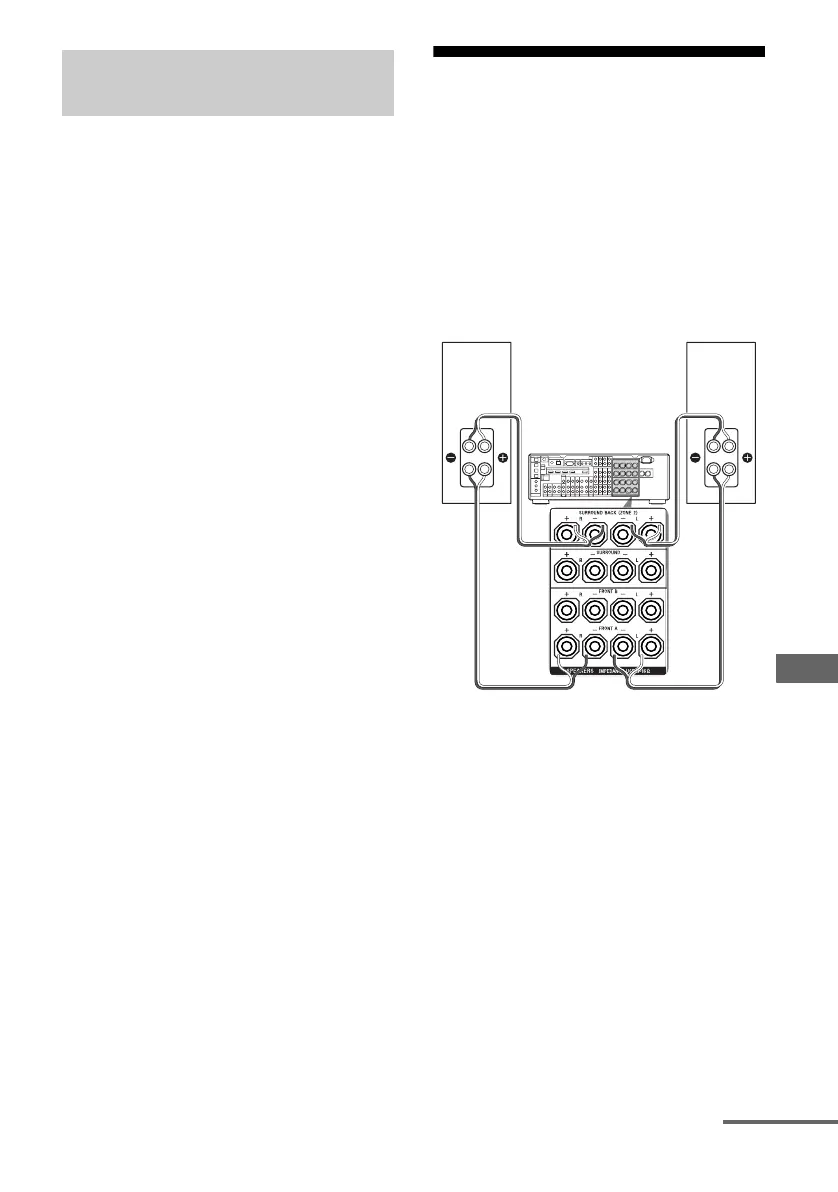
If you are not using the surround back
speakers, you can use the SPEAKERS
SURROUND BACK terminals for the front
speakers in a bi-amplifier connection.
To connect the speakers
Connect the jacks on the Lo (or Hi) side of the
front speakers to the SPEAKERS FRONT A
terminals, and connect the jacks on the Hi (or
Lo) side of the front speakers to the
SPEAKERS SURROUND BACK terminals.
Make sure that the metal fittings of Hi/Lo
attached to the speakers have been removed
from the speakers. Otherwise, it may cause the
receiver to malfunction.
Option menu parameter of zone
2 operations
Front speaker
(R)
Front speaker
(L)
Hi
Lo
Hi
Lo
continued















 To Next Page