30
US
D:\Cannes\STR-DA3400ES_U_R1\3289137121\3289137121\3289137121\01US-
STRDA3400ESUC\030CON.fm
masterpage: Left
STR-DA3400ES
3-289-137-12(1)
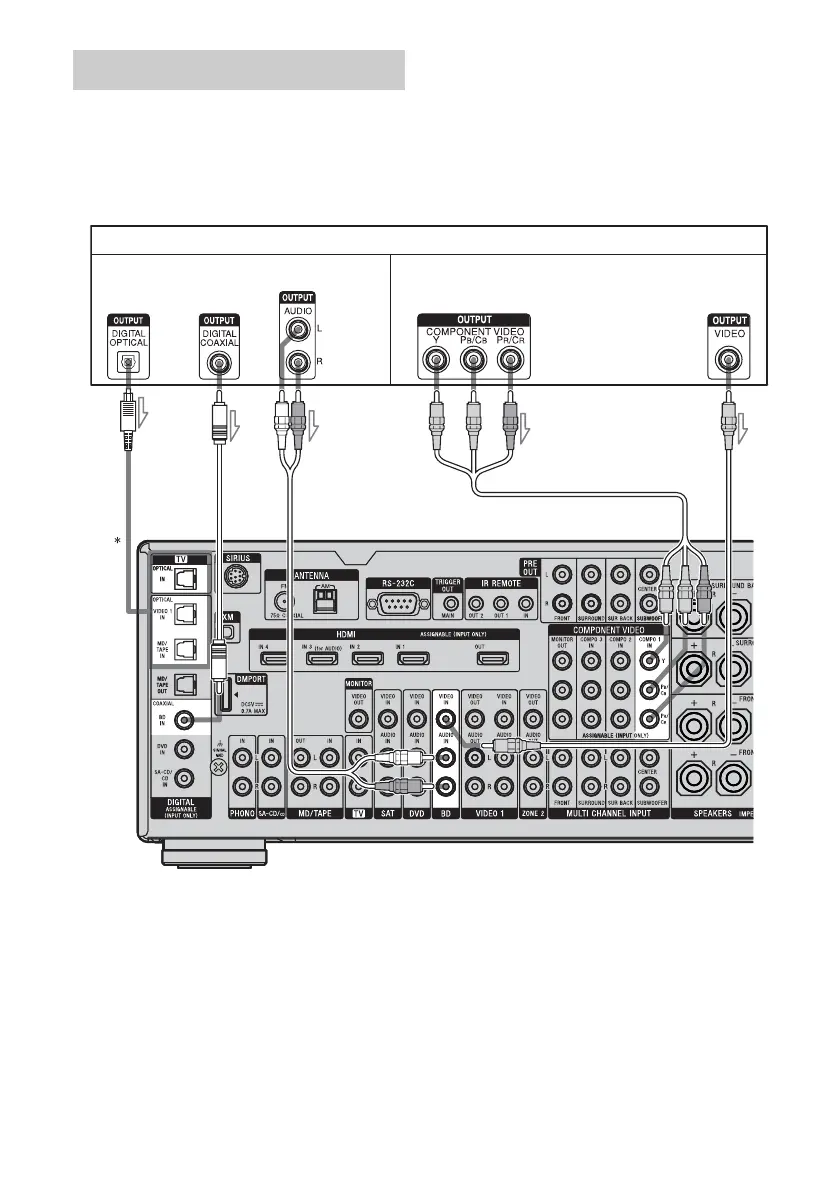
The following illustration shows how to
connect a Blu-ray disc player.
It is not necessary to connect all the cords.
Connect the audio and video cords according
to the jacks of your components.
Note
To output multi channel digital audio from the
Blu-ray disc player, set the digital audio output
setting on the Blu-ray disc player. Refer to the
operating instructions supplied with the Blu-ray disc
player.
Connecting a Blu-ray disc player
Blu-ray disc player
ABC
A Optical digital cord (not supplied)
B Coaxial digital cord (not supplied)
C Audio cord (not supplied)
D Component video cord (not supplied)
E Video cord (not supplied)
* When you connect a component equipped with
an OPTICAL jack, set “Input Assign” in the
Input menu.
Tip
The COMPONENT VIDEO COMPO 1 IN jacks
have been assigned to the Blu-ray disc player. If you
connect your Blu-ray disc player to the
COMPONENT VIDEO COMPO 2 or COMPO 3 IN
jacks, set “Input Assign” in the Input menu.
D
Audio signals Video signals
E















 To Next Page