14
GB
* You can watch the selected input image when you
connect the HDMI OUT or MONITOR OUT jacks
to a TV (page 24).
You can use the supplied remote to operate the
receiver and to control the Sony audio/video
components that the remote is assigned to
operate.
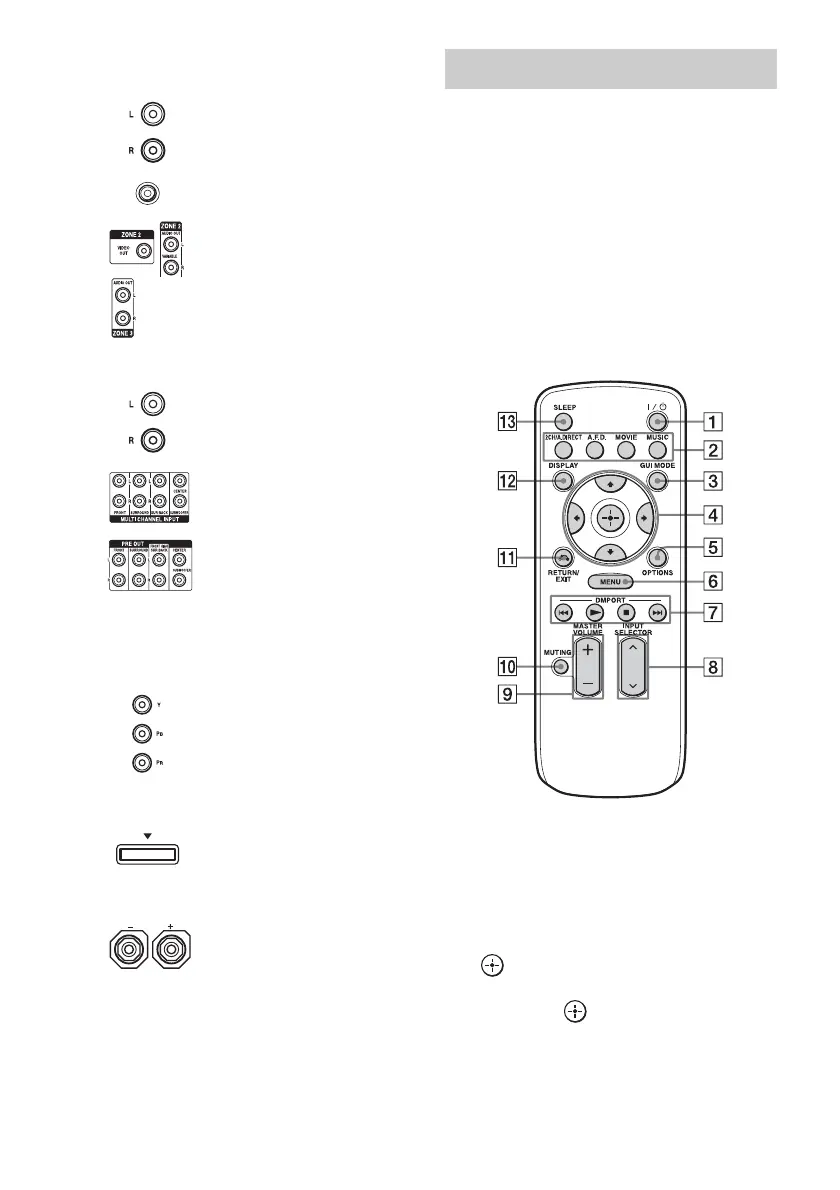
Simple remote commander
(RM-AAU039)
This remote can only be used to operate the
receiver. You can control the main functions of
the receiver with simple operations using this
remote.
A ?/1 (on/standby)
Press to turn a receiver on or off.
B 2CH/A.DIRECT, A.F.D., MOVIE,
MUSIC (page 72, 73, 74, 76)
C GUI MODE (page 54)
D V/v/B/b
Press V/v/B/b to select the menu item.
Then press to enter the selection.
E OPTIONS (page 55)
F MENU (page 43, 54)
G N, x, ./> (page 58, 81)
F VIDEO/AUDIO INPUT/OUTPUT
section (page 24, 28, 31)
AUDIO IN/OUT jacks
VIDEO IN/OUT* jacks
AUDIO OUT jacks
VIDEO OUT jack
(page 90)
G AUDIO INPUT/OUTPUT section
AUDIO IN/OUT jacks
(page 37)
MULTI CHANNEL INPUT
jacks (page 36)
PRE OUT jacks
Connect to an external power amplifier.
H COMPONENT VIDEO INPUT/
OUTPUT section (page 24, 28)
Y, P
B
, P
R
IN/OUT* jacks
I DMPORT (page 34)
J SPEAKERS section (page 22)
Remote commander















 To Next Page