23
GB
Location of Parts and Basic Operations
3 78 2
1
5 6
4
PHONES
SPEAKERS
A
OFF
A
+
B
B
0
1
0
SHIFT FM/AM
– +
PRESET TUNING
MEMORY FM MODE
LRVIDEO AUDIOS-VIDEO
INPUT
MODE
VIDEO 3
INPUT
EQUALIZER SOUND FIELD
GENRE MODE
CURSOR
MODE
SET UP
V
bB
v
PHONO
SOUND FIELD
ON/OFF
TUNERCDMD/DATTAPETV/LDDVDVIDEO 3VIDEO 2
BASS BOOST
VIDEO 1
•
•
•
BALANCE
LR
SUR
INDEX
EQ
DISPLAY
MULTI CHANNEL DECODING
MODE FUNCTION MUTING
MASTER
VOLUME
5.1
INPUT
TUNING/
– PTY SELECT +
RDS
PTY EON
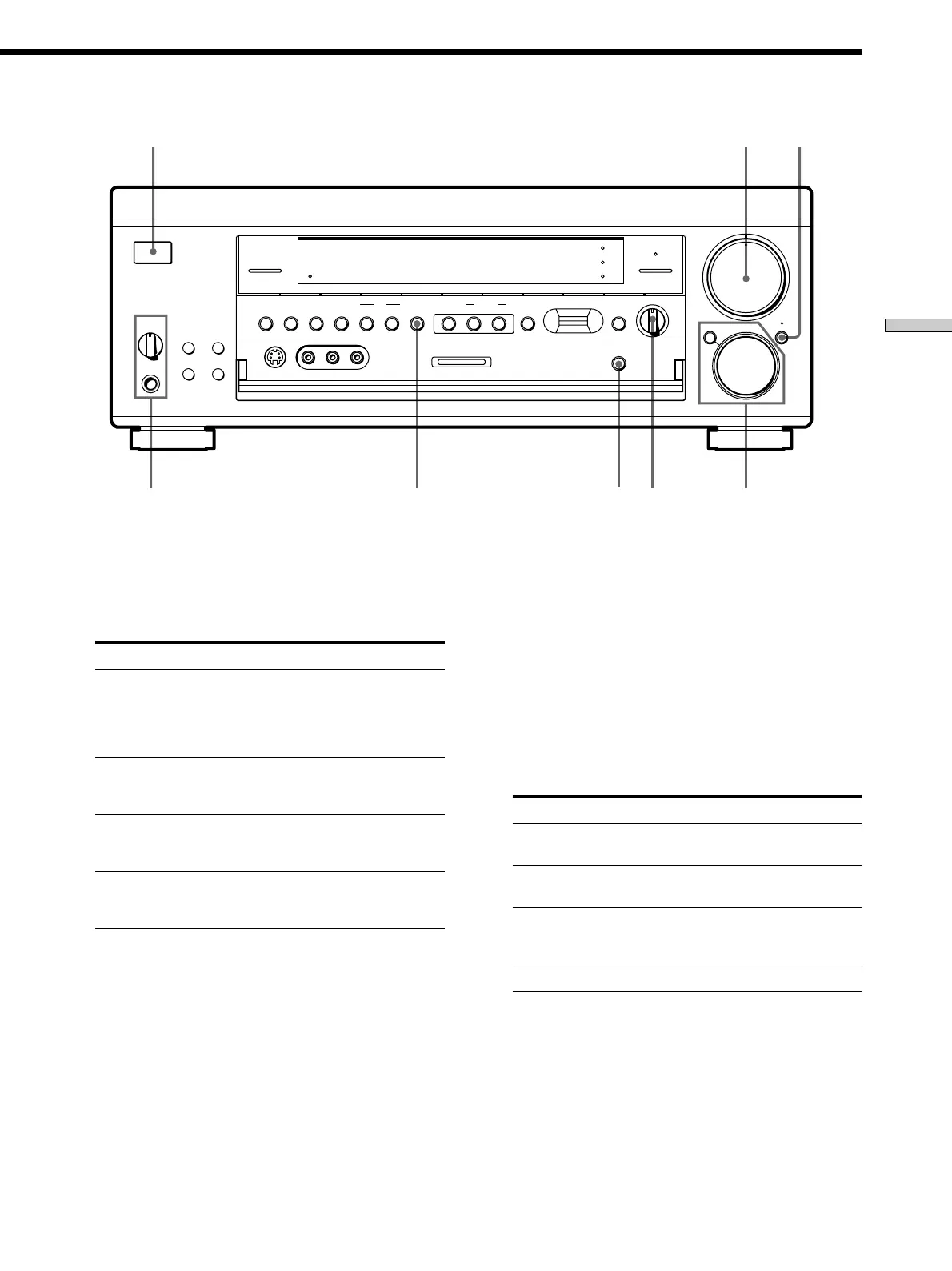
3 INPUT MODE button
Press to select the input mode for your digital
components (DVD, TV/LD, CD and MD/DAT).
Each press switches the input mode of the currently
selected component.
Select To
AUTO Give priority to digital signals
when there are both digital and
analog connections. If there are
no digital signals, analog is
selected
ANALOG Specify the analog audio signals
input to the AUDIO IN (L and R)
jacks
DIGITAL (OPTICAL) Specify the digital audio signals
input to the DIGITAL OPTICAL
input jacks
DIGITAL (COAXIAL) Specify the digital audio signals
input to the DIGITAL COAXIAL
input jack (DVD only)
4 5.1 INPUT button
Press to enjoy the audio source connected to the 5.1
INPUT jacks with the video from the selected
component.
To select another video source, use MODE (2).
• When the 5.1 INPUT is selected, the equalizer, bass booster,
and sound field effects do not function.
5 MASTER VOLUME control
After turning on the component you selected, rotate to
adjust the volume.
6 MUTING button
Press to mute the sound. The indicator above the
button lights up when the sound is muted.
7 BALANCE control
Rotate to adjust the balance of the front speakers.
8 SPEAKERS selector
Set according to the front speakers you want to drive.
Set to To select
A The speakers connected to the FRONT
SPEAKERS A terminals
B The speakers connected to the FRONT
SPEAKERS B terminals
A+B The speakers connected to both the FRONT
SPEAKERS A and B terminals (parallel
connection)
OFF No front speaker output
PHONES jack
Connects headphones.
•To use the headphones, set the SPEAKERS selector to OFF
to output sound to the headphones.
• When the sound field is ON, setting the SPEAKERS
selector to OFF will automatically present a two channel
downmix from the headphones.















 To Next Page