13
Getting Started
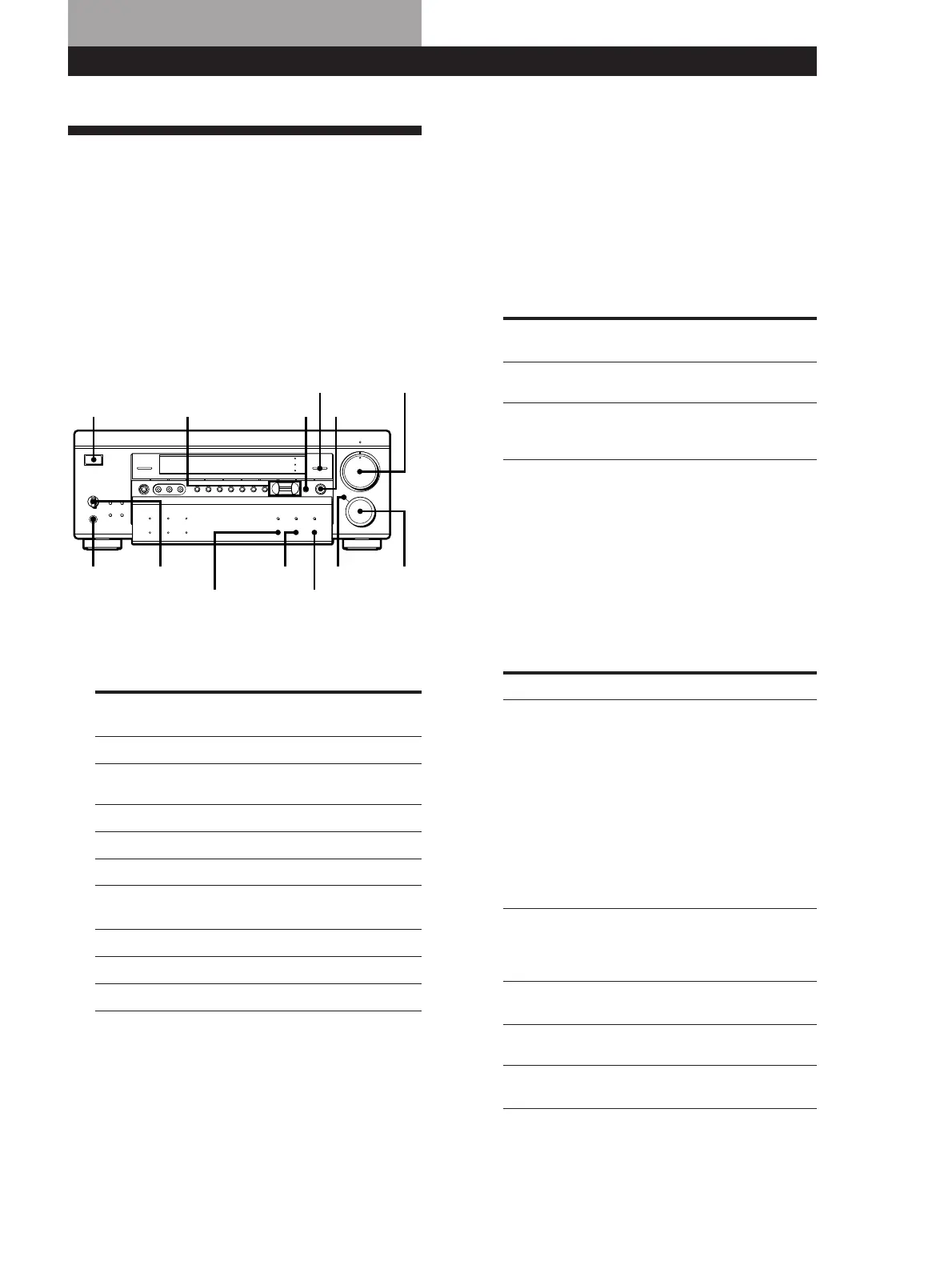
Receiver Operations
Selecting a Component
To listen to or watch a connected component, first
select the function on the receiver or with the remote.
Before you begin, make sure you have:
• Connected all components securely and correctly as
indicated on pages 4 to 12.
• Turned MASTER VOL to the leftmost position (0) to
avoid damaging your speakers.
• Pressed PANEL UP/DOWN to access the buttons
inside of the front cover.
BALANCE
•
•
•
LR
PHONES
POWER
SPEAKERS
A
OFF
A
+B
B
FM/AM
VIDEO 3
INPUT
S-VIDEO
VIDEO 1 VIDEO 2 VIDEO 3 LD/DVD TV/DBS TAPE DAT/MD CD TUNER
INDEX
PHONO
VIDEO L AUDIO R FM MODE TUNING EQUALIZER DPC
MODE
–+
BAND CH
SOUND FIELD
DISPLAY
MASTER VOL
MUTING
FUNCTION
100
MODE
GENRE MODE
DIRECT
PASS
BASS
BOOST
INPUT
MODE
EQ
SUR
SET UP
SHIFT
+–
PRESET TUNING
g
{MEMORY}
PANEL
UP/DOWN
V
v
Bb
POWER
BALANCE
PHONES
SPEAKERS
MASTER VOLPANEL UP/DOWN
SET UP
INPUT MODE
BASS BOOST MODE
DIRECT PASS
FUNCTION
1 Press POWER to turn on the receiver.
2 Select the component you want to use:
To watch or
listen to
Rotate FUNCTION to light
up
4 Turn MASTER VOL to adjust the volume.
To adjust the volume of the TV’s speakers, use the
volume control on the TV.
z To enjoy any video source and any audio source at
the same time
Do the procedure below to select and play any video
source in combination with any audio source.
1 Select a program source.
2 Select one of the available program source.
Digital processing
control buttons
Receiver Operations
Video tapes
Laser discs or DVD discs
TV programs
Audio tapes
Digital Audio Tapes
(DAT) or MiniDiscs (MD)
Compact Discs (CD)
Radio programs
Records
VIDEO 1 or VIDEO 2
LD/DVD
TV/DBS*
TAPE
DAT/MD
CD
TUNER
PHONO
Video camera recorder or
video game
VIDEO 3
(Continued)
* DBS tuners can be used with the USA, Canadian, and
Australian models.
3 Turn on the component, for example, a CD player,
and then start playing.
To tune in radio stations on this receiver, see
“Receiving Broadcasts” on page 15.
Note
If 8 seconds elapse after you press the MODE button,
“NORMAL” will appear in the display. If this happens,
repeat Step 2.
z To listen to digital program sources
Do the procedure below.
1 Do Steps 1 and 2 above to select the component.
2 Press INPUT MODE repeatedly to select input mode
for the component.
When you select The receiver selects
AUTO INPUT the component connected to the
following jack(s) depending on
the component selected in Step 1
above (listed in order of priority).
When you selected LD/DVD:
1 LD DVD AC-3 RF IN jack
2 LD DVD COAXIAL IN jack
3 LD DVD OPTICAL IN jack
4 LD/DVD (analog) jacks
When you selected TV/DBS, CD,
or DAT/MD:
1 the OPTICAL jack
2 the analog jacks
DIGITAL(AC-3 RF)
(appears only when
you selected LD/
DVD in Step 1)
the component connected to the
LD DVD AC-3 RF IN jack
DIGITAL
(COAXIAL)
the component connected to the
LD DVD COAXIAL IN jack
ANALOG INPUT the component connected to the
analog jacks
VCR, LD/DVD
player, or TV
VISUAL SELECT
Tape deck, DAT/MD
deck, CD player, tuner,
or turntable
AUDIO SELECT
To select Press DISPLAY repeatedly to
display
DIGITAL
(OPTICAL)
the component connected to the
OPTICAL jack















 To Next Page