EasyManua.ls Logo

Sony STR-DE405 - Video Component Hookups

Sony STR-DE405
23 pages
Print Icon
To Next Page IconTo Next Page
To Previous Page IconTo Previous Page
Loading...
Getting
Started
Selecting
the
speaker
system
¢
Video
cable
(not
supplied)
(1
for
a
TV
monitor)
To
drive
the
speakers,
select
the
speaker
system
as
Yellow
<Co3m
af
}=
Yellow
follows:
er
To
drive
Depress
SPEAKERS
button
Hookups
Speaker
system
A
(connected
A
The
arrow
=>
indicates
signal
flow.
to
the
FRONT
SPEAKERS
A
;
terminals)
TV/DBS
TV
tuner
or
Digital
Receiver
broadcasting
system
Speaker
system
B
(connected
B
TwibES
oun
to
the
FRONT
SPEAKERS
B
VIDEO
"|
WEG
terminals)
e
Both
speaker
systems
A
and
A+B
B
(series
connection)
Notes
¢
If
you
want
to
enjoy
the
surround
sound,
be
sure
to
connect
the
front
speakers
to
the
FRONT
SPEAKERS
A
terminal.
No
sound
is
heard
when
you
press
SPEAKERS
A+B
without
connecting
speaker
system
B.
MONITOR
Where
do
I!
go
next?
To
complete
your
system,
go
to
“AC
Hookups”
on
page
8.
If
you
want
to
connect
video
components
to
enjoy
surround
sound
when
watching/listening
to
TV
programs
or
video
VCR
tapes,
go
on
to
the
next
section.
Video
Component
Hookups
Overview
:
:
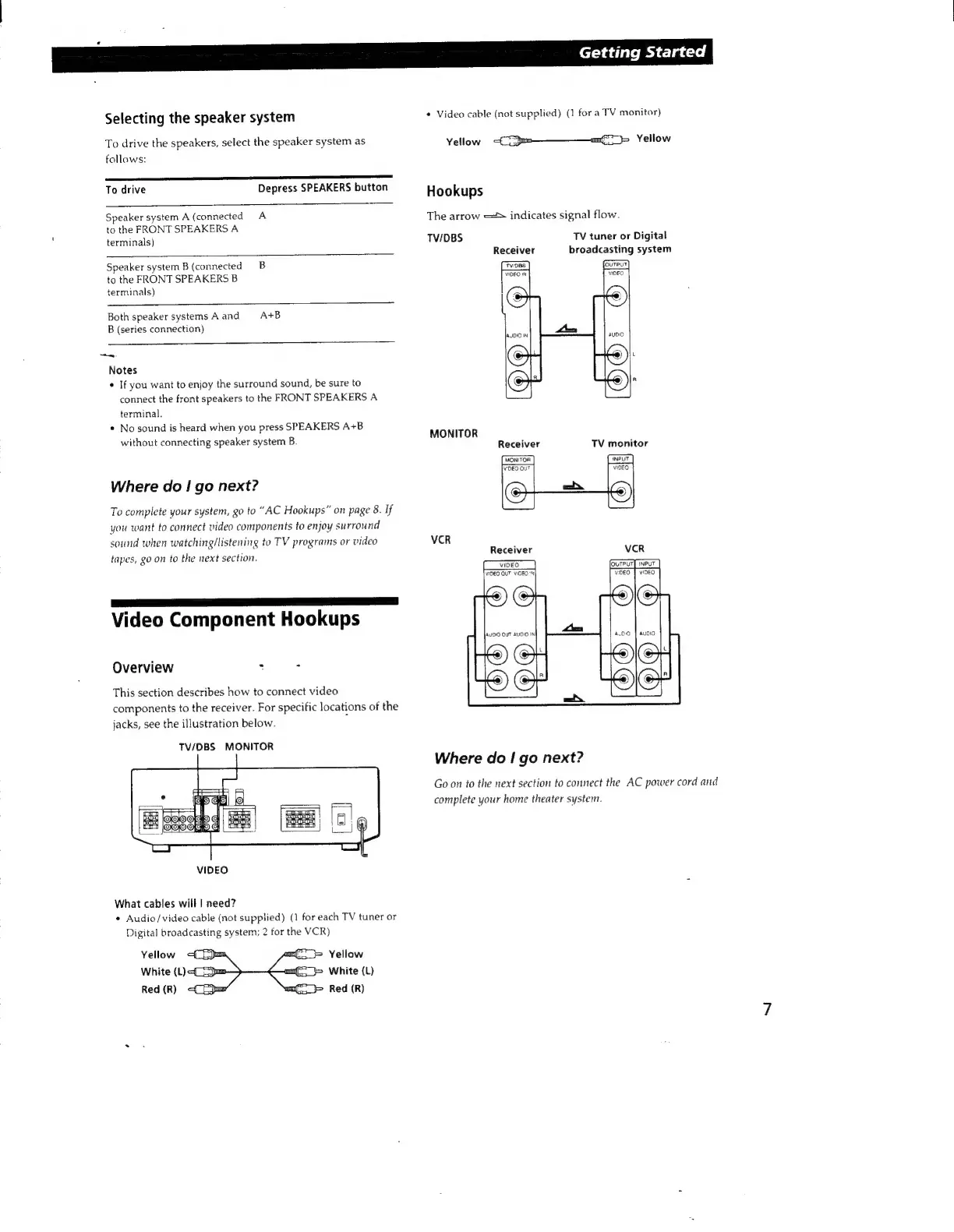
This
section
describes
how
to
connect
video
components
to
the
receiver.
For
specific
locations
of
the
jacks,
see
the
illustration
below.
TV/DBS
MONITOR
Where
do
|
go
next?
Go
on
to
the
next
section
to
connect
the
AC
power
cord
and
complete
your
home
theater
system.
VIDEO
What
cables
will
|
need?
¢
Audio/video
cable
(not
supplied)
(1
for
each
TV
tuner
or
Digital
broadcasting
system;
2
for
the
VCR)