EasyManua.ls Logo

Sony STR-DE405 - Circuit Diagrams and Layouts; Circuit Board Physical Locations

Sony STR-DE405
23 pages
Print Icon
To Next Page IconTo Next Page
To Previous Page IconTo Previous Page
Loading...
Getting
Started
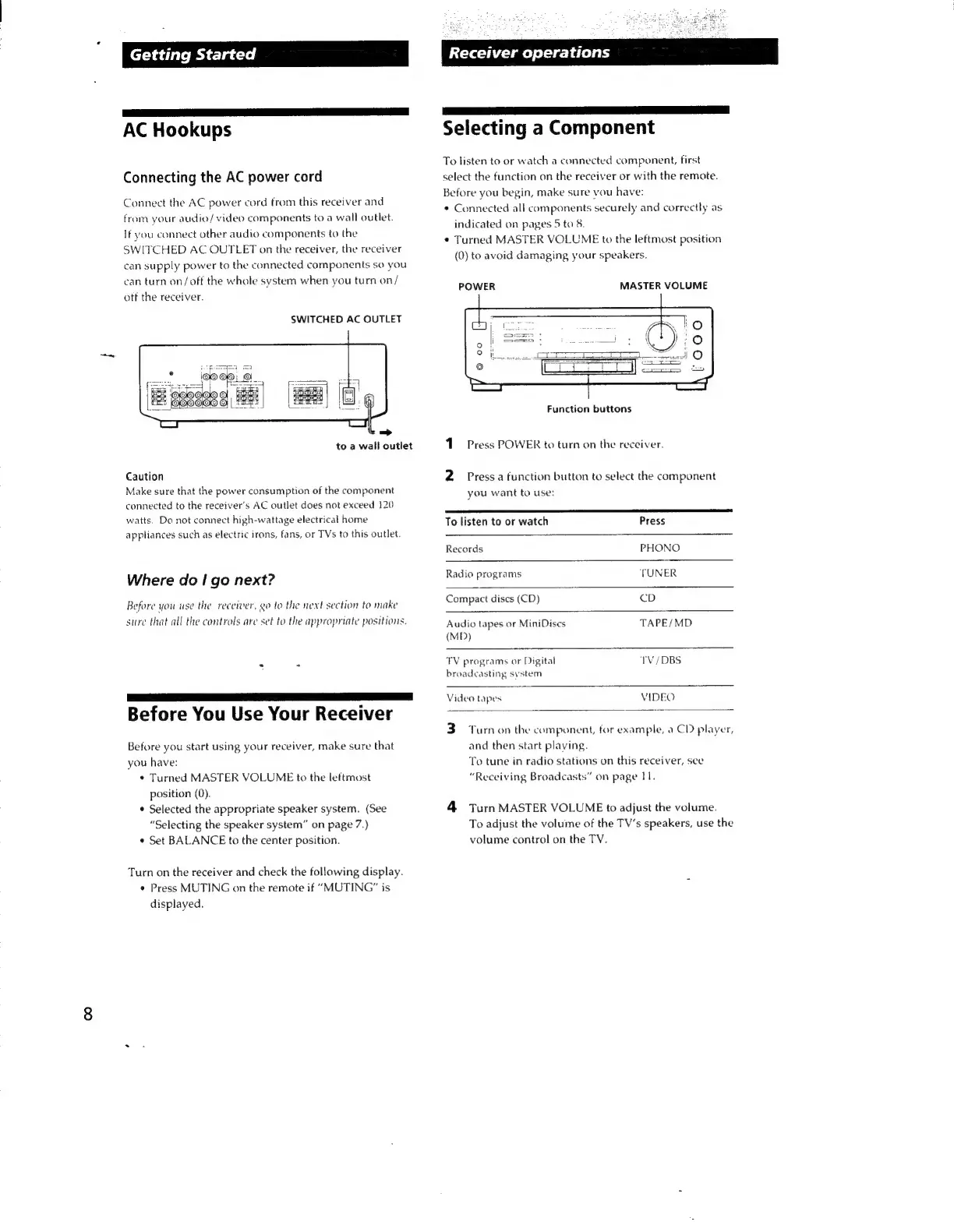
AC
Hookups
Connecting
the
AC
power
cord
Connect
the
AC
power
cord
from
this
receiver
and
from
your
audio/video
components
to
a
wall
outlet.
If
you
connect
other
audio
components
to
the
SWITCHED
AC
OUTLET
on
the
receiver,
the
receiver
can
supply
power
to
the
connected
components
so
you
can
turn
on/off
the
whole
system
when
you
turn
on/
otf
the
receiver.
SWITCHED
AC
OUTLET
to
a
wall
outlet
Caution
Make
sure
that
the
power
consumption
of
the
component
connected
to
the
receiver’s
AC
outlet
does
not
exceed
120
watts.
Do
not
connect
high-wattage
electrical
home
appliances
such
as
electric
irons,
fans,
or
TVs
to
this
outlet.
Where
do
|
go
next?
Before
you
use
the
receiver,
go
to
the
next
section
to
make
sure
that
all
the
controls
are
set
to
the
appropriate
positions.
Before
You
Use
Your
Receiver
Before
you
start
using
your
receiver,
make
sure
that
you
have:
¢
Turned
MASTER
VOLUME
to
the
leftmost
position
(0).
¢
Selected
the
appropriate
speaker
system.
(See
“Selecting
the
speaker
system”
on
page
7.)
*
Set
BALANCE
to
the
center
position.
Turn
on
the
receiver
and
check
the
following
display.
*
Press
MUTING
on
the
remote
if
“MUTING”
is
displayed.
Receiver
operations
aS
er
Selecting
a
Component
To
listen
to
or
watch
a
connected
component,
first
select
the
function
on
the
receiver
or
with
the
remote.
Before
you
begin,
make
sure
vou
have:
*
Connected
all
components
securely
and
correctly
as
indicated
on
pages
5
to
8.
¢
Turned
MASTER
VOLUME
to
the
leftmost
position
(0)
to
avoid
damaging
your
speakers.
POWER
MASTER
VOLUME
Function
buttons
_
Press
POWER
to
turn
on
the
receiver.
N
Press
a
function
button
to
select
the
component
you
want
to
use:
To
listen
to
or
watch
Press
Records
PHONO
Radio
programs
TUNER
Compact
dises
(CD)
CD
Audio
tapes
or
MiniDises
TAPE/MD
(MD)
TV
programs
or
Digital
IV/DBS
broadcasting
system
Video
tapes
VIDEO
3)
Turnon
the
component,
for
example,
a
CD
player,
and
then
start
playing.
To
tune
in
radio
stations
on
this
receiver,
see
“Receiving
Broadcasts”
on
page
11.
4
Turn
MASTER
VOLUME
to
adjust
the
volume.
To
adjust
the
volume
of
the
TV's
speakers,
use
the
volume
control
on
the
TV.