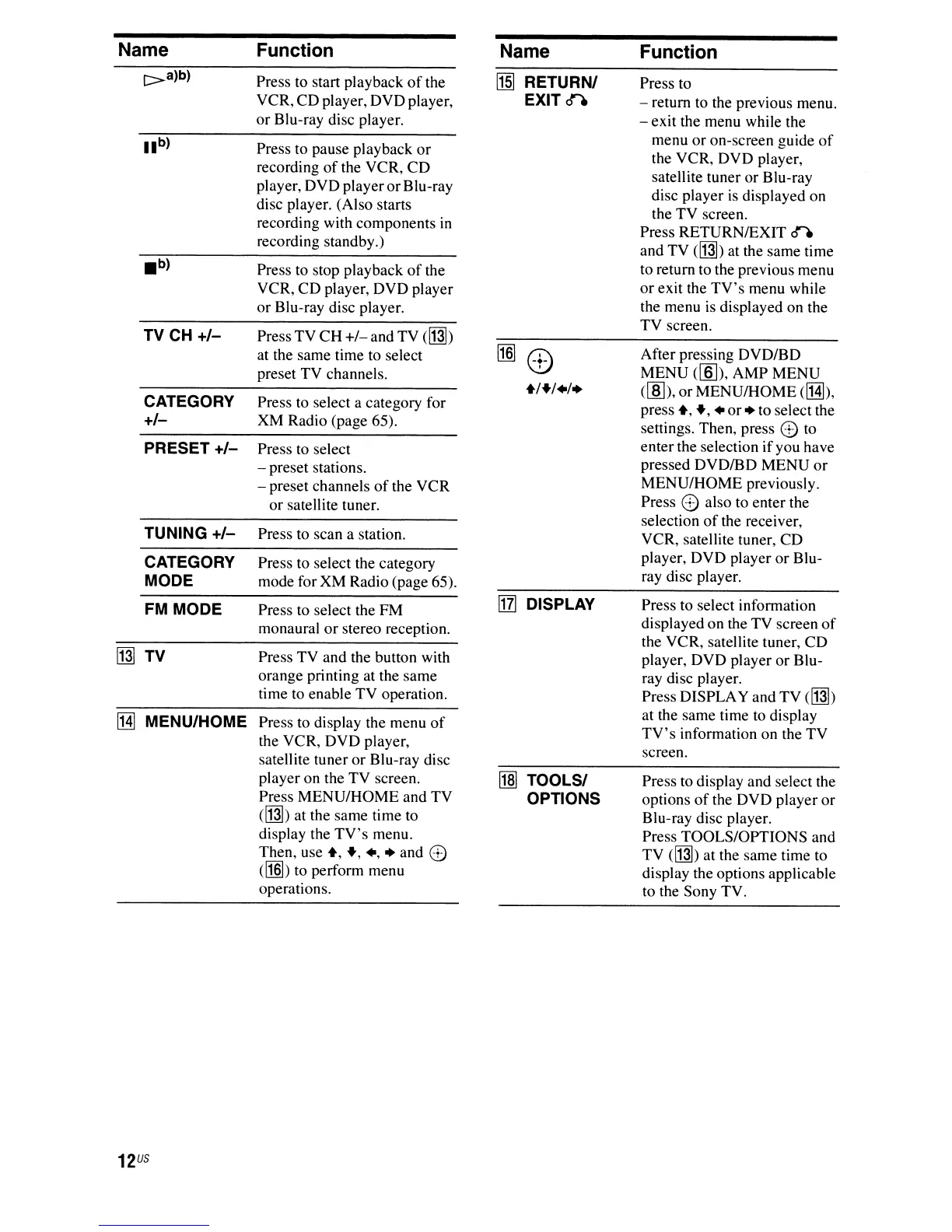
Name
Function Name
Function
e>a)b)
Press to start playback
of
the
ff§]
RETURN/
Press to
VCR, CD player, DVD player,
EXIT
o""'e
- return to the previous menu.
or
Blu-ray disc player.
- exit the menu while the
lib)
Press to pause playback
or
menu
or
on-screen guide
of
the VCR, DVD player,
recording
of
the VCR,
CD
satellite tuner or Blu-ray
player, DVD player
or
Blu-ray
disc player
is
displayed on
disc player. (Also starts
the TV screen.
recording with components
in
Press RETURNIEXIT
ere
recording standby.)
and TV
([J]]) at the same time
.b)
Press to stop playback
of
the
to return to the previous menu
VCR,
CD
player, DVD player
or
exit the
TV's
menu while
or
Blu-ray disc player.
the menu
is
displayed on the
Press TV
CH
+/-
and TV ([J]])
TV screen.
TV CH
+/-
at the same time to select
[1§]
0)
After pressing DVDIBD
preset TV channels.
MENU
([ID), AMP MENU
+/+/./.
(lID),
or
MENU/HOME
elHb,
CATEGORY Press to select a category for
press
+,
+,
•
or.
to select the
+/-
XM Radio (page 65).
settings. Then, press
e to
PRESET
+/-
Press to select
enterthe selection
if
you have
- preset stations.
pressed DVDIBD MENU
or
- preset channels
of
the VCR
MENU/HOME previously.
or satellite tuner.
Press
e also to enter the
selection
of
the receiver,
TUNING
+/-
Press to scan a station.
VCR, satellite tuner, CD
CATEGORY
Press to select the category
player, DVD player
or
Blu-
MODE
mode for XM Radio (page 65).
ray disc player.
[j] DISPLAY
FM MODE
Press to select the FM
Press to select information
monaural
or
stereo reception.
displayed on the TV screen
of
the VCR, satellite tuner, CD
[J]] TV Press TV and the button with
player, DVD player
or
Blu-
orange printing at the same
ray disc player.
time to enable TV operation.
Press DISPLAY and
TV
([J]])
[HI
MENU/HOME Press to display the menu
of
at the same time to display
the VCR, DVD player,
TV's
information on the TV
satellite tuner
or
Blu-ray disc
screen.
player on the TV screen.
l1m
TOOLS/
Press to display and select the
Press MENU/HOME and TV
OPTIONS options
of
the DVD player
or
([J]]) at the same time to
Blu-ray disc player.
display the
TV's
menu.
Press TOOLS/OPTIONS and
Then, use
+,
+,.,.
and e
TV ([J]]) at the same time to
([1§])
to perform menu
display the options applicable
operations.
to the Sony TV.
12
US



 To Next Page