EasyManua.ls Logo

Sony STR-DG720 - Page 13

Sony STR-DG720
100 pages
Print Icon
To Next Page IconTo Next Page
To Previous Page IconTo Previous Page
Loading...
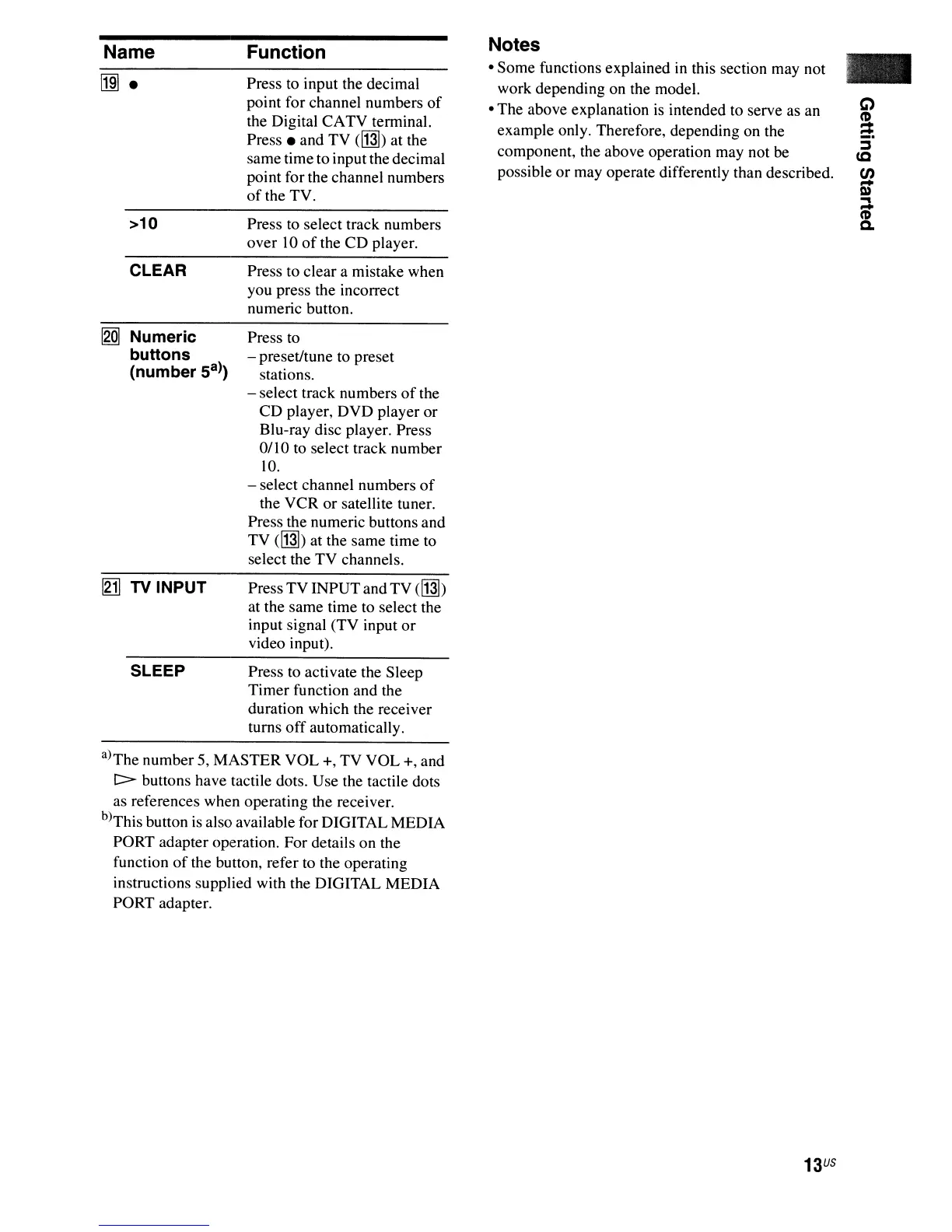
Name
llm-
>10
CLEAR
[gQ]
Numeric
buttons
(number
Sa»
I21l
TV INPUT
SLEEP
Function
Press to input the decimal
point
for
channel
numbers
of
the Digital
CATV
terminal.
Press _
and
TV
(~)
at
the
same
time
to
input
the decimal
point
for the
channel
numbers
of
the
TV.
Press
to
select
track numbers
over
10
of
the
CD
player.
Press
to
clear
a mistake
when
you
press the incorrect
numeric button.
Press to
- preset/tune
to
preset
stations.
-
select
track
numbers
of
the
CD
player,
DVD
player
or
Blu-ray disc player.
Press
0/
I0 to select
track
number
10.
- select
channel
numbers
of
the
VCR
or
satellite tuner.
Press the
numeric
buttons
and
TV
(~)
at
the
same
time
to
select
the
TV
channels.
Press
TV
INPUT
and
TV
(~)
at the
same
time
to
select
the
input signal
(TV
input
or
video input).
Press
to
activate
the
Sleep
Timer
function
and
the
duration
which
the receiver
turns
off
automatically.
Notes
Some
functions
explained
in this section may not
work
depending
on the model.
The
above
explanation
is intended
to
serve as an
example
only. Therefore,
depending
on the
component,
the
above
operation
may
not be
possible
or
may operate differently than described.
-
Q
~
:::s
CC
en
-
Q)
i
a.
a)The
number
5,
MASTER
VOL
+,
TV
VOL
+,
and
[::::> buttons
have
tactile dots.
Use
the tactile
dots
as references
when
operating
the
receiver.
b)This button
is
also available for
DIGITAL
MEDIA
PORT
adapter
operation.
For
details
on
the
function
of
the button, refer to the operating
instructions
supplied
with
the
DIGITAL
MEDIA
PORT
adapter.
13
US

Table of Contents

Other manuals for Sony STR-DG720

Related product manuals