EasyManua.ls Logo

Sony STR-DG720 - Getting Started: Connectivity; Rear Panel Input;Output Sections

Sony STR-DG720
100 pages
Print Icon
To Next Page IconTo Next Page
To Previous Page IconTo Previous Page
Loading...
Rear
panel:,
1
TV
.;
[Q]
't,,'
[Q]
\;P1r
t
",
t1(;'I.
IN~
(':)H:A~
.
II]
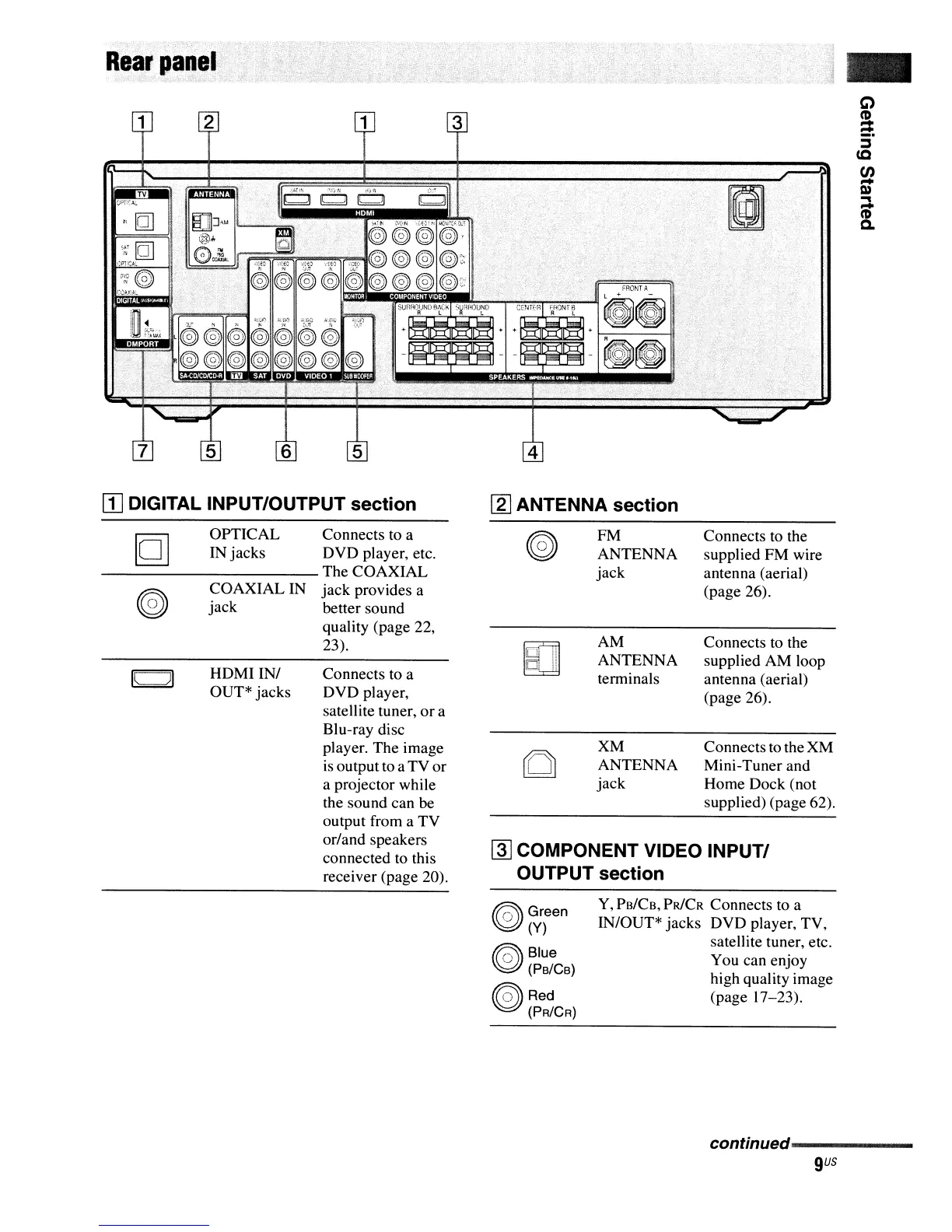
DIGITAL INPUT/OUTPUT section
-
[2J
ANTENNA section
g
OPTICAL
IN jacks
®
COAXIAL IN
jack
Ie
JI
HDMIINI
OUT* jacks
rnJ
COMPONENT
VIDEO INPUT/
OUTPUT
section
Connects to a
DVD player,
satellite tuner,
or
a
Blu-ray disc
player. The image
is
outputto a TV
or
a projector while
the sound can
be
output from a TV
orland speakers
connected to this
receiver (page
20).
FM
ANTENNA
jack
AM
ANTENNA
terminals
XM
ANTENNA
jack
Connects to the
supplied FM wire
antenna (aerial)
(page 26).
Connects to the
supplied AM loop
antenna (aerial)
(page 26).
Connects
to
the XM
Mini-Tuner and
Home Dock (not
supplied) (page 62).
~Green
~(Y)
@8lue
~
(Ps/Cs)
®Red
(PR/CR)
Y,
Ps/Cs,
PRIeR
Connects to a
IN/OUT* jacks DVD player, TV,
satellite tuner, etc.
You can enjoy
high quality image
(page
17-23).
continued------
gus

Table of Contents

Other manuals for Sony STR-DG720

Related product manuals