68
GB
D:\NORM'S JOB\SONY HA\SO0129\STR-DH820_PMRF_01\4266497112_GB\GB05ENJ_STR-
DH820-CEL.fm
masterpage: Left
STR-DH820
4-266-497-11(2)
Using the Settings menu
You can adjust various settings for speakers,
surround effects, etc. using the Settings menu.
To display the menu of the receiver on the TV
screen, make sure that the receiver is in “GUI
MODE” by following the steps in “To turn
“GUI MODE” on and off” (page 41).
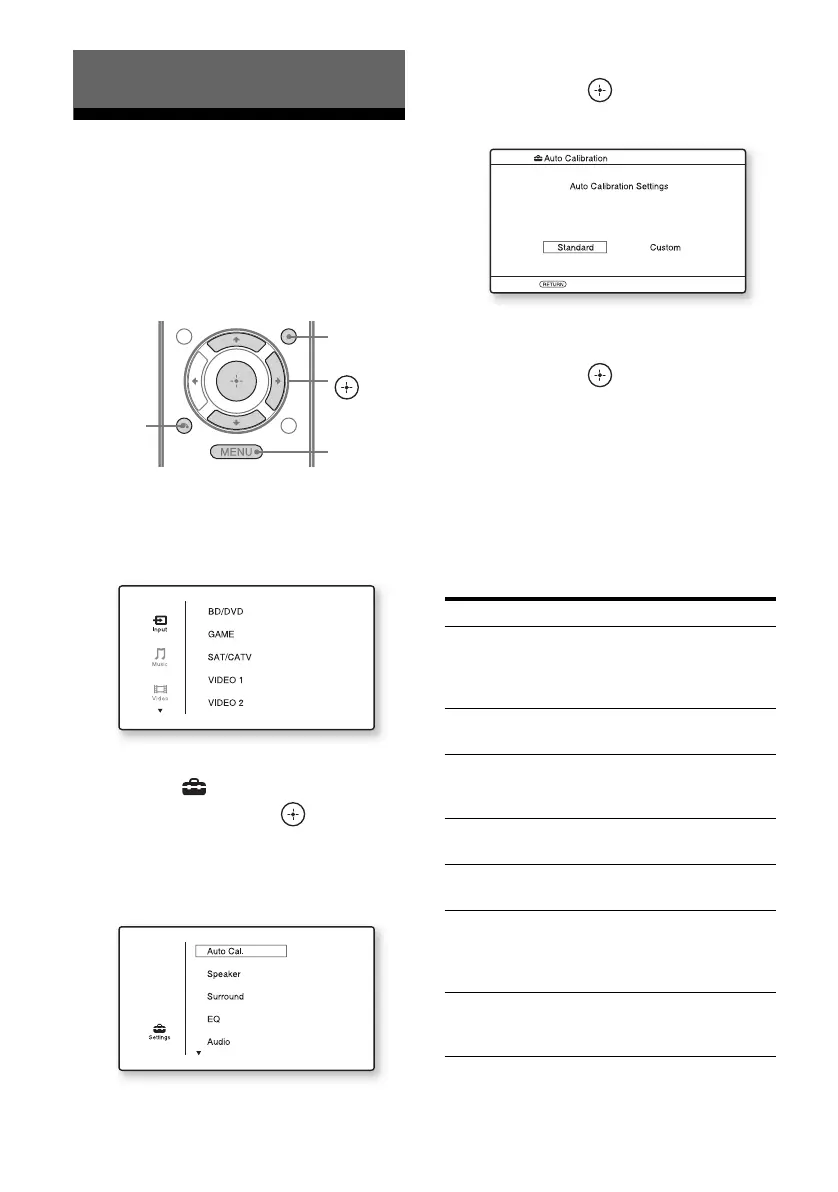
1 Press GUI MODE.
Press MENU if the GUI menu does not
appear on the TV screen.
2 Select “ Settings” from the
menu, then press or b to
enter the menu mode.
The Settings menu list appears on the TV
screen.
3 Select the menu item you want,
then press .
Example: When you select “Auto Cal.”.
4 Select the parameter you want,
then press .
To return to the previous screen
Press RETURN/EXIT O.
To exit the menu
Press MENU.
Settings menu list
Adjusting Settings
V/v/b,
GUI MODE
MENU
RETURN/
EXIT O
Settings menu Description
Auto Cal. Sets the speaker level or
distance and makes the
measurement automatically
(page 36).
Speaker Sets the speaker position
manually (page 69).
Surround Selects the sound field and
adjusts the surround effect
you choose (page 71).
EQ Adjusts the equalizer (bass/
treble sound) (page 72).
Audio Sets various sound items
(page 72).
HDMI Makes settings for sound/
images from equipment
connected to the HDMI jacks
(page 73).
System Makes settings for the
system of the receiver
(page 74).














 To Next Page