74
US
• Refer to “Compatible iPod/iPhone/iPad
models” on this page for details on the
supported versions of iOS or iTunes.
• Update iOS or iTunes to the latest version
before using with the receiver.
• Refer to the operating instructions of your
device for details on operating iOS devices,
iTunes or AirPlay.
• You cannot use this receiver as a PARTY host
while using the AirPlay function.
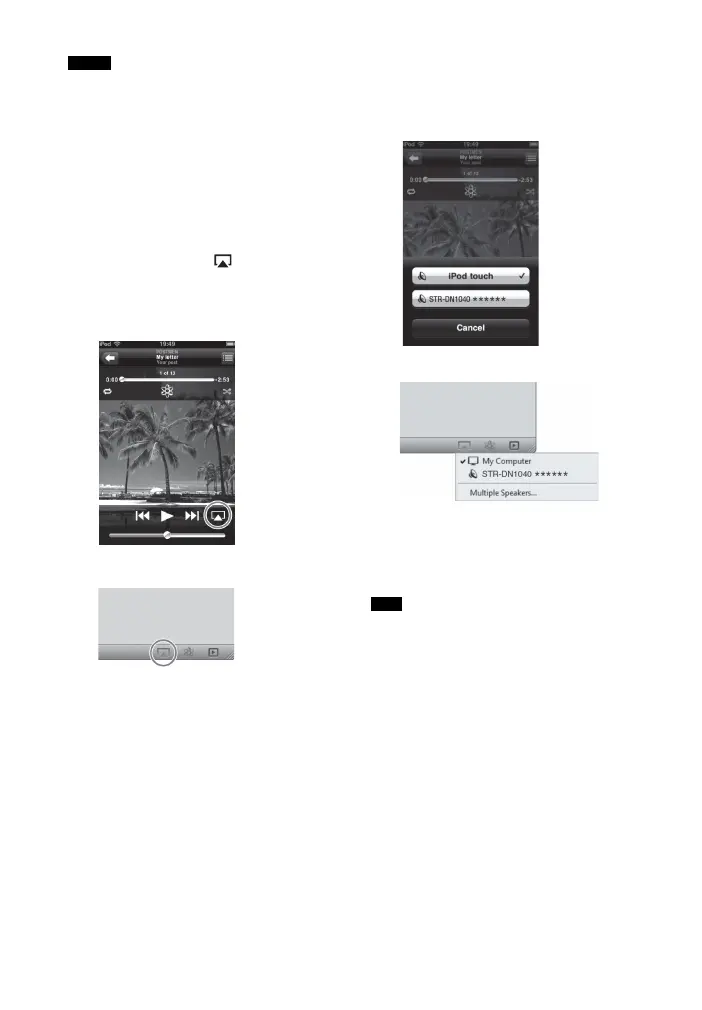
1 Tap/click on the icon at bottom
right of the iOS device screen or
iTunes window.
[iOS device]
[iTunes]
2 Select “STR-DN1040” on the
AirPlay menu of iTunes or your iOS
device.
[iOS device]
[iTunes]
3 Start playing back audio content
on an iOS device or on iTunes.
AirPlay is selected as a function of the
receiver automatically.
• “******” is the last 6 digits of MAC Address of
the receiver.
• If the playback does not start, perform the
process again from step 1.
To confirm/edit the device
name
See “Device Name” (page 101) for
instructions on how to rename the device.
To control AirPlay playback
You can use the 2 +/–, N, X, x, .,
>, SHUFFLE and REPEAT buttons.
Operation from the receiver and the remote
control is active only when the receiver is
selected as the device for output.
Notes
Tips



 To Next Page