15
US
H COMPONENT VIDEO INPUT/
OUTPUT section (page 28, 33)
* You must connect the HDMI OUT or
MONITOR OUT jack to your TV to watch the
selected input image (page 28).
** You can also use this port for maintenance and
service (page 101).
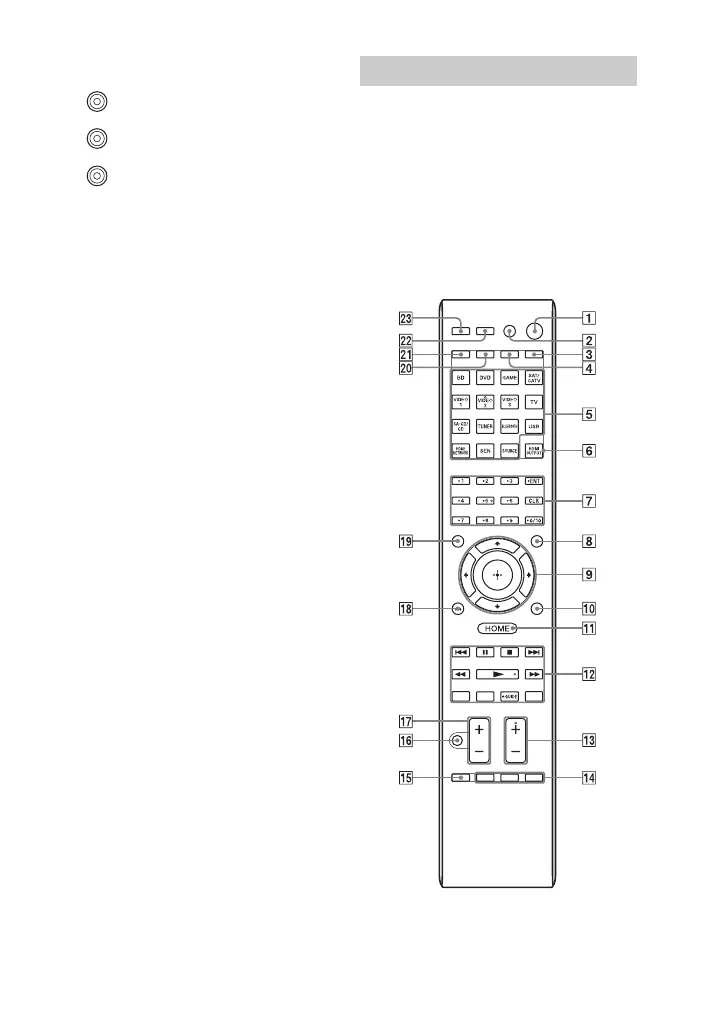
Use the supplied remote control to operate
this receiver and other equipment. The
remote control is pre-programmed to
operate Sony audio/video equipment. You
can also program the remote control to
operate non-Sony equipment. For details,
see “Programming the remote control”
(page 108).
RM-AAP102
Y, PB, PR IN/OUT*
jacks
Green (Y)
Blue (P
B)
Red (PR)
Remote control



 To Next Page