You can select audio/music content from the Chromecast-enabled app and play back via this
receiver.
Using Chromecast built-in™ to enjoy audio content from a smartphone or tablet device
Spotify
You can select audio/music content from the Spotify app and play back via this receiver.
Using Spotify Connect to enjoy music
[83] Using Network Features Setting up a wired LAN connection (for wired LAN connections
only)
Connecting the receiver to the network using a LAN
cable (for wired LAN connections only)
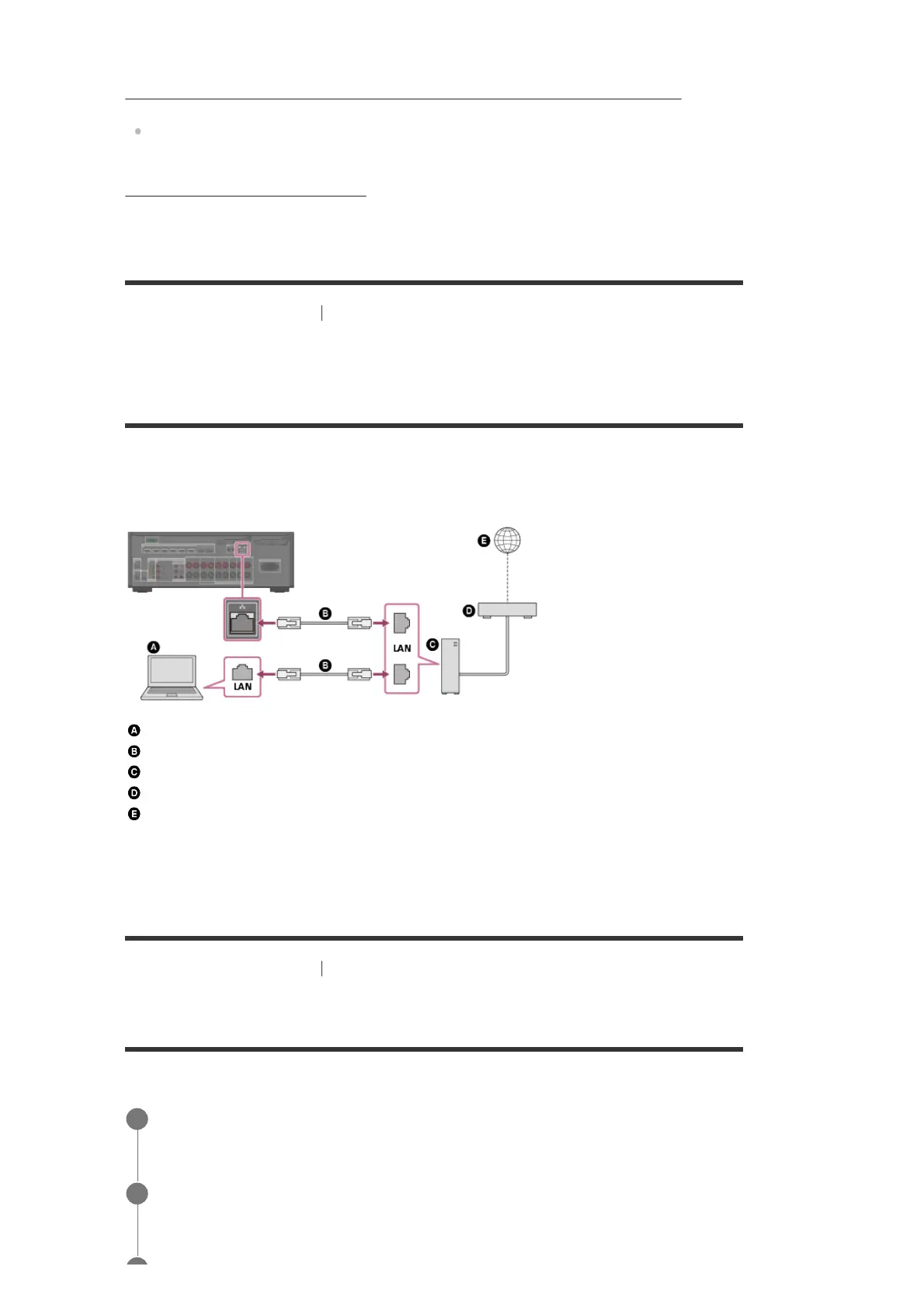
The following illustration is an example configuration of a home network with the receiver and a
server.
We recommend that you connect the server to the router with a wired connection.
Server (computer, etc.)
LAN cable (*) (not supplied)
Router
Modem
Internet
[84] Using Network Features
Setting up a wired LAN connection (for wired LAN connections
only)
Setting up a wired LAN connection
You can set up a wired LAN connection by the following procedure.
We recommend using category 7 cables.
*
Select [Setup] - [Network Settings] from the home menu.
1
Select [Internet Settings].
2



 To Next Page