EasyManua.ls Logo

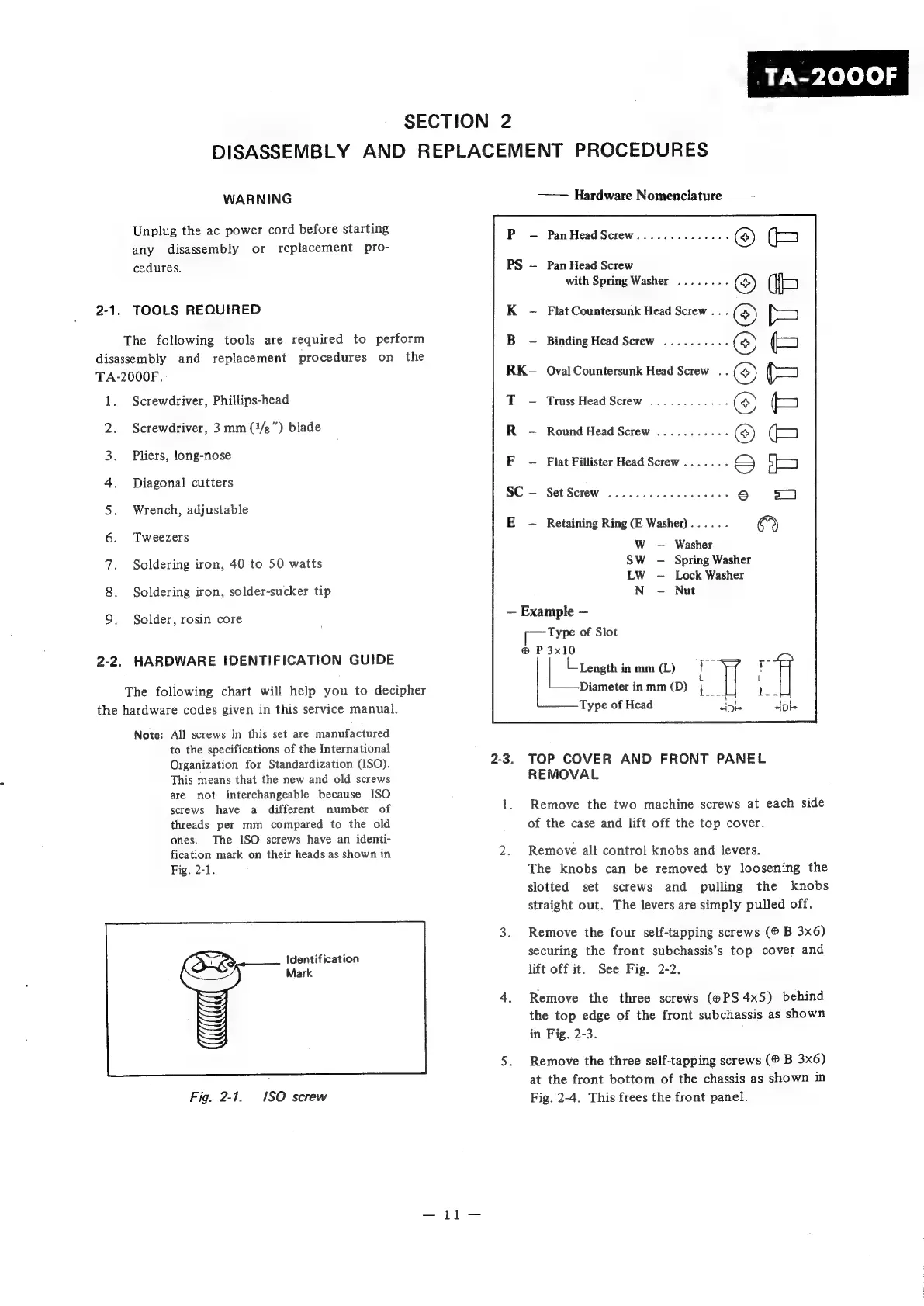
Sony TA-2000F - Disassembly and Replacement Procedures; Tools Required; Top Cover and Front Panel Removal

Sony TA-2000F
51 pages
Print Icon
To Next Page IconTo Next Page
To Previous Page IconTo Previous Page
Loading...
iy
wy
ielele)
s
SECTION
2
DISASSEMBLY
AND
REPLACEMENT
PROCEDURES
WARNING
——
Hardware
Nomenclature
Unplug
the
ac
power
cord
before
starting
any
disassembly
or
replacement
pro-
Pan
Head
Screw
cedures.
Pan
Head
Screw
with
Spring
Washer
2-1.
TOOLS
REQUIRED
Flat
Countersunk
Head
Screw
..
.
The
following
tools
are
required
to
perform
Binding
Head
Screw
disassembly
and
replacement
procedures
on
the
TA-2000F.
:
Oval
Countersunk
Head
Screw
..
1.
Screwdriver,
Phillips-head
Truss
Head
Screw
2.
Screwdriver,
3
mm
(1/g")
blade
Round
Head
Screw
3.
i
long-
PHSE,
AORE
ROS
Flat
Fillister
Head
Screw
4.
Diagonal
cutters
Set
Screw
5.
Wrench,
adjustable
E
Retaining
Ring
(E
Washer)
6.
Tweezers
WwW
Washer
7.
Soldering
iron,
40
to
50
watts
SW
Spring
Washer
LW
Lock
Washer
8.
Soldering
iron,
solder-sucker
tip
N
Nut
9.
Solder,
rosin
core
~
Example
Type
of
Slot
®
P
3x10
2-2.
HARDWARE
IDENTIFICATION
GUIDE
oe
:
Length
inmm(L)
7
T
: :
L
The
following
chart
will
help
you
to
decipher
Diameterinmm(D)
;
1.
the
hardware
codes
given
in
this
service
manual.
Type
of
Head
«0
“Di
Note:
All
screws
in
this
set
are
manufactured
to
the
specifications
of
the
International
Organization
for
Standardization
(ISO).
2-3.
TOP
COVER
AND
FRONT
PANEL
This
means
that
the
new
and
old
screws
REMOVAL
are
not
interchangeable
because
ISO
:
screws
have
a
different
number
of
1.
Remove
the
two
machine
screws
at
each
side
threads
per
mm
compared
to
the
old
of
the
case
and
lift
off
the
top
cover.
ones.
The
ISO
screws
have
an
identi-
fication
mark
on
their
heads
as
shown
in
2.
Remove
all
control
knobs
and
levers.
Fig.
2-1.
The
knobs
can
be
removed
by
loosening
the
slotted
set
screws
and
pulling
the
knobs
straight
out.
The
levers
are
simply
pulled
off.
3.
Remove
the
four
self-tapping
screws
B
3x6)
jaentitnation
securing
the
front
subchassis’s
top
cover
and
Mark
lift
off
it.
See
Fig.
2-2.
4.
Remove
the
three
screws
(@PS
4x5)
behind
the
top
edge
of
the
front
subchassis
as
shown
in
Fig.
2-3.
5.
Remove
the
three
self-tapping
screws
B
3x6)
at
the
front
bottom
of
the
chassis
as
shown
in
Fig.
2-1.
1SO
screw
Fig.
2-4.
This
frees
the
front
panel.

Related product manuals