EasyManua.ls Logo

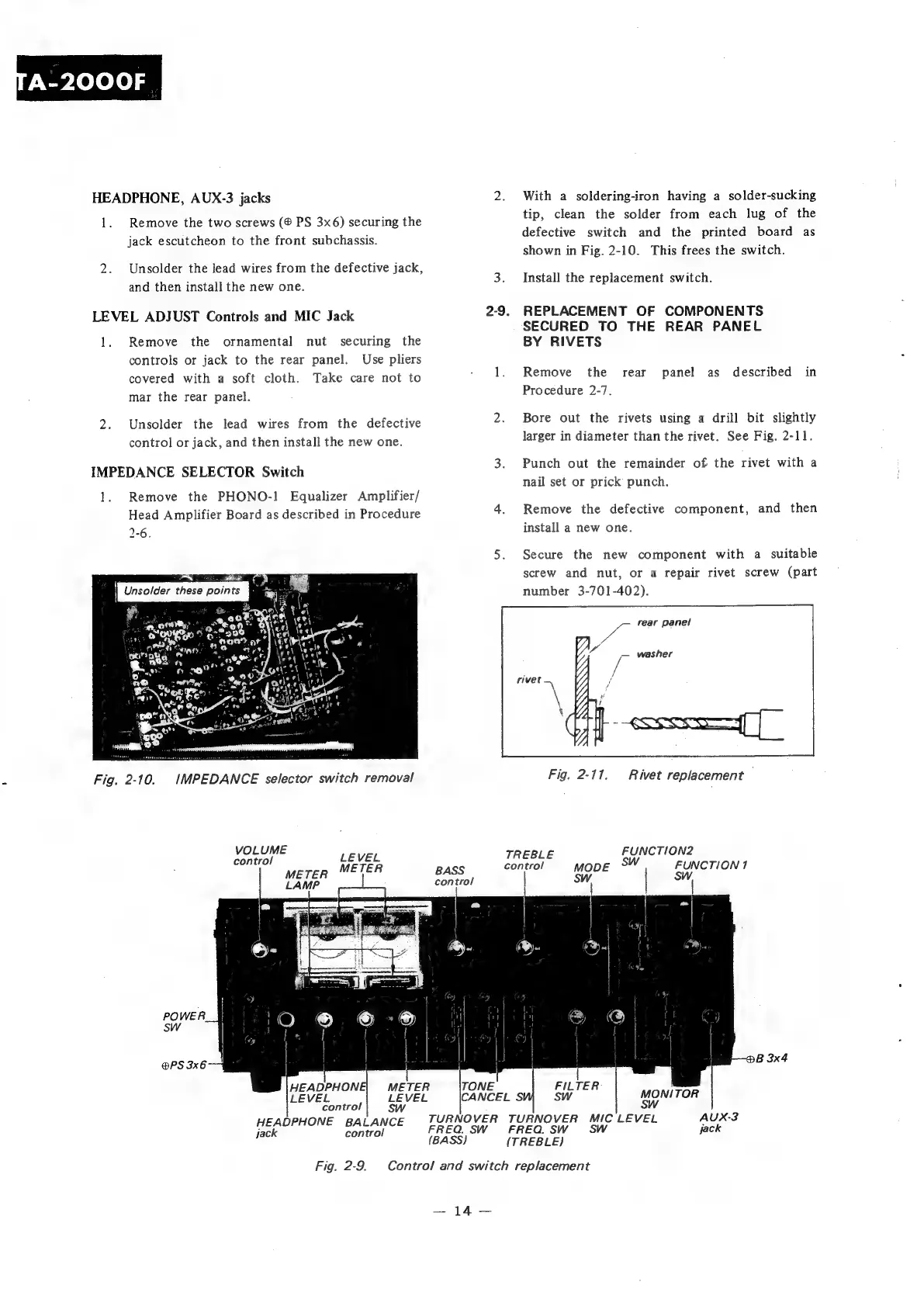
Sony TA-2000F - Secured to the Rear Panel; By Rivets Oo

Sony TA-2000F
51 pages
Print Icon
To Next Page IconTo Next Page
To Previous Page IconTo Previous Page
Loading...
With
a
soldering-iron
having
a
solder-sucking
tip,
clean
the
solder
from
each
lug
of
the
defective
switch
and
the
printed
board
as
shown
in
Fig.
2-10.
This
frees
the
switch.
HEADPHONE,
AUX-3
jacks
2.
1.
Remove
the
two
screws
PS
3x6)
securing
the
jack
escutcheon
to
the
front
subchassis.
2.
Unsolder
the
lead
wires
from
the
defective
jack,
nd
Phen
quctall
the
heer
One:
3.
Install
the
replacement
switch.
REPLACEMENT
OF
COMPONENTS
SECURED
TO
THE
REAR
PANEL
BY
RIVETS
LEVEL
ADJUST
Controls
and
MIC
Jack
2-9.
1.
Remove
the
ornamental
nut
securing
the
controls
or
jack
to
the
rear
panel.
Use
pliers
covered
with
a
soft
cloth.
Take
care
not
to
1.
Remove
the
rear
panel
as
described
in
mar
the
rear
panel.
Procedure
2-7.
2.
Unsolder
the
lead
wires
from
the
defective
2.
Bore
out
the
rivets
using
a
drill
bit
slightly
control
or
jack,
and
then
install
the
new
one.
larger
in
diameter
than
the
rivet.
See
Fig.
2-11.
IMPEDANCE
SELECTOR
Switch
3.
Punch
out
the
remainder
of
the
rivet
with
a
nail
set
or
prick
punch.
1.
Remove
the
PHONO-!
Equalizer
Amplifier/
;
Head
Amplifier
Board
as
described
in
Procedure
4.
Remove
the
defective
component,
and
then
1-6.
install
a
new
one.
5.
Secure
the
new
component
with
a
suitable
ear
Pye
‘a
#
a
for
x
oe
eos:
4
reg
Q|
en)
Oo
pr
sO
ere
oro
CO
nae?
or”
\
IO
aye.
<2
per
ds)
<a
§
of
Ce
Canes
t
Jats
2
mip,
.
«,
nod
n
a
0
Lan
Sn
QO
8S
oo,
»
Meee
screw
and
nut,
or
a
repair
rivet
screw
(part
number
3-701-402).
/—
fear
panel
washer
f
ss
Fig.
2-10.
IMPEDANCE
selector
switch
removal
Fig.
2-117.
Rivet
replacement
,
VOLUME
TR
FUNCTION2
LEVEL
EBLE
cone!
control
move
SW
METER
cig
es
HEADPHONE
BALANCE
jack
control
Fig.
2-9.
FREQ.
SW
FUNCTION
1
SW,
TURNOVER
TURNOVER
MIC
LEVEL
FREQ.
SW
SW
(TREBLE)
Control
and
switch
replacement

Related product manuals