EasyManua.ls Logo

Sony TA-2000F - Sensitivity Measurement

Sony TA-2000F
51 pages
Print Icon
To Next Page IconTo Next Page
To Previous Page IconTo Previous Page
Loading...
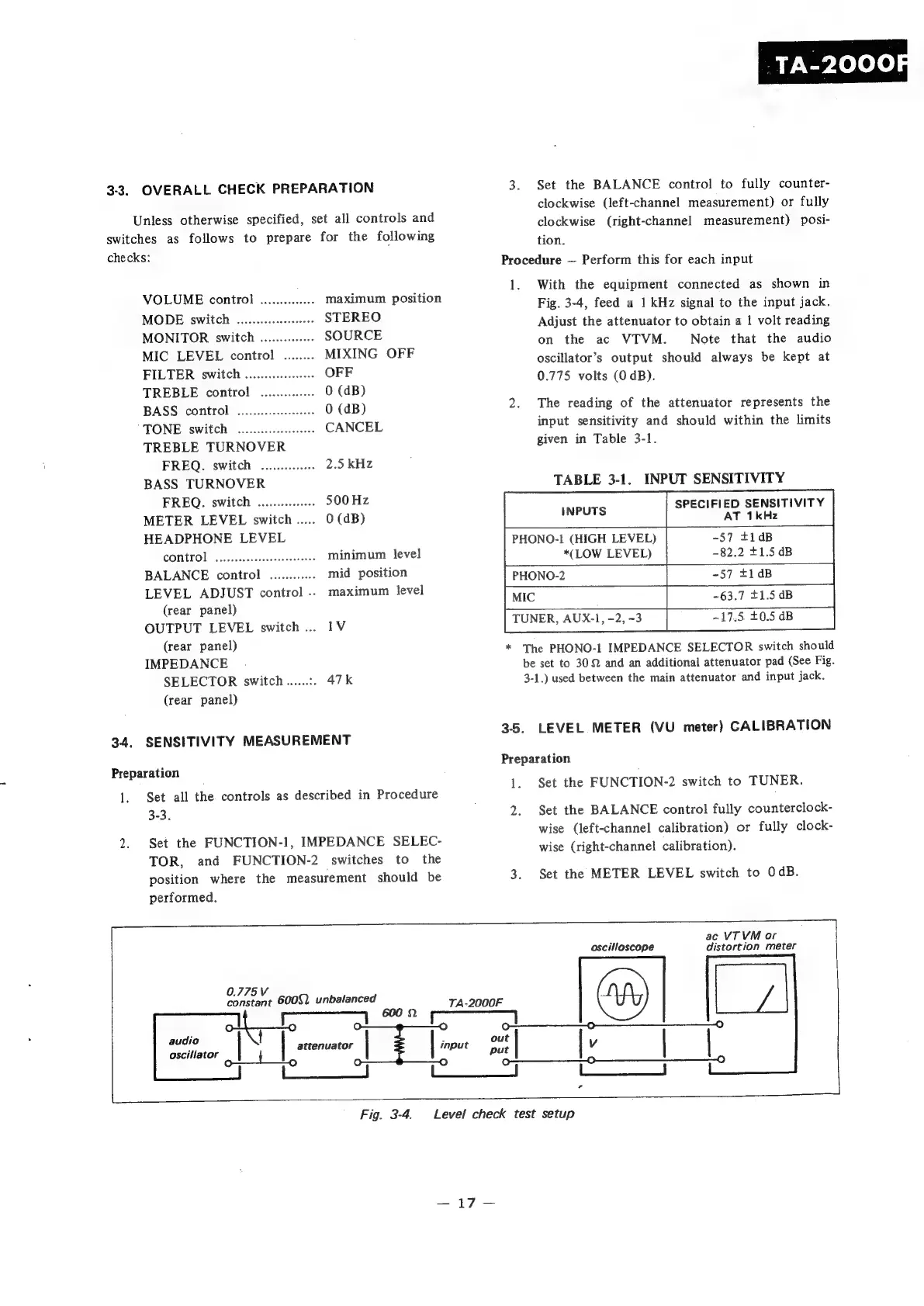
3-3.
OVERALL
CHECK
PREPARATION
Unless
otherwise
specified,
set
all
controls
and
switches
as
follows
to
prepare
for
the
following
checks:
VOLUME
control
..............
maximum
position
MODE
switch
...............0+
STEREO
MONITOR
switch
..............
SOURCE
MIC
LEVEL
control
........
MIXING
OFF
FILTER
switch
........0..0.
OFF
TREBLE
control
.............
0
(dB)
BASS
control
wo...
0
(dB)
TONE
switch
oe
CANCEL
TREBLE
TURNOVER
FREQ.
switch
...........
2.5
kHz
BASS
TURNOVER
FREQ.
switch
............
$00
Hz
METER
LEVEL
switch
.....
0
(dB)
HEADPHONE
LEVEL
(lose
A
0)
re
minimum
level
BALANCE
control
............
mid
position
LEVEL
ADJUST
control
..
maximum
level
(rear
panel)
OUTPUT
LEVEL
switch...
1V
(rear
panel)
IMPEDANCE
SELECTOR
switch......:.
47k
(rear
panel)
TA-2000F
Set
the
BALANCE
control
to
fully
counter-
clockwise
(left-channel
measurement)
or
fully
clockwise
(right-channel
measurement)
posi-
tion.
Procedure
Perform
this
for
each
input
1.
With
the
equipment
connected
as
shown
in
Fig. 3-4,
feed
a
1
kHz
signal
to
the
input
jack.
Adjust
the
attenuator
to
obtain
a
|
volt
reading
on
the
ac
VTVM.
Note
that
the
audio
oscillator’s
output
should
always
be
kept
at
0.775
volts
(0
dB).
The
reading
of
the
attenuator
represents
the
input
sensitivity
and
should
within
the
limits
given
in
Table
3-1.
TABLE
3-1.
INPUT
SENSITIVITY
SPECIFIED
SENSITIVITY
AT
1kHz
INPUTS
PHONO-1
(HIGH
LEVEL)
-57
+1dB
*(LOW
LEVEL)
-82.2
£1.5
dB
MIC
PHONO-2
TUNER,
AUX-1,
-2,
-3
-17.5.
£0.5
dB
-57
+1dB
-63.7
$1.5
dB
*
The
PHONO-1
IMPEDANCE
SELECTOR
switch
should
be
set
to
30.9
and
an
additional
attenuator
pad
(See
Fig.
3-1.)
used
between
the
main
attenuator
and
input
jack.
ees
fy
3-5.
LEVEL
METER
(VU
meter)
CALIBRATION
34.
SENSITIVITY
MEASUREMENT
(
;
Preparation
Preparation
:
:
1.
Set
the
FUNCTION-2
switch
to
TUNER.
Set
all
the
controls
as
described
in
Procedure
3-3.
2.
Set
the
BALANCE
control
fully
counterclock-
wise
(left-channel
calibration)
or
fully
clock-
Set
the
FUNCTION-1,
IMPEDANCE
SELEC-
;
;
;
i
:
wise
(right-channel
calibration).
TOR,
and
FUNCTION-2
switches
to
the
position
where
the
measurement
should
be
3.
Set
the
METER
LEVEL
switch
to
OdB.
performed.
ac
VT
VM
or
oscilloscope
distortion
meter
0.775
V
constant
6002.
unbalanced
TA-2000F
(7.
eA
600
2
audio
t
;
out
oiciliator
|
attenuator
|
inoue
put
|
V
|
|
fa
Pace
ee
ss
Fig.
3-4.
Level
check
test
setup

Related product manuals