EasyManua.ls Logo

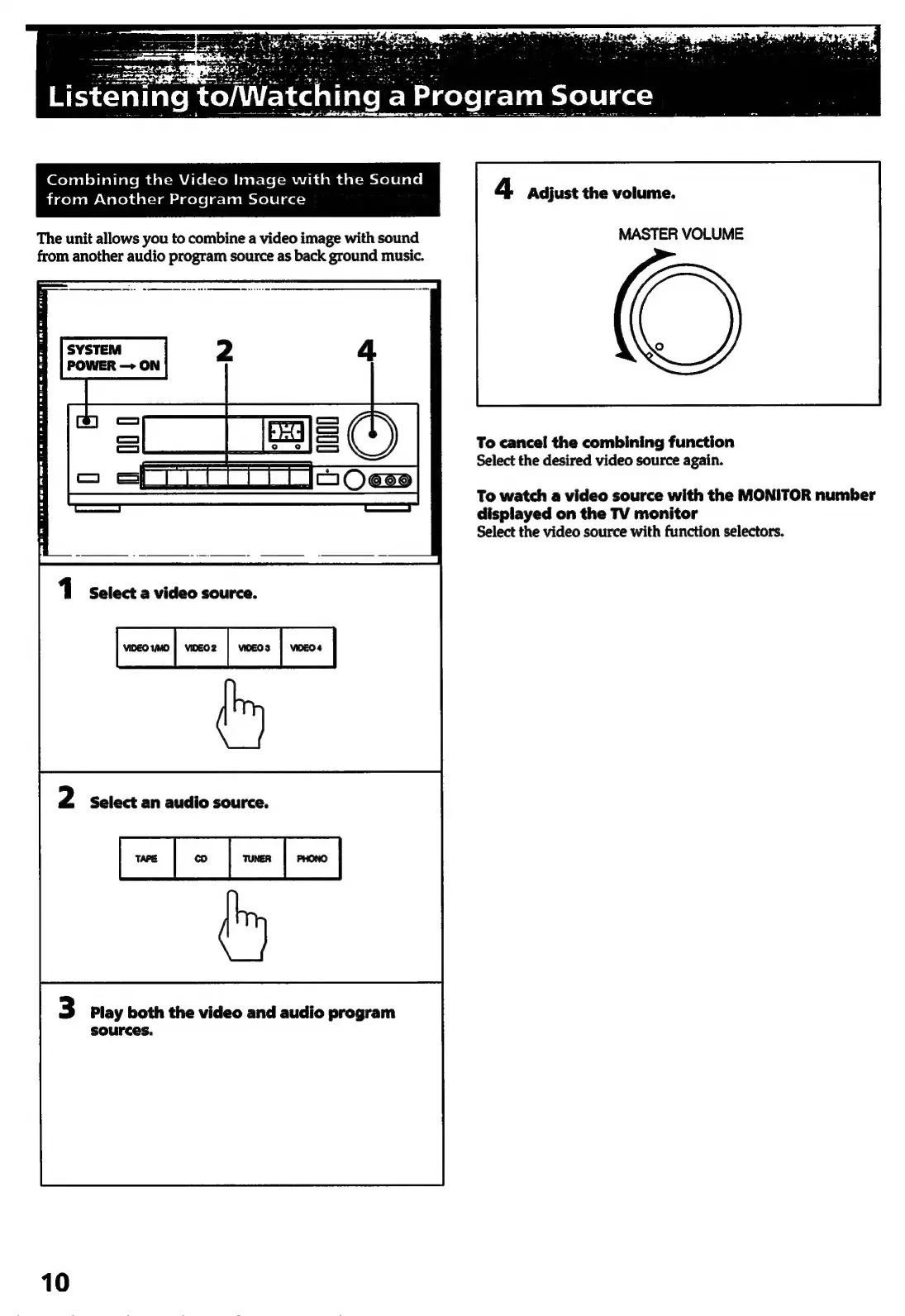
Sony TA-E741 - Listening to;Watching a Program Source; Combining Video with Different Audio

Sony TA-E741
23 pages
Print Icon
To Next Page IconTo Next Page
To Previous Page IconTo Previous Page
Loading...
ning
a
Program
Source
(oy
nelolielials
mm
eat=M
ale
(tom
bearcle(-Mmudi
val
dal-meTelelale|
4
*
from
Another
Program
Source
Adjust
the
volume.
The
unit
allows
you
to
combine
a
video
image
with
sound
MASTER
VOLUME
from
another
audio
program
source
as
back
ground
music.
Darwen
ea
Te
Te
To
cancel
the
combining
function
Select
the
desired
video
source
again.
To
watch
a
video
source
with
the
MONITOR
number
displayed
on
the
TV
monitor
Select
the
video
source
with
function
selectors.
Pm
ete
1
Select
a
video
source.
seromo|
veer
|
wens
|
woe
|
2
Select
an
audio
source.
J
we
|
|
me
|
new
|
3
Play
both
the
video
and
audio
program
sources.
10

Related product manuals