EasyManua.ls Logo

Sony TA-E741 - Troubleshooting

Sony TA-E741
23 pages
Print Icon
To Previous Page IconTo Previous Page
Loading...
Nigelelel(=larelos
dale)
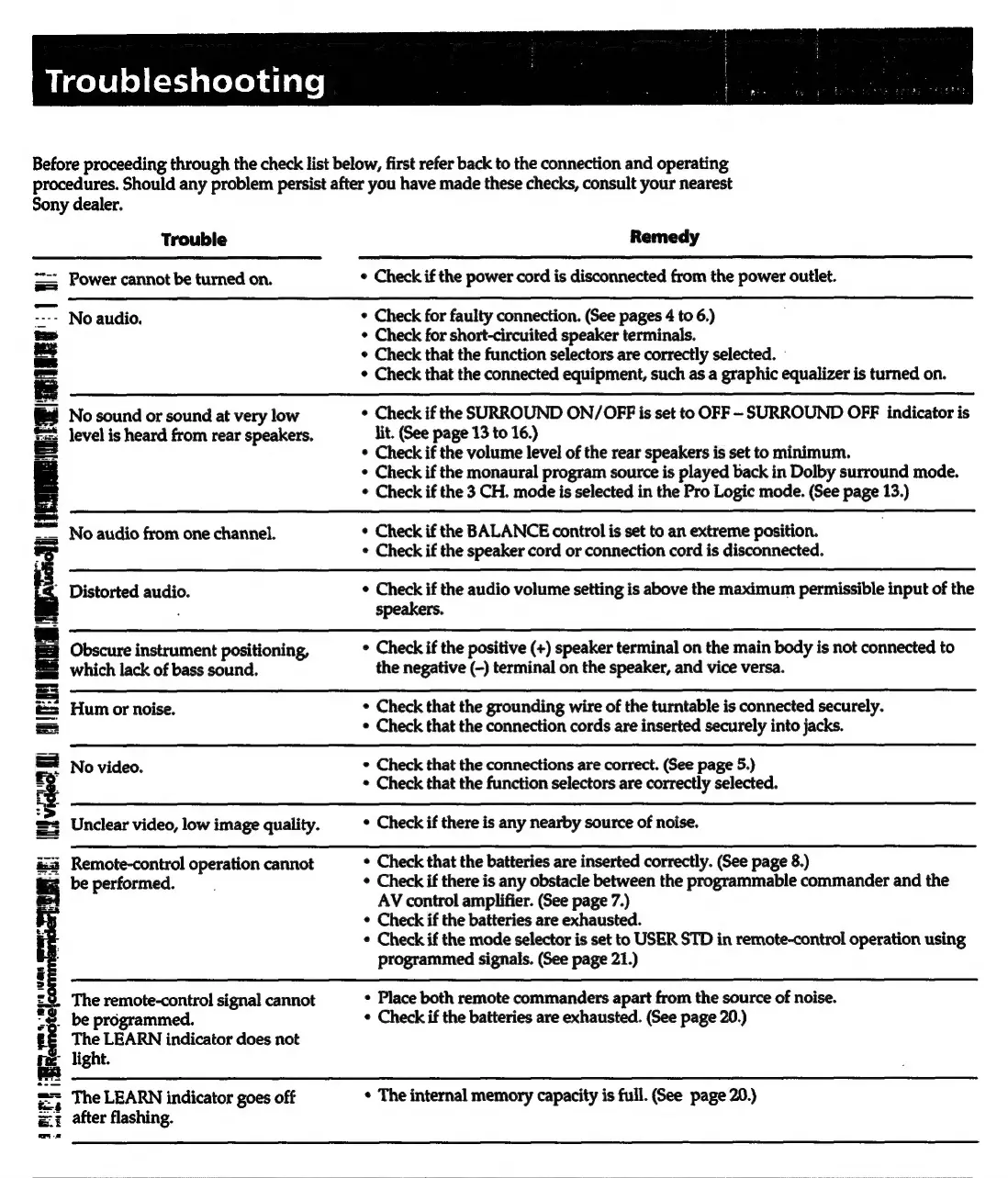
Before
proceeding
through
the
check
list
below,
first
refer
back
to
the
connection
and
operating
procedures.
Should
any
problem
persist
after
you
have
made
these
checks,
consult
your
nearest
Sony
dealer.
Trouble
Remedy
==
Power
cannot
be
turned
on.
¢
Check
if
the
power
cord
is
disconnected
from
the
power
outlet.
<--
No
audio.
*
Check
for
faulty
connection.
(See
pages
4
to
6.)
ts
¢
Check
for
short-circuited
speaker
terminals.
ae
¢
Check
that
the
function
selectors
are
correctly
selected.
-
¢
Check
that
the
connected
equipment,
such
as
a
graphic
equalizer
is
turned
on.
PI
No
sound
or
sound
at
very
low
¢
Check
if
the
SURROUND
ON/OFF
is
set
to
OFF
-SURROUND
OFF
indicator
is
level
is
heard
from
rear
speakers.
lit.
(See
page
13
to
16.)
E
*
Check
if
the
volume
level
of
the
rear
speakers
is
set
to
minimum.
Check
if
the
monaural
program
source
is
played
back
in
Dolby
surround
mode.
¢
Check
if
the
3
CH.
mode
is
selected
in
the
Pro
Logic
mode.
(See
page
13.)
=a
iouaeats
=.
No
audio
from
one
channel.
*
Check
if
the
BALANCE
control
is
set
to
an
extreme
position.
é
*
Check
if
the
speaker
cord
or
connection
cord
is
disconnected.
.
Distorted
audio.
*
Check
if
the
audio
volume
setting
is
above
the
maximum
permissible
input
of
the
;
speakers.
Obscure
instrument
positioning,
¢
Check
if
the
positive
(+)
speaker
terminal
on
the
main
body
is
not
connected
to
which
lack
of
bass
sound.
the
negative
(-)
terminal
on
the
speaker,
and
vice
versa.
=
Hum
or
noise.
¢
Check
that
the
grounding
wire
of
the
turntable
is
connected
securely.
=
¢
Check
that
the
connection
cords
are
inserted
securely
into
jacks.
=
No
video.
¢
Check
that
the
connections
are
correct.
(See
page
5.)
=o.
*
Check
that
the
function
selectors
are
correctly
selected.
=
Unclear
video,
low
image
quality.
*
Check
if
there
is
any
nearby
source
of
noise.
i:
Remote-control
operation
cannot
*
Check
that
the
batteries
are
inserted
correctly.
(See
page
8.)
|
be
performed.
¢
Check
if
there
is
any
obstacle
between
the
programmable
commander
and
the
ie
AV
control
amplifier.
(See
page
7.)
¢
Check
if
the
batteries
are
exhausted.
¢
Check
if
the
mode
selector
is
set
to
USER
STD
in
remote-control
operation
using
=
programmed
signals.
(See
page
21.)
'
£8
The
remote-control
signal
cannot
*
Place
both
remote
commanders
apart
from
the
source
of
noise.
"2.
be
programmed.
«
Check
if
the
batteries
are
exhausted.
(See
page
20.)
f&
The
LEARN
indicator
does
not
1s
light.
=
The
LEARN
indicator
goes
off
*
The
internal
memory
capacity
is
full.
(See
page
20.)
=z
after
flashing.

Related product manuals