EasyManua.ls Logo

Sony TA-E741 - Adjusting Surround Sound Levels

Sony TA-E741
23 pages
Print Icon
To Next Page IconTo Next Page
To Previous Page IconTo Previous Page
Loading...
rNeohiUlsalalemaatsmel0lacolerate@M-a'Z-)
ce]
a
Slot
i
oh
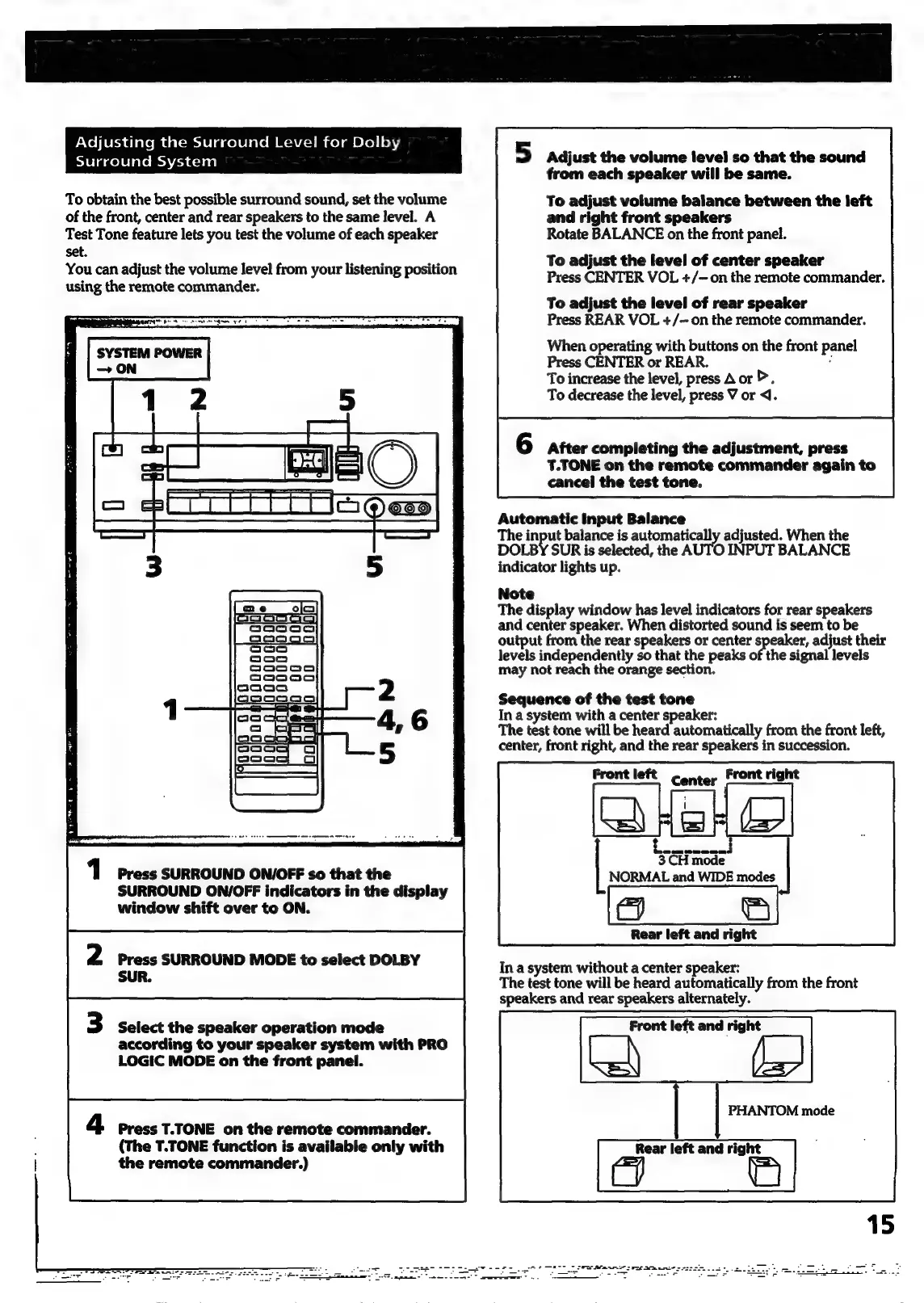
Surround
System
To
obtain
the
best
possible
surround
sound,
set
the
volume
of
the
front,
center
and
rear
speakers
to
the
same
level.
A
Test
Tone
feature
lets
you
test
the
volume
of
each
speaker
set.
You
can
adjust
the
volume
level
from
your
listening
position
using
the
remote
commander.
SYSTEM
POWER
—
ON
Press
SURROUND
ON/OFF
so
that
the
SURROUND
ON/OFF
indicators
in
the
display
window
shift
over
to
ON.
Press
SURROUND
MODE
to
select
DOLBY
SUR.
Select
the
speaker
operation
mode
according
to
your
speaker
system
with
PRO
LOGIC
MODE
on
the
front
panel.
Press
T.TONE
on
the
remote
commander.
(The
T.TONE
function
is
available
only
with
the
remote
commander.)
5
Adjust
the
volume
level
so
that
the
sound
from
each
speaker
will
be
same.
To
adjust
volume
balance
between
the
left
and
right
front
speakers
Rotate
BALANCE
on
the
front
panel.
To
adjust
the
level
of
center
speaker
Press
CENTER
VOL
+/-
on
the
remote
commander.
To
adjust
the
level
of
rear
speaker
Press
REAR
VOL
+/—
on
the
remote
commander.
When
operating
with
buttons
on
the
front
panel
Press
CENTER
or
REAR.
:
To
increase
the
level,
press
A
or
>.
To
decrease
the
level,
press
V
or
<1.
After
completing
the
adjustment,
press
T.TONE
on
the
remote
commander
again
to
cancel
the
test
tone.
Automatic
Input
Balance
The
input
balance
is
automatically
adjusted.
When
the
DOLBY
SUR
is
selected,
the
AUTO
INPUT
BALANCE
indicator
lights
up.
Note
The
display
window
has
level
indicators
for
rear
speakers
and
center
speaker.
When
distorted
sound
is
seem
to
be
output
from
the
rear
speakers
or
center
>
ipa
adjust
their
levels
independently
so
that
the
peaks
of
the
signal
levels
may
not
reach
the
orange
section.
Sequence
of
the
test
tone
In
a
system
with
a
center
speaker:
The
test
tone
will
be
heard
automatically
from
the
front
left,
center,
front
right,
and
the
rear
speakers
in
succession.
Front
left
Center
Front
right
[a
3
CH
mode
NORMAL
and
WIDE
modes
Rear
left
and
right
In
a
system
without
a
center
speaker:
The
test
tone
will
be
heard
automatically
from
the
front
speakers
and
rear
speakers
alternately.
Front
left
and
right
=
PHANTOM
mode
Rear
left
and
right
C=/
i

Related product manuals