EasyManua.ls Logo

Sony TA-E741 - Enjoying Surround Sound; Listening with Surround Sound Modes

Sony TA-E741
23 pages
Print Icon
To Next Page IconTo Next Page
To Previous Page IconTo Previous Page
Loading...
See
ee
_—
eR
e
Enjoying
Su
d
Mics
acvatiate
mcomnidamlelacelllele
mio]
elale:
5
Adjust
the
level
of
the
center
speaker
and
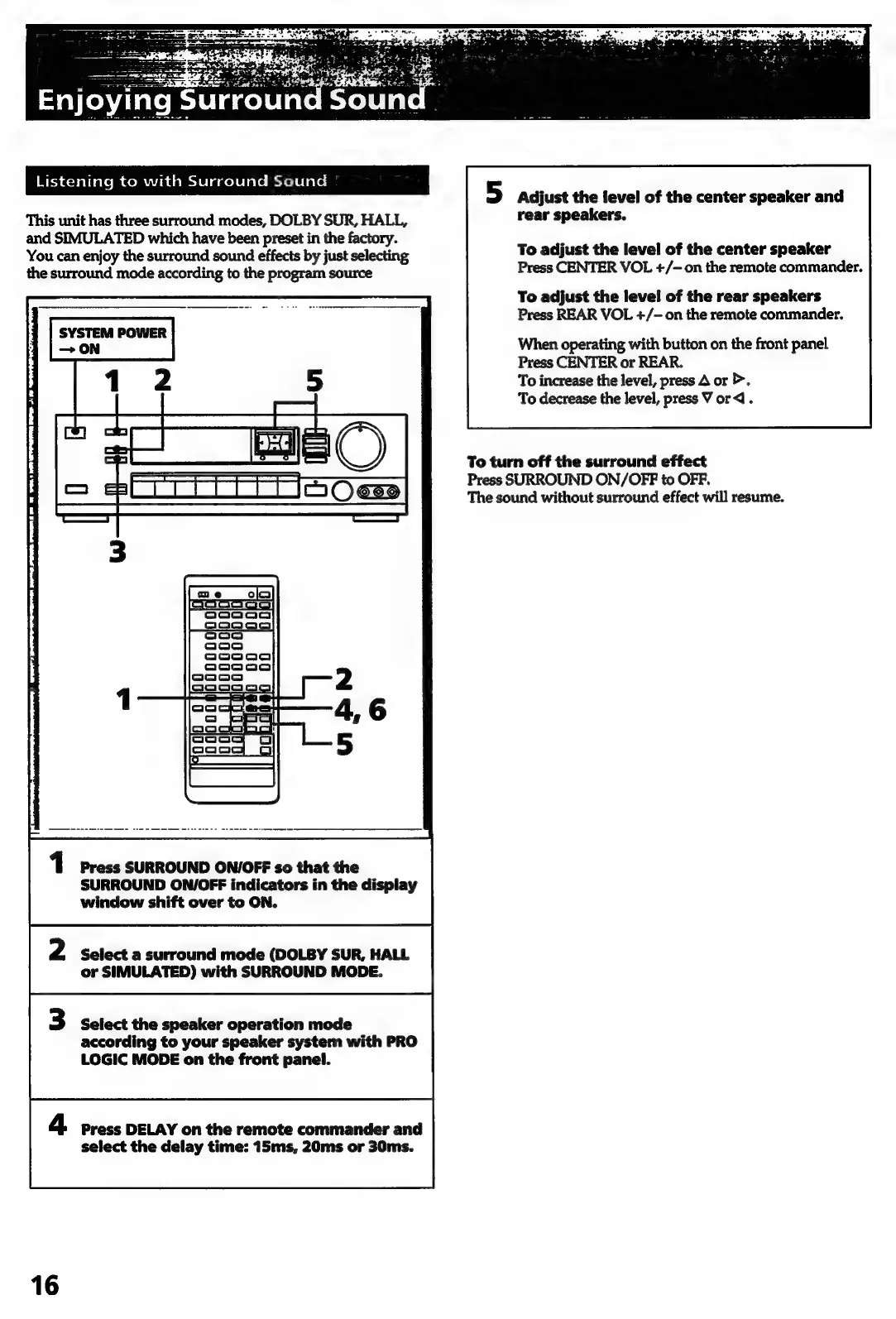
This
unit
has
three
surround
modes,
DOLBY
SUR,
HALL,
rear
speakers.
and
SIMULATED
which
have
been
preset
in
the
factory.
:
You
can
enjoy
the
surround
sound
effects
by
just
selecting
To
adjust
the
level
of
the
center
speaker
the
surround
mode
according
to
the
program
source
Press
CENTER
VOL
+/-
on
the
remote
commander.
To
adjust
the
level
of
the
rear
speakers
Press
REAR
VOL
+/-
on
the
remote
commander.
SYSTEM
POWER
When
operating
with
button
on
the
front
panel
Press
CENTER
or
REAR.
To
increase
the
level,
press
A
or
>.
To
decrease
the
level,
press
V
or
.
To
turn
off
the
surround
effect
Press
SURROUND
ON/OFF
to
OFF.
The
sound
without
surround
effect
will
resume.
Press
SURROUND
ON/OFF
so
that
the
SURROUND
ON/OFF
indicators
in
the
display
window
shift
over
to
ON.
Select
a
surround
mode
(DOLBY
SUR,
HALL
or
SIMULATED)
with
SURROUND
MODE.
Select
the
speaker
operation
mode
according
to
your
speaker
system
with
PRO
LOGIC
MODE
on
the
front
panel.
Press
DELAY
on
the
remote
commander
and
select
the
delay
time:
15ms,
20ms
or
30ms.
16

Related product manuals