EasyManua.ls Logo

Sony TA-E741 - Recording Program Sources; Recording Audio Program Source; Recording Video Program Source

Sony TA-E741
23 pages
Print Icon
To Next Page IconTo Next Page
To Previous Page IconTo Previous Page
Loading...
Ls
C-Veelgelialematelel
re)
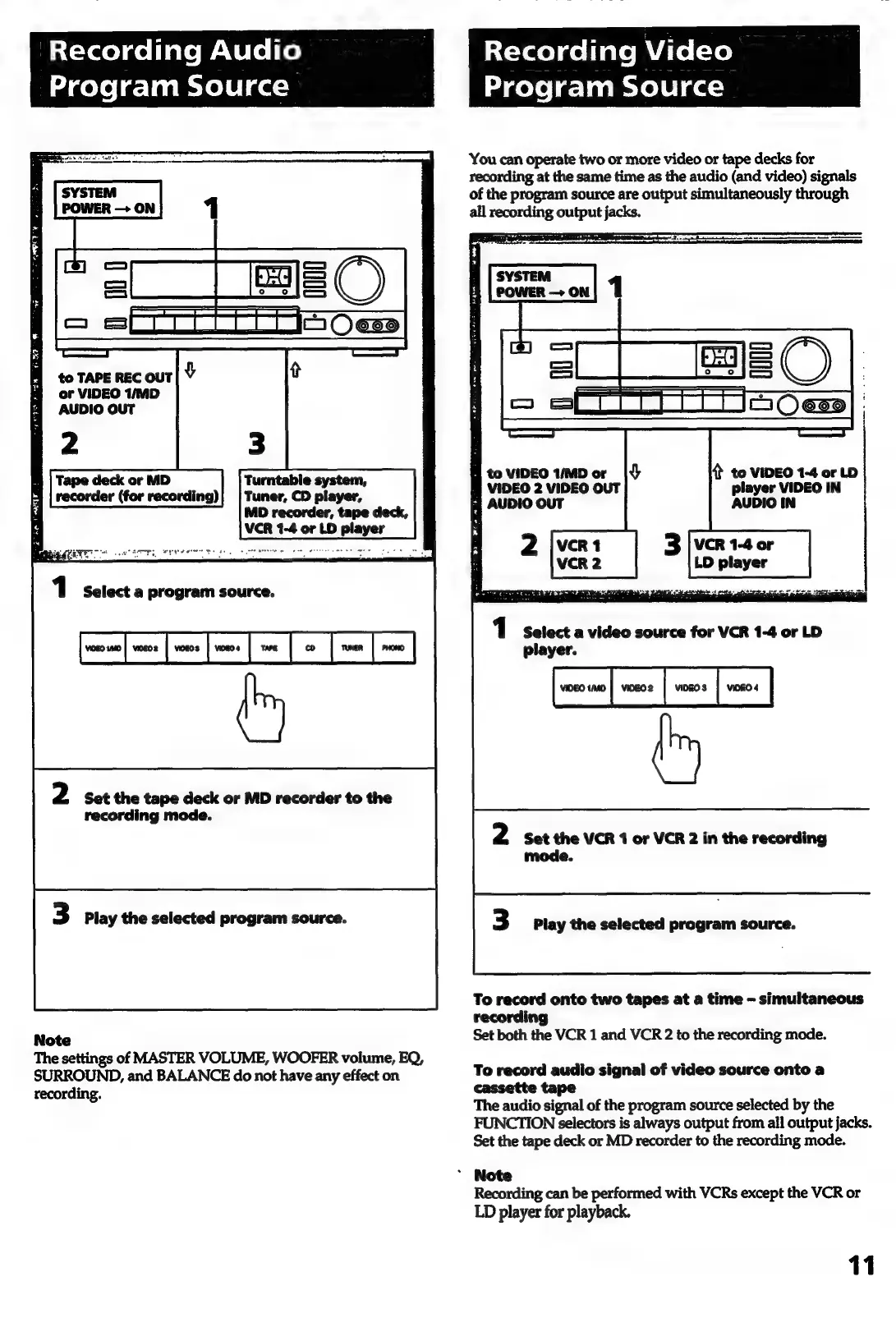
Recording
Video
Program
Source
or
VIDEO
1/MD
AUDIO
OUT
Tape
deck
or
MD
Turntable
system,
recorder
(for
recording)
Tuner,
CD
player,
MD
recorder,
tape
deck,
VCR
1-4
or
LD
player
1
Select
a
program
source.
2
Set
the
tape
deck
or
MD
recorder
to
the
recording
mode.
3
Play
the
selected
program
source.
Note
The
settings
of
MASTER
VOLUME,
WOOFER
volume,
EQ,
SURROUND,
and
BALANCE
do
not
have
any
effect
on
recording.
Program
Source
You
can
operate
two
or
more
video
or
tape
decks
for
recording
at
the
same
time
as
the
audio
(and
video)
signals
of
the
program
source
are
output
simultaneously
through
all
recording
output
jacks.
Pretty
eo
eL
2s
=
rm
We
4
to
VIDEO
1-4
or
LD
player
VIDEO
IN
AUDIO
IN
H
to
VIDEO
1/MD
or
VIDEO
2
VIDEO
OUT
|
AUDIO
OUT
LD
player
1
Select
a
video
source
for
VCR
1-4
or
LD
player.
sexo
me
|
vos
|
wns
|
vos
|
2
Set
the
VCR
1
or
VCR
2
in
the
recording
mode.
3
Play
the
selected
program
source.
To
record
onto
two
tapes
at
a
time
-
simultaneous
recording
Set
both
the
VCR
1
and
VCR
2
to
the
recording
mode.
To
record
audio
signal
of
video
source
onto
a
cassette
tape
The
audio
signal
of
the
program
source
selected
by
the
FUNCTION
selectors
is
always
output
from
all
output
jacks.
Set the
tape
deck
or
MD
recorder
to
the
recording
mode.
*
Note
Recording
can
be
performed
with
VCRs
except
the
VCR
or
LD
player
for
playback.
11

Related product manuals