EasyManua.ls Logo

Sony TA-E741 - Inserting the Batteries; Amplifier;TV Section Controls

Sony TA-E741
23 pages
Print Icon
To Next Page IconTo Next Page
To Previous Page IconTo Previous Page
Loading...
Remote
Commander
Here
eA
alee
[3]
Amplifier/TV
section
Note
on
the
@
(recording)
button
under
[3]
SURROUND
mode
buttons
Equipment
control
button
(for
the
AV
control
amplifier)
If
your
recorder
is
of
such
type
as
pressing
@
+
>
or
@
+
ON/OFF:
Turns
on/off
the
surround
mode.
“i
puts
it
in
recording
mode.
MODE:
Selects
the
surround
mode.
T.(test)
TONE:
Outputs
test
tone
to
each
speakers
in
Note
succession.
The
<@/B>
(play)
buttons
(for
TAPE,
CD,
MD
or
VTR
1
DELAY:
Press
when
adjusting
the
delay
time.
and
the
SHIFT
button
and
PRESET/CH
+/-
buttons
in
CENTER
VOL
+/-
buttons:
Control
the
volume
of
center
can
function
without
pressing
one
of
the
FUNCTION
speaker.
(
for
the
AV
control
amplifier.)
buttons
in
[3].
REAR
VOL/TV
CH
+/—buttons:
Control
the
volume
of
rear
speakers.
(for
the
AV
control
amplifier.)
SUPER
WOOFER
ON/OFF
button:
Turns
on/off
the
super
woofer.
(for
the
AV
control
amplifier)
PHASE
button:
Turns
on/off
the
phase
effect.
(for
the
AV
control
amplifier)
: :
VOL
+/~
buttons:
Control
the
volume
ofthe
super
woofer.
(for
the
AV
control
amplifier)
CURSOR
CONTROL
buttons:
Select
a
number
or
adjust
the
level
(for
the
AV
control
amplifier)
FLAT
button:
Flattens
the
equalizer
curve.
(for
the
AV
1
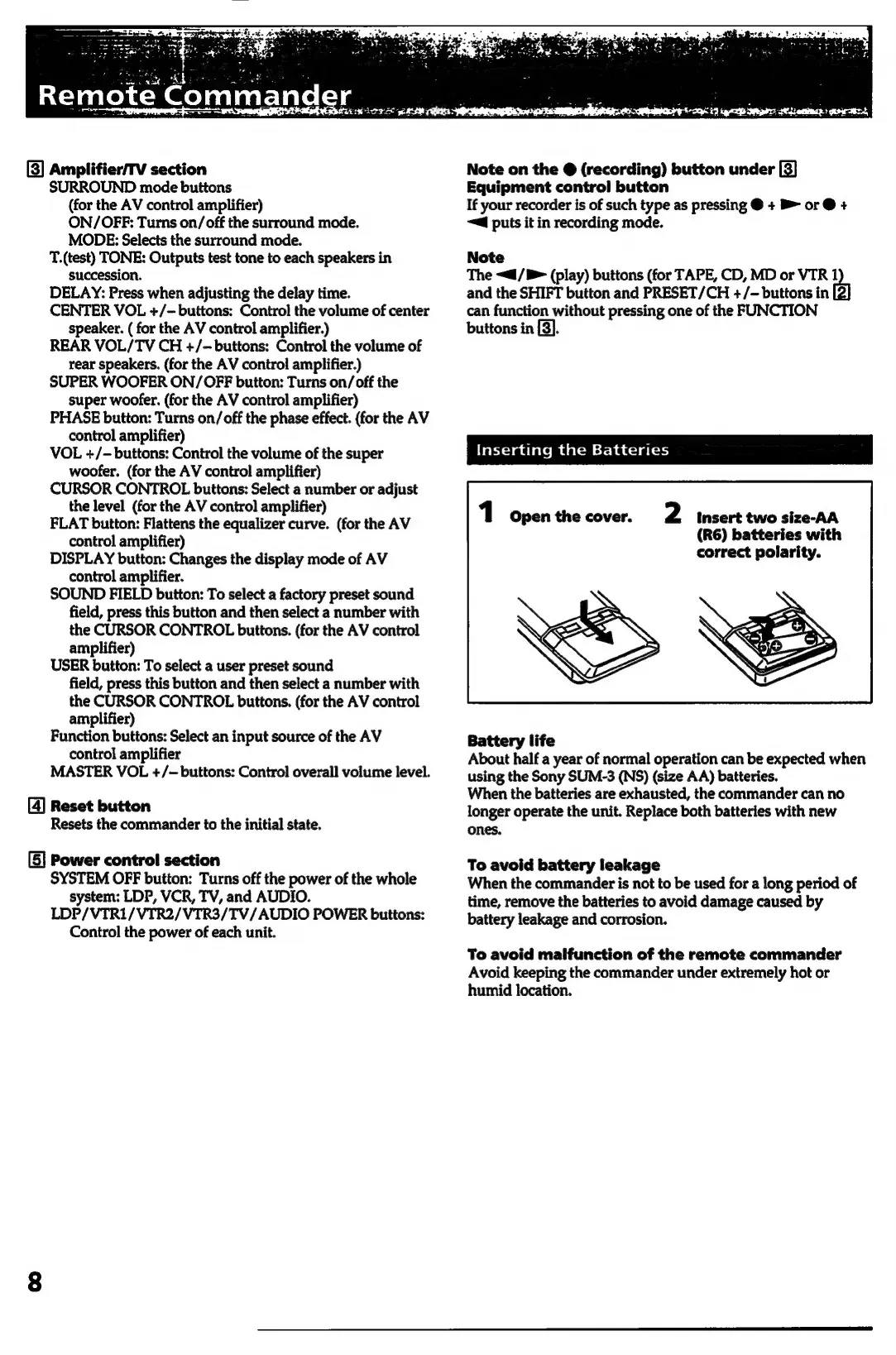
open
the
cover.
2
pboashbe
nn
hich
control
amplifier)
DISPLAY
button:
Changes
the
display
mode
of
AV
correct
polarity.
control
amplifier.
SOUND
FIELD
button:
To
select
a
factory
preset
sound
field,
press
this
button
and
then
select
a
number
with
the
CURSOR
CONTROL
buttons.
(for
the
AV
control
amplifier)
USER
button:
To
select
a
user
preset
sound
field,
press
this
button
and
then
select
a
number
with
the
CURSOR
CONTROL
buttons.
(for
the
AV
control
amplifier)
Function
buttons:
Select
an
input
source
of
the
AV
Battery
life
control
amplifier
About
half
a
year
of
normal
operation
can
be
expected
when
MASTER
VOL
+/~
buttons:
Control
overall
volume
level.
using
the
Sony
SUM-3
(NS)
(size
AA)
batteries.
When
the
batteries
are
exhausted,
the
commander
can
no
[4]
Reset
button
longer
operate
the
unit.
Replace
both
batteries
with
new
Resets
the
commander
to
the
initial
state.
ones.
[5]
Power
control section
To
avoid
battery
leakage
SYSTEM
OFF
button:
Turns
off
the
power
of
the
whole
When
the
commander
is
not
to
be
used
for
a
long
period
of
system:
LDP,
VCR,
TV,
and
AUDIO.
time,
remove
the
batteries
to
avoid
damage
caused
by
LDP/VTR1/VTR2/VTR3/TV/AUDIO
POWER
buttons:
—_pattery
leakage
and
corrosion.
Control
the
power
of
each
unit.
To
avoid
malfunction
of
the
remote
commander
Avoid
keeping
the
commander
under
extremely
hot
or
humid
location.

Related product manuals