EasyManua.ls Logo

Sony TCD-D3 - Page 13

Sony TCD-D3
35 pages
Print Icon
To Next Page IconTo Next Page
To Previous Page IconTo Previous Page
Loading...
WRITE
gay
on
oe
ee
ee
AASE
-aBxso
3224
@
6
420
A
=
we
earn
OVER
|
*
On
the
CAUTION
indicator
Press
the
POWER
switch
again
when
the
CAUTION
flickers.
If
the
indicator
flickers
again
or
flickers
frequently
during
you
use
the
unit,
consult
your
local
Sony’s
dealer
or
service
station
after
turning
off
the
power.
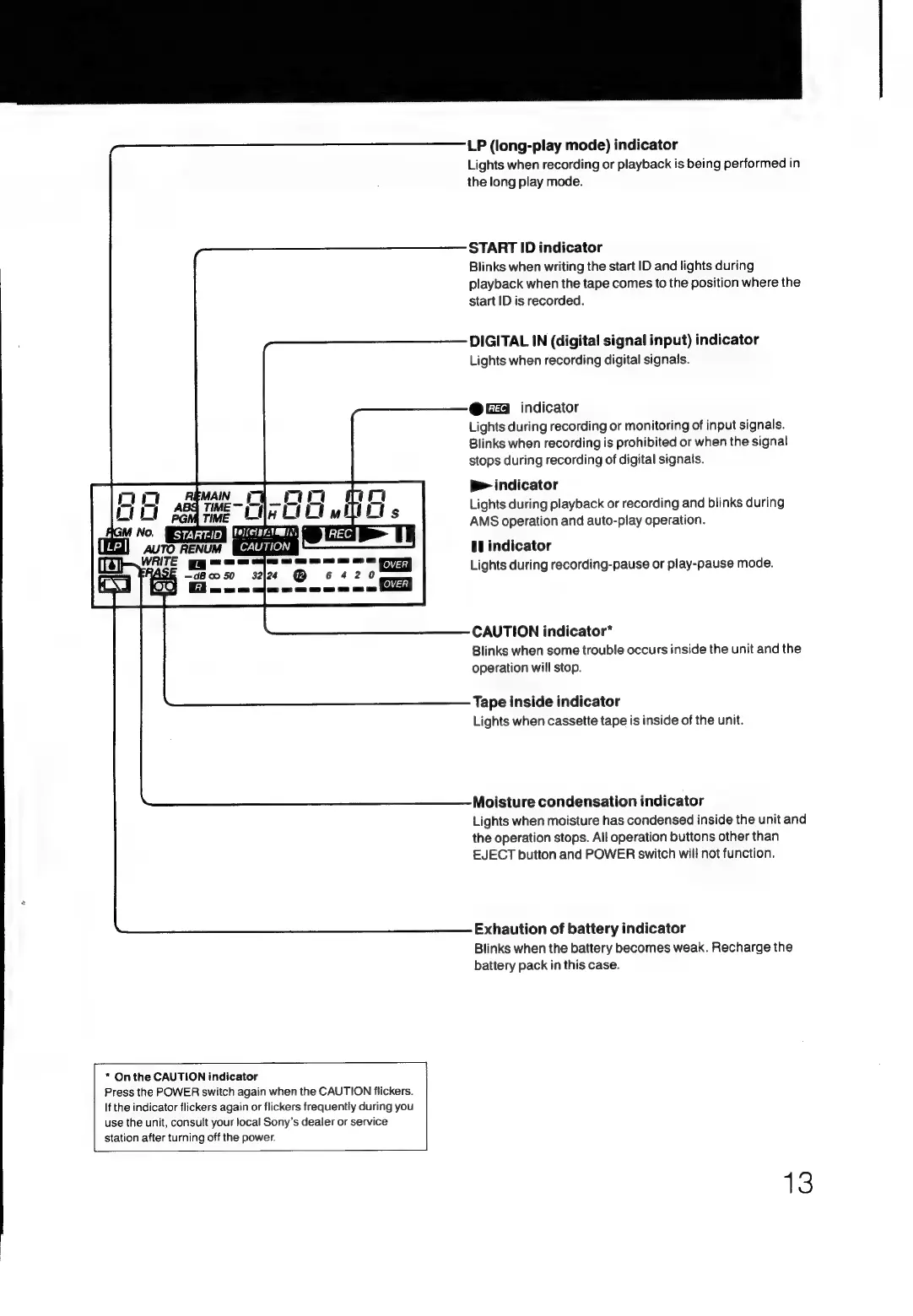
LP
(long-play
mode)
indicator
Lights
when
recording
or
playback
is
being
performed
in
the
long
play
mode.
START
ID
indicator
Blinks
when
writing
the
start
ID
and
lights
during
playback
when
the
tape
comes
to
the
position
where
the
start
ID
is
recorded.
DIGITAL
IN
(digital
signal
input)
indicator
Lights
when
recording
digital
signals.
@
G24
indicator
Lights
during
recording
or
monitoring
of
input
signals.
Blinks
when
recording
is
prohibited
or
when
the
signal
stops
during
recording
of
digital
signals.
p>
indicator
Lights
during
playback
or
recording
and
blinks
during
AMS
operation
and
auto-play
operation.
Wl
indicator
Lights
during
recording-pause
or
play-pause
mode.
CAUTION
indicator*
Blinks
when
some
trouble
occurs
inside
the
unit
and
the
operation
will
stop.
Tape
inside
indicator
Lights
when
cassette
tape
is
inside
of
the
unit.
Moisture
condensation
indicator
Lights
when
moisture
has
condensed
inside
the
unit
and
the
operation
stops.
All
operation
buttons
other
than
EJECT
button
and
POWER
switch
will
not
function.
Exhaution
of
battery
indicator
Blinks
when
the
battery
becomes
weak.
Recharge
the
battery
pack
in
this
case.
13

Related product manuals