EasyManua.ls Logo

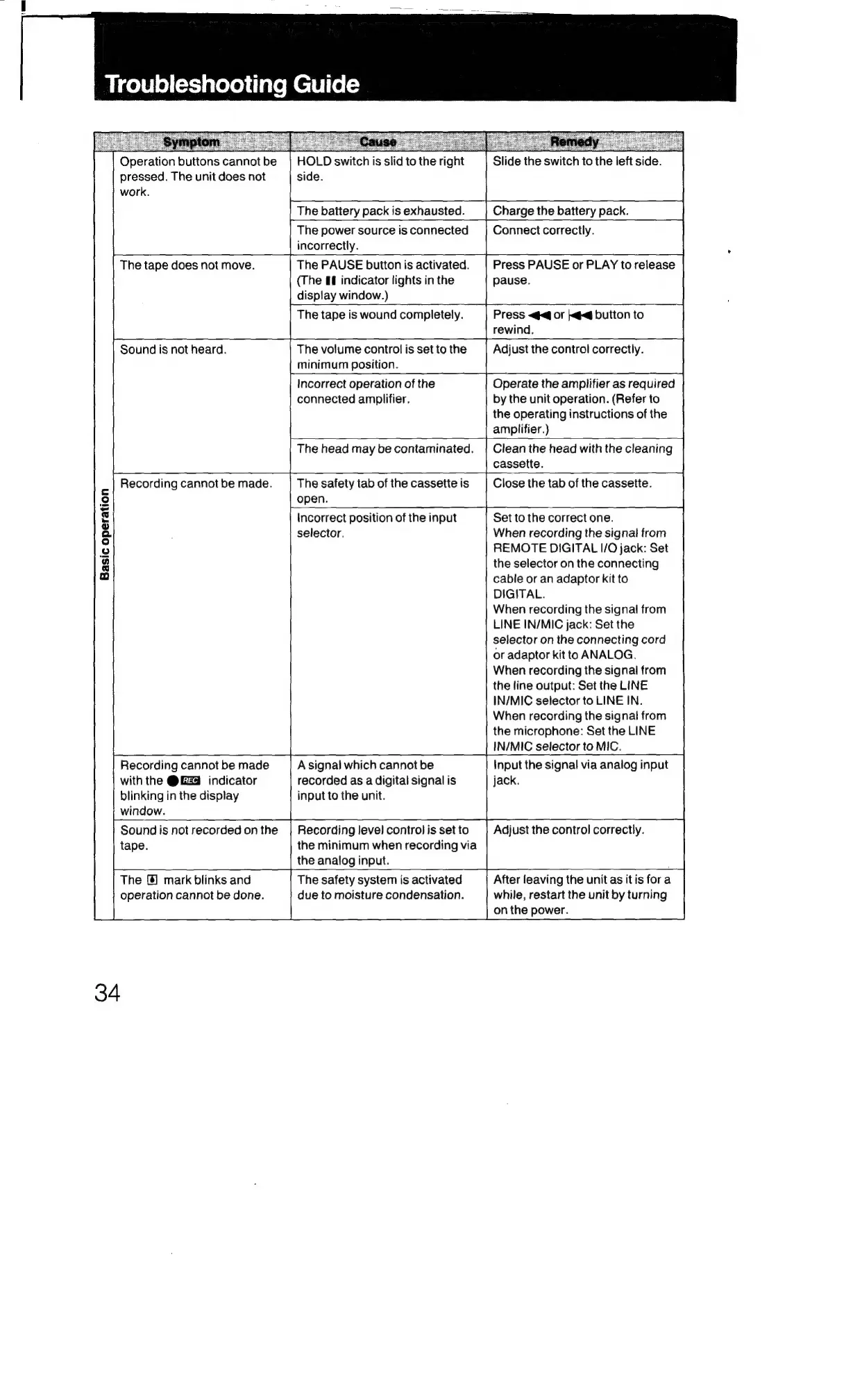
Sony TCD-D3 - Troubleshooting Guide; Basic Operation Issues

Sony TCD-D3
35 pages
Print Icon
To Next Page IconTo Next Page
To Previous Page IconTo Previous Page
Loading...
Troubleshooting
Guide
Operation
buttons
cannot
be
pressed.
The
unit
does
not
work.
HOLD
switch
is
slid
to
the
right
side.
Slide
the
switch
to
the
left
side.
The
battery
pack
is
exhausted.
|
Charge
the
battery
pack.
r
;
The
power
source
is
connected
incorrectly.
Connect
correctly.
The
tape
does
not
move.
=
(The
&f
indicator
lights
in
the
display
window.)
|
The
PAUSE
button
is
activated.
|
|
Press
PAUSE
or
PLAY
to
release
pause.
The
tape
is
wound
completely.
Press
<@<@
or
|}<¢<@
button
to
rewind.
Sound
is
not
heard.
{
The
volume
control
is
set
to
the
|
minimum
position.
Incorrect
operation
of
the
connected
amplifier.
L
a
a
Adjust
the
control
correctly.
|
Operate
the
amplifier
as
required
by
the
unit
operation.
(Refer
to
the
operating
instructions
of
the
amplifier.)
The
head
may
be
contaminated.
|
Clean
the
head
with
the
cleaning
assette.
Recording
cannot
be
made.
Basic
operation
open.
f
Incorrect
position
of
the
input
selector.
c
t—
The
safety
tab
of
the
cassette
is
I
ctose
the tab
of
the
cassette.
+
Set
to
the
correct
one.
When
recording
the
signal
from
REMOTE
DIGITAL
I/O
jack:
Set
the
selector
on
the
connecting
cable
or
an
adaptor
kit
to
DIGITAL.
When
recording
the
signal
from
LINE
IN/MIC
jack:
Set
the
selector
on
the
connecting
cord
or
adaptor
kit
to
ANALOG,
When
recording
the
signal
from
the
line
output:
Set
the
LINE
IN/MIC
selector
to
LINE
IN.
When
recording
the
signal
from
the
microphone:
Set
the
LINE
IN/MIC
selector
to
MIC.
Recording
cannot
be
made
with
the
@GZ@
indicator
blinking
in
the
display
window.
A
signal
which
cannot
be
recorded
as
a
digital
signal
is
input
to
the
unit.
Input
the
signal
via
analog
input
jack.
Sound
is
not
recorded
onthe
|
Recording
level
control
is
set
to
|
Adjust
the
control
correctly.
tape.
the
minimum
when
recording
via
The
{@]
mark
blinks
and
operation
cannot
be
done.
34
the
analog
input.
The
safety
system
is
activated
due
to
moisture
condensation.
After
leaving
the
unit
as
it
is
fora
while,
restart
the
unit
by
turning
on
the
power.

Related product manuals