EasyManua.ls Logo

Sony TCD-D3 - Recording and Playback Problems

Sony TCD-D3
35 pages
Print Icon
To Previous Page IconTo Previous Page
Loading...
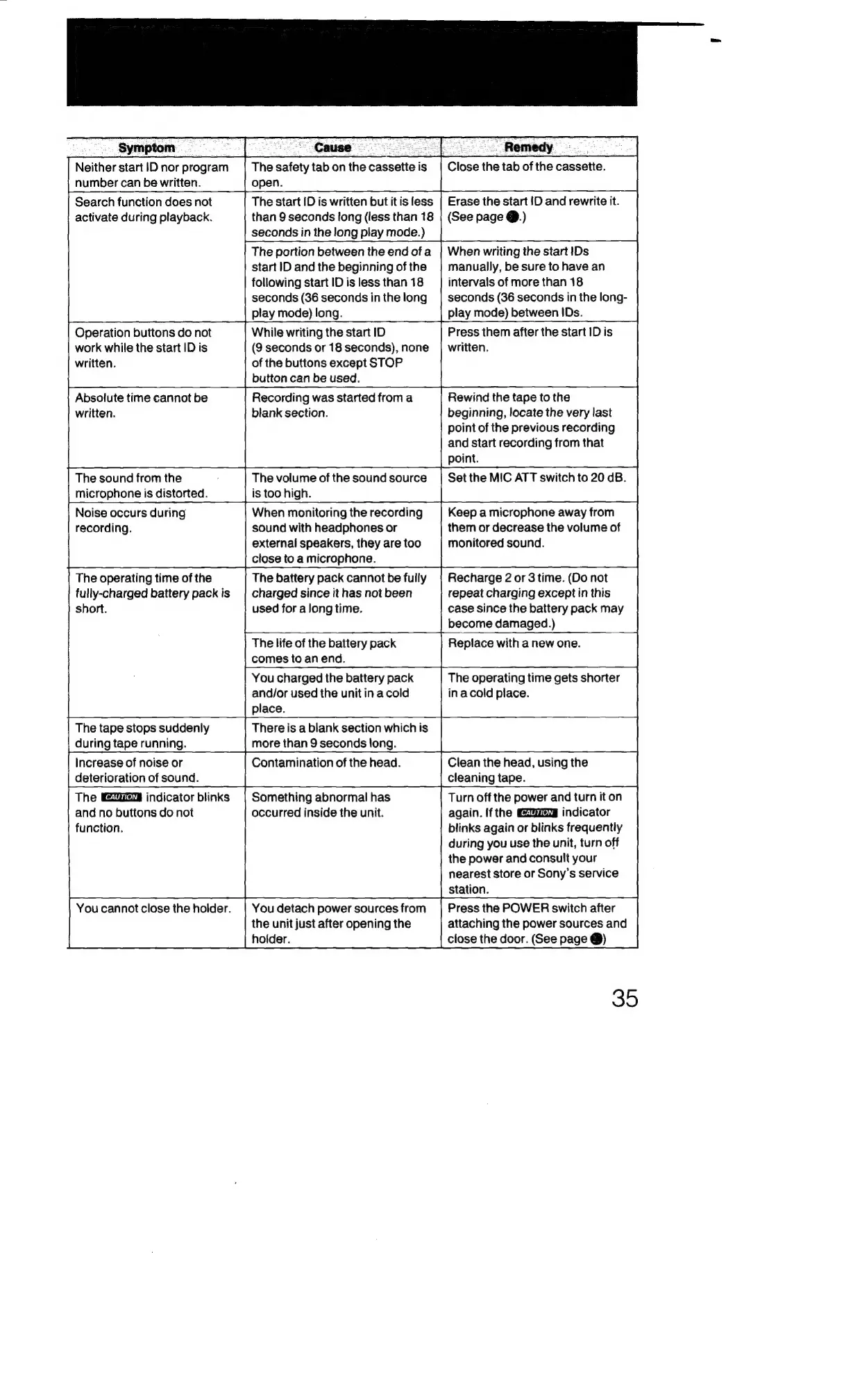
Symptom
Cause
Neither
start
!|Dnor
program
|
Thesafety
tab
onthe
cassetteis
|
Close
the
tab
of
the
cassette.
number
can
be
written.
open.
Search
function
does
not
The
start
ID
is
written
but
itis
less
|
Erase
the
start
ID
and
rewrite
it.
activate
during
playback.
than
9
seconds
long
(less
than
18
|
(See
page
@.)
seconds
in
the
long
play
mode.)
The
portion
between
the
end
ofa
_|
When
writing
the
start
IDs
start
ID
and
the
beginning
of
the
|
manually,
be
sure
to
have
an
following
start
ID
is
less
than
18
intervals
of
more
than
18
seconds
(36
seconds
inthelong
|
seconds
(36
seconds
in
the
long-
play
mode)
long.
play
mode)
between
IDs.
Operation
buttons
do
not
While
writing
the
start
ID
Press
them
after
the
start
ID
is
work
while
the
start
ID
is
(9
seconds
or
18
seconds),
none
|
written.
written.
of
the
buttons
except
STOP
button
can
be
used.
Absolute
time
cannot
be
Recording
was
started
froma
Rewind
the
tape
to
the
written.
blank
section.
beginning,
locate
the
very
last
point
of
the
previous
recording
and
start
recording
from
that
point.
The
sound
from
the
;
The
volume
of
the
soundsource
|
Set
the
MIC
ATT
switch
to
20
dB.
microphone
is
distorted.
is
too
high.
Noise
occurs
during
When
monitoring
the
recording
Keep
a
microphone
away
from
recording.
sound
with
headphones
or
them
or
decrease
the
volume
of
external
speakers,
they
are
too
monitored
sound.
close
to
a
microphone.
The
battery
pack
cannot
be
fully
charged
since
it
has
not
been
used
for
a
long
time.
The
operating
time
of
the
fully-charged
battery
pack
is
short.
Recharge
2
or
3
time.
(Do
not
repeat
charging
except
in
this
case
since
the
battery
pack
may
become
damaged.)
The
life
of
the
battery
pack
Replace
with
a
new
one.
comes
to
an
end.
You
charged
the
battery
pack
The
operating
time
gets
shorter
and/or
used
the
unit
in
a
cold
inacold
place.
place.
The
tape
stops
suddenly
There
is
a
blank
section
which
is
during
tape
running.
more
than
9
seconds
long.
Increase
of
noise
or
Contamination
of
the
head.
Clean
the
head,
using
the
cleaning
tape.
deterioration
of
sound.
The
indicator
blinks
|
Something
abnormal
has
Turn
off
the
power
and
turn
it
on
again.
If
the
indicator
and
no
buttons
do
not
occurred
inside
the
unit.
blinks
again
or
blinks
frequently
function.
during
you
use
the
unit,
turn
off
the
power
and
consult
your
nearest
store
or
Sony’s
service
station.
Press
the
POWER
switch
after
attaching
the
power
sources
and
close
the
door.
(See
page
@)
You
cannot
close
the
holder.
|
You
detach
power
sources
from
the
unit
just
after
opening
the
holder.
35

Related product manuals