EasyManua.ls Logo

Sony TCD-D3 - Recording Limitations and Safety

Sony TCD-D3
35 pages
Print Icon
To Next Page IconTo Next Page
To Previous Page IconTo Previous Page
Loading...
ee
90
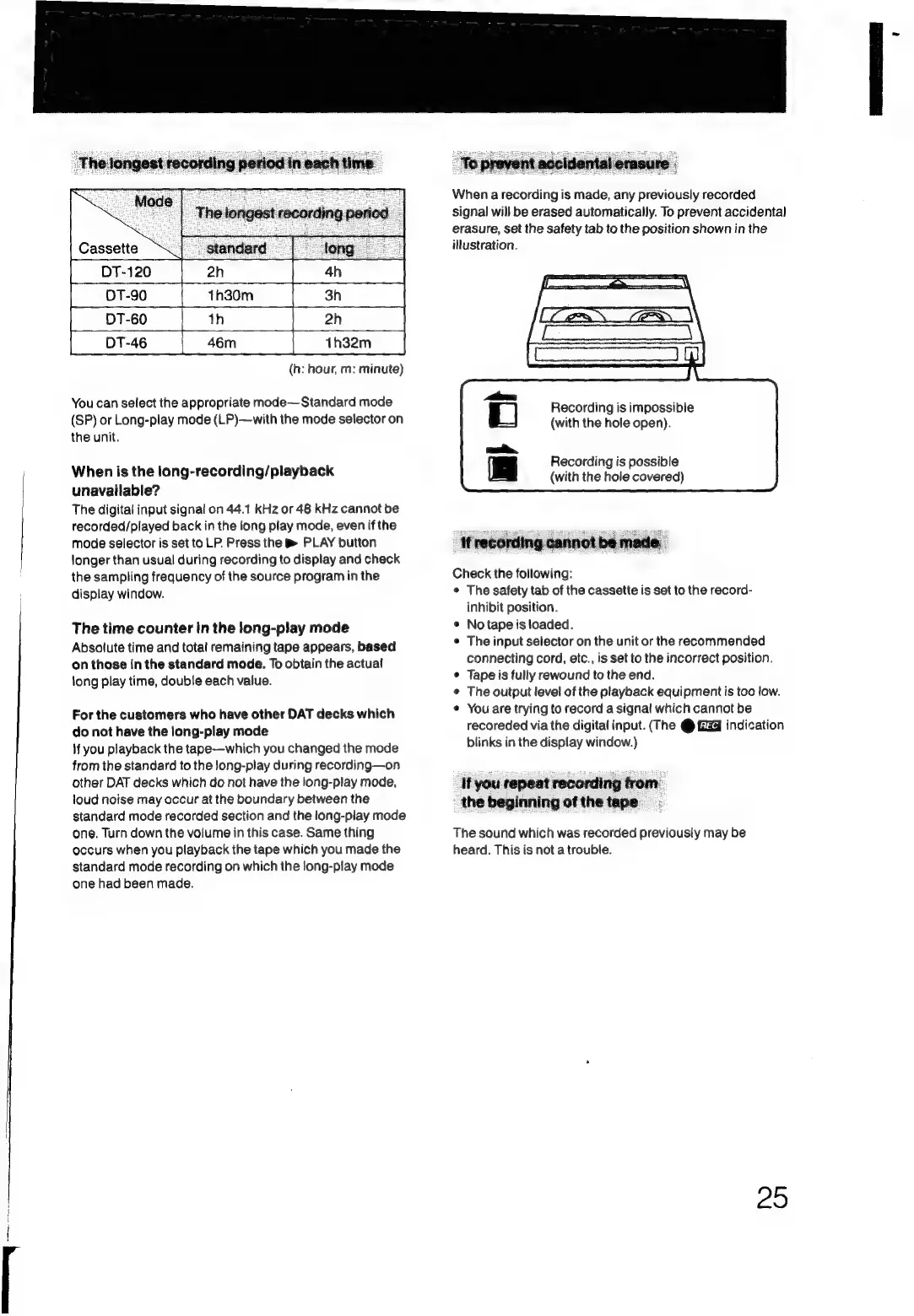
1h30m
a
60
th
|
T-46
|
46
1h32m
(h:
hour,
m:
minute)
You
can
select
the
appropriate
mode—Standard
mode
(SP)
or
Long-play
mode
(LP)—with
the
mode
selector
on
the
unit.
When
is
the
long-recording/playback
unavailable?
The
digital
input
signal
on
44.1
kHz
or
48
KHz
cannot
be
recorded/played
back
in
the
long
play
mode,
even
if
the
mode
selector
is
set
to
LP.
Press
the
®
PLAY
button
longer
than
usual
during
recording
to
display
and
check
the
sampling
frequency
of
the
source
program
in
the
display
window.
The
time
counter
in
the
long-play
mode
Absolute
time
and
total
remaining
tape
appears,
based
on
those
in
the
standard
mode.
To
obtain
the
actual
long
play
time,
double
each
value.
For
the
customers
who
have
other
DAT
decks
which
do
not
have
the
iong-play
mode
If
you
playback
the
tape—which
you
changed
the
mode
from
the
standard
to
the
long-play
during
recording—on
other
DAT
decks
which
do
not
have
the
long-play
mode,
loud
noise
may
occur
at
the
boundary
between
the
standard
mode
recorded
section
and
the
tong-play
mode
one.
Turn
down
the
volume
in
this
case.
Same
thing
occurs
when
you
playback
the
tape
which
you
made
the
standard
mode
recording
on
which
the
long-play
mode
one
had
been
made.
When
a
recording
is
made,
any
previously
recorded
signal
will
be
erased
automatically.
To
prevent
accidental
erasure,
Set
the
safety
tab
to
the
position
shown
in
the
illustration.
Recording
is
impossible
(with
the
hole
open).
Recording
is
possible
(with
the
hole
covered)
Check
the
following:
©
The
safety
tab
of
the
cassette
is
set
to
the
record-
inhibit
position.
©
No
tape
is
loaded.
¢
The
input
selector
on
the
unit
or
the
recommended
connecting
cord,
etc.,
is
set
to
the
incorrect
position.
¢
Tape
is
fully
rewound
to
the
end.
¢
The
output
level
of
the
playback
equipment
is
too
low.
«
You
are
trying
to
record
a
signal
which
cannot
be
recoreded
via
the
digital
input.
(The
@
Giza
indication
blinks
in
the
display
window.)
It
you
repeat
recording
from.
the
beginning
of
the
tape.
The
sound
which
was
recorded
previously
may
be
heard.
This
is
not
a
trouble.
25

Related product manuals